View the name of a private project, through notification settings
A user who subscribed to notifications for a public project could still see the project's name and receive notifications after the project was made private. This allowed an attacker to monitor changes to a private project they no longer had access to.
Hello, I found something interesting, we can look at the name of a private project (and it is even possible to receive notifications about all its changes) in a specific case.
1 . And for starters, I created a public project on account ==A==
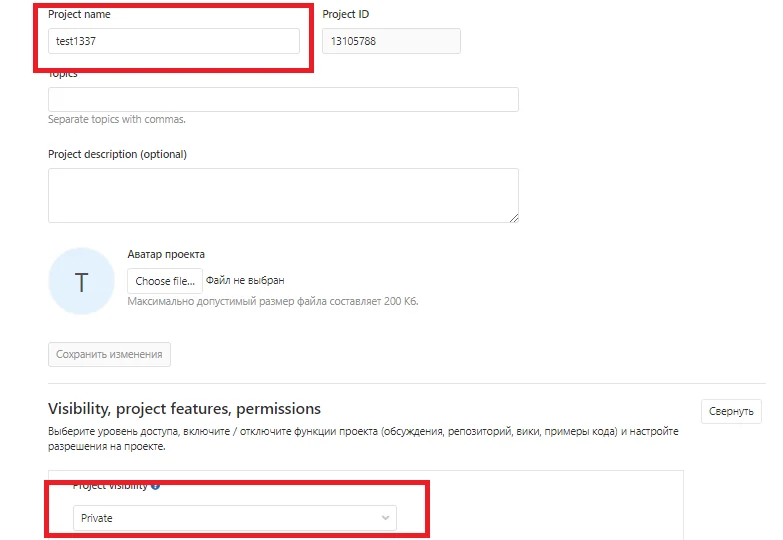
2 . Next, from account ==B==, I recognized the project identifier
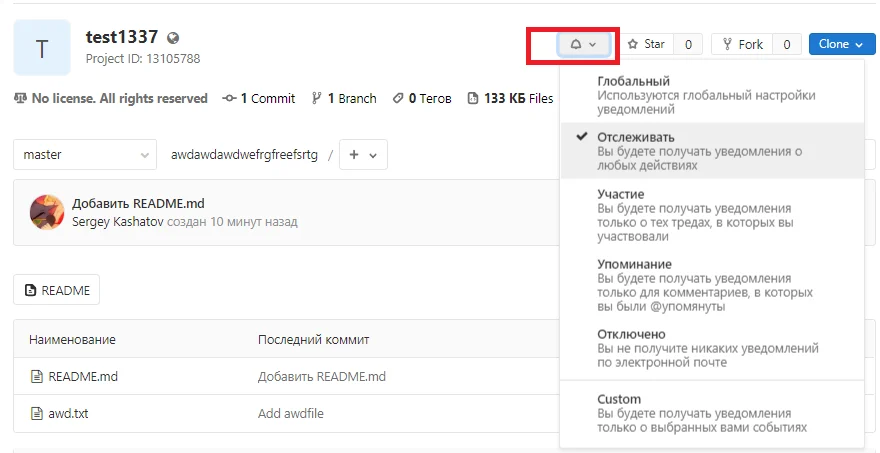
Project ID: 13105788
3 . Next account ==B== subscribed to project notifications
The original report as published on GitLab. Images and videos are our own copies; raw HTML is shown as text. View it on GitLab.
Not written yet. The AI write-up for this report has not been written yet. The Original tab links to the source.
Generating the AI write-up for this report.
This usually takes about 50 seconds. You can read the original meanwhile; this page updates itself.
Writing the technical write-up
Writing the version for beginners
Checking every passage against the original
How it worked
Root cause
Likely the notification subscription was not revoked when the project's visibility changed to private, and access controls did not re-check permissions for existing subscribers.
What the attacker needed
Attacker has an account; Victim has a public project; Attacker knows project ID; Attacker subscribes before project becomes private
How it was found
Create a public project on account A.
From account B, obtain the project identifier.
From account B, subscribe to project notifications.
On account A, change the project to private.
On account B, check that notification settings remain.
On account A, change the project name and observe the update on account B.
Explained by bugbounty.wiki with AI from the original and checked against quotes from it; it can still be wrong. Read the original before relying on a detail.
Not written yet. The AI write-up for this report has not been written yet. The Original tab links to the source.
Generating the AI write-up for this report.
This usually takes about 50 seconds. You can read the original meanwhile; this page updates itself.
Writing the technical write-up
Writing the version for beginners
Checking every passage against the original
When a project is public, anyone can subscribe to get updates about it. If the project later becomes private, the system should stop sending updates to people who are not members. Here, it did not, so someone could keep watching a private project.
What is Access control?
A user can do something their role should not allow: reach an admin function, act on a feature they have not paid for, or skip a permission check. IDOR is the special case where the object belongs to someone else.
A user can do something their role should not allow: reach an admin function, act on a feature they have not paid for, or skip a permission check. IDOR is the special case where the object belongs to someone else.