Vulnerability feedback information visible in public projects
The vulnerability feedback endpoint for dependency scanning was accessible without proper authorisation, allowing unauthorised users to view security-related information from public projects and guests to see it in private projects.

GitLab
Originally disclosed on GitLab
- Fixed in 6 months
- Disclosed after 6 months
HackerOne report #490250 by ashish_r_padelkar on 2019-02-02, assigned to estrike:
Summary:
Hello,
There is a feature in project called Security Dashboard which is not visible publicly. When you browse security dashboard, the following endpoint is requested in background
https://gitlab.com/<UserName>/<ProjectName>/vulnerability_feedback?category=dependency_scanning
This endpoint is also visible publicly which i think it should not because it reveals some important information.
Description:
This endpoint also works in following scenario
- When public projects have below settings
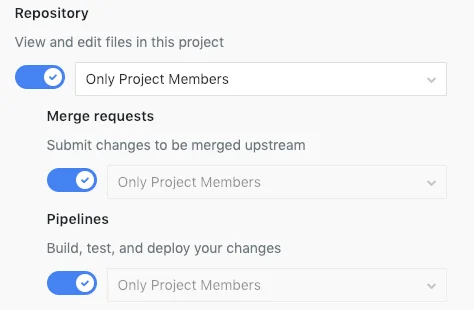
- Guest in private projects too able to see this information.
Steps To Reproduce:
- As a owner of public project set above settings shown in screen shot
- Now access the url with/without authentication or another user
https://gitlab.com/<UserName>/<ProjectName>/vulnerability_feedback?category=dependency_scanning
Regards,
Ashish
Impact
Public project reveals security related information to unauthorised users
Attachments
Warning: Attachments received through HackerOne, please exercise caution!
Not written yet. The AI write-up for this report has not been written yet. The Original tab links to the source.
How it worked
Impact
Public projects could reveal security-related information to unauthorised users, and guests in private projects could also see this information.
What the attacker needed
Public project with specific settings; or guest access to private project
How it was found
- As an owner of a public project, set the settings shown in the screenshot.
- Access the vulnerability_feedback URL with or without authentication, or as another user.
Explained by bugbounty.wiki with AI from the original and checked against quotes from it; it can still be wrong. Read the original before relying on a detail.
Not written yet. The AI write-up for this report has not been written yet. The Original tab links to the source.
A security dashboard in GitLab shows vulnerability feedback, but the web address for that data could be opened by anyone, even without logging in. This meant outsiders could see which security problems a project had, which should have been private.
What is Access control?
A user can do something their role should not allow: reach an admin function, act on a feature they have not paid for, or skip a permission check. IDOR is the special case where the object belongs to someone else.

