Creating unauthorized comments on Facebook Live Stream!
A Facebook Android user could post a quick comment on a live stream belonging to a non-friend whose privacy setting allowed only friends to comment. The comment was accepted without any error, letting the attacker bypass the intended comment restriction.
 Published on publish.whoisbinit.me
·Nov 15, 2018·
The full write-up lives on its author's site
It belongs to its author, so we link to it rather than copy it. The other two tabs are our own rewrites, checked against it.
Context
Facebook Live Streams let viewers react to and comment on a broadcast. On posts and streams, the broadcaster can restrict who is allowed to comment, for example to friends only. When a viewer is not permitted to comment, the interface normally hides the comment box at the bottom of the screen, leaving only actions such as sharing or reacting.
Around the time of this report, Facebook had launched a feature that lets viewers post quick comments in a live stream without typing free text: a set of preset buttons for things like Hello and emojis such as a thumbs up. This quick comment area appears in every live stream, and pressing one of the buttons posts that comment to the stream.
The report describes a privilege escalation in the Facebook Android app: a user who was not a friend of the broadcaster, and whose stream allowed only friends to comment, could still post a quick comment. The comment text was limited to the given set of quick comments.

Setup
The researcher describes the following requirements:
- A Facebook account (the researcher's own): User X.
- An account which is not a friend of User X and allows only Friends to comment on posts: User V.
- A running or an ended live stream on that non-friend's account: Stream J.
The testing was done through the Facebook Android app; the product area recorded in the report is Facebook - Android. No specific app version, device model or tooling is given.
Finding it
On October 4, 2018, a friend shared a live stream of a person who had been kicked out of a reality television show. The researcher opened the stream and wanted to comment something like Hello!, but the comment box did not appear at the bottom of the Android screen, because the live streamer was not a friend. The only available actions were sharing or reacting to the stream.
The quick comment area was still present on that stream, even though the comment box did not appear because the live streamer was not a friend.
Exploitation
Step 1
The researcher visited the profile of User V through the account User X.
Step 2
He scrolled down until he found Stream J.
Step 3
On Stream J, the quick comment area was displayed. Pressing any of the quick comment buttons posted that comment to the live stream. No error or limitation message was shown.
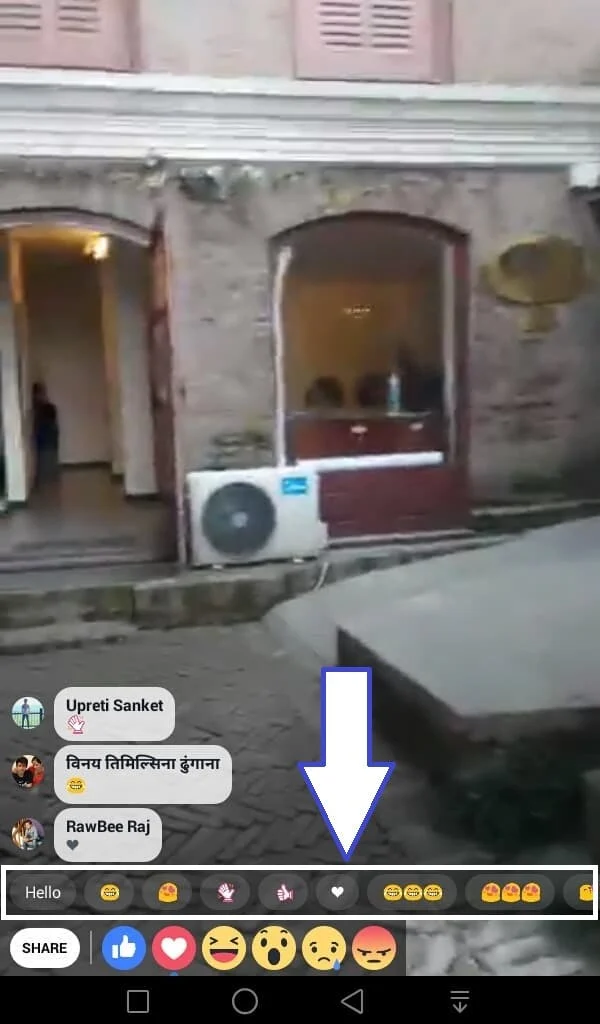
To confirm, he pressed again and the comment was posted again. When he checked the comments list later, his comment was there.
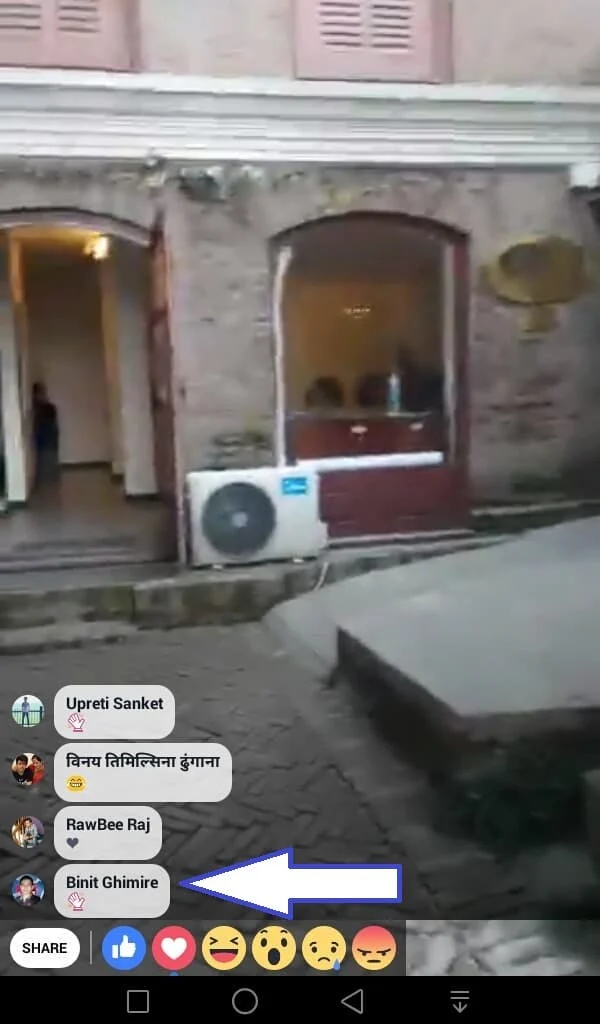
The report contains no HTTP requests, parameters, headers or responses; the interaction happened entirely through the Android app interface.
Root cause
The report does not describe the server-side code or the exact check that failed. What it shows is that the friends-only commenting restriction was applied to the normal text comment path (the comment box was hidden) but not to the quick comment path, so the quick comment action was authorised without verifying that the viewer was allowed to comment on that stream. In other words, the authorisation check was tied to one commenting feature rather than to the act of commenting itself. This is likely a broken authorisation issue, since the quick comment action was accepted where commenting was restricted.
Impact
A malicious Facebook user could add a comment to any live stream even when the stream had friends-only privacy. The content was limited to the fixed set of quick comments, so the attacker could not post arbitrary text. The report says a malicious user could add a comment on any live stream even with friends-only privacy; the requirements list allows for a running or an ended live stream.
Fix
Facebook confirmed the vulnerability was patched on November 10, 2018, and the researcher confirmed the patch the same day. The report does not describe what was changed. The appropriate fix would be to enforce the commenting permission on the server for the quick comment action, the same way it is enforced for text comments, rather than relying on the client to hide the buttons.
Timeline
| Event | Date |
|---|---|
| Vulnerability reported | October 5, 2018 |
| Automated response | October 5, 2018 |
| Requested for video PoC | October 9, 2018 |
| Submitted PoC | October 9, 2018 |
| Triaged | October 12, 2018 |
| Requested information to determine impact (Facebook) | October 12, 2018 |
| Provided further information (researcher) | October 12, 2018 |
| Vulnerability patch confirmation (Facebook) | November 10, 2018 |
| Vulnerability patch confirmed (researcher) | November 10, 2018 |
| Bounty amount rewarded | November 14, 2018 |
| Thanked the security team | November 14, 2018 |
| Inclusion in the Whitehat Thanks page of 2018 | November 27, 2018 |
The security team issued a bounty of $750 for responsibly reporting the vulnerability.

Variants to test
- Other quick actions on restricted content: try reactions, shares, polls or other one-tap actions on posts or streams where the broadcaster has limited interaction to friends. A positive result is the action succeeding with no error where the equivalent free-text action is blocked.
- Other privacy settings: repeat the test where commenting is limited by a setting other than friends-only, such as a custom audience. A positive result is the quick comment posting despite the restriction.
- Ended versus running streams: test both states, since the report's requirements allow either. A positive result is the comment appearing in the comments list after the stream has ended.
- Other clients: check whether the same quick comment path is reachable from the web or other platform clients under the same restricted conditions. A positive result is the comment being accepted from a client where the restriction should apply.
- Direct calls to the commenting action: if the quick comment action can be invoked outside the normal UI flow, attempt it against a stream where commenting is not permitted. A positive result is a successful response rather than a permission error.
What happened, in plain words
Facebook Live Streams are broadcasts that people watch in real time (or after they have ended). While watching, viewers can react to the broadcast and leave comments underneath it. The person broadcasting can decide who is allowed to comment. One common setting is friends only: only the broadcaster's Facebook friends may comment, and everyone else is blocked.
When you are not allowed to comment, Facebook normally hides the comment box at the bottom of the screen. You can still share the stream or react to it, but there is no place to type a comment.
Around the time of this report, Facebook had added a feature that lets viewers post a quick comment without typing anything. Instead of a text box, there is a row of preset buttons: one for Hello, and others for emojis such as a thumbs up. This quick comment area appears in every live stream, and pressing one of the buttons posts that comment to the stream.
The researcher found that this quick comment area was still shown on a stream where commenting was limited to friends, and that pressing a button actually posted the comment. In other words, a person who was not allowed to comment could still comment, as long as they used one of the preset buttons instead of typing. The comment text was limited to the given set of quick comments, so the attacker could not write arbitrary words.
This kind of problem is called privilege escalation: someone gets an ability they should not have, here the ability to comment on a stream that is restricted to friends. It is also a broken authorisation issue, which means the system did not properly check whether this particular person was allowed to do this particular thing.
The setup
To reproduce the problem, the researcher needed three things:
- A Facebook account, the researcher's own, called User X.
- Another account, called User V, which is not a friend of User X and which allows only Friends to comment on its posts.
- A live stream on that non-friend's account, called Stream J. It could be running or already ended.
The testing was done through the Facebook Android app. The report records the product area as Facebook - Android. It does not give a specific app version, device model or tooling.
How the researcher found it
On October 4, 2018, a friend shared a live stream of a person who had been kicked out of a reality television show. The researcher opened the stream and wanted to comment something like Hello!. The comment box did not appear at the bottom of the Android screen, because the live streamer was not a friend. The only actions available were sharing or reacting to the stream.
The quick comment area was still present on that stream, even though the comment box did not appear because the live streamer was not a friend.
Reproducing it step by step
Step 1
The researcher visited the profile of User V through the account User X. Visiting the profile is how you reach a person's posts and streams in the app.
Step 2
He scrolled down until he found Stream J. Scrolling through the profile is how you locate a specific post or broadcast among the person's content.
Step 3
On Stream J, the quick comment area was displayed. Pressing any of the quick comment buttons posted that comment to the live stream. No error or limitation message was shown.
To confirm, he pressed again and the comment was posted again. When he checked the comments list later, his comment was there.
The report contains no HTTP requests, parameters, headers or responses. The interaction happened entirely through the Android app interface, so there is no code to show here.
Why it worked
The report does not describe the server-side code or the exact check that failed. What it shows is that the friends-only commenting restriction was applied to the normal text comment path, which is why the comment box was hidden, but not to the quick comment path. So the quick comment action was authorised without checking that the viewer was allowed to comment on that stream. In other words, the authorisation check was tied to one commenting feature rather than to the act of commenting itself. This is likely a broken authorisation issue, since the quick comment action was accepted where commenting was restricted.
What the impact was
A malicious Facebook user could add a comment to any live stream even when the stream had friends-only privacy. The content was limited to the fixed set of quick comments, so the attacker could not post arbitrary text. The report says a malicious user could add a comment on any live stream even with friends-only privacy. The requirements list allows for a running or an ended live stream.
The fix
Facebook confirmed the vulnerability was patched on November 10, 2018, and the researcher confirmed the patch the same day. The appropriate fix would be to enforce the commenting permission on the server for the quick comment action, the same way it is enforced for text comments, rather than relying on the client to hide the buttons.
Timeline
| Event | Date |
|---|---|
| Vulnerability reported | October 5, 2018 |
| Automated response | October 5, 2018 |
| Requested for video PoC | October 9, 2018 |
| Submitted PoC | October 9, 2018 |
| Triaged | October 12, 2018 |
| Requested information to determine impact (Facebook) | October 12, 2018 |
| Provided further information (researcher) | October 12, 2018 |
| Vulnerability patch confirmation (Facebook) | November 10, 2018 |
| Vulnerability patch confirmed (researcher) | November 10, 2018 |
| Bounty amount rewarded | November 14, 2018 |
| Thanked the security team | November 14, 2018 |
| Inclusion in the Whitehat Thanks page of 2018 | November 27, 2018 |
The security team issued a bounty of $750 for responsibly reporting the vulnerability.
Other things worth testing
- Other quick actions on restricted content: try reactions, shares, polls or other one-tap actions on posts or streams where the broadcaster has limited interaction to friends. A positive result is the action succeeding with no error where the equivalent free-text action is blocked.
- Other privacy settings: repeat the test where commenting is limited by a setting other than friends-only, such as a custom audience. A positive result is the quick comment posting despite the restriction.
- Ended versus running streams: test both states, since the report's requirements allow either. A positive result is the comment appearing in the comments list after the stream has ended.
- Other clients: check whether the same quick comment path is reachable from the web or other platform clients under the same restricted conditions. A positive result is the comment being accepted from a client where the restriction should apply.
- Direct calls to the commenting action: if the quick comment action can be invoked outside the normal UI flow, attempt it against a stream where commenting is not permitted. A positive result is a successful response rather than a permission error.
Glossary
- API: a way for one piece of software to talk to another, like a waiter taking your order to the kitchen and bringing back the result.
- Authorisation: the check that decides whether a particular person is allowed to do a particular thing.
- Broken authorisation: a flaw where that check is missing, wrong or applied to only some of the ways of doing the action.
- Bounty: a reward paid by a company for a responsibly reported security problem.
- Client: the app or browser on your device that talks to the company's servers.
- Comment box: the text field where you type a comment before posting it.
- Cookie: a small piece of data a website stores in your browser so it can remember who you are between requests.
- Endpoint: a specific address on a server that a client sends a request to.
- Header: extra information sent along with a web request or response, such as the type of content or a session identifier.
- HTTP request: a message a client sends to a server asking for something or asking it to do something.
- Live stream: a video broadcast that people watch while it is happening, or after it has ended.
- Parameter: a named value sent with a request, such as an identifier or a piece of text.
- PoC (proof of concept): a demonstration that a problem is real, usually a video or a set of steps that reproduces it.
- Privilege escalation: getting an ability or level of access you should not have.
- Quick comment: a preset comment, such as Hello or an emoji, posted with a single button press instead of typing.
- Response: the message a server sends back after receiving a request.
- Root cause: the underlying reason a problem exists, as opposed to its visible symptoms.
- Server: the computer that stores the data and runs the checks behind an app or website.
- Session: a period during which a server remembers that a particular person is logged in.
- Token: a piece of data used to prove who you are or to authorise an action, similar to a ticket.
- Triaged: reviewed and accepted by the security team as a valid issue worth investigating.
- UI (user interface): the buttons, boxes and screens you see and interact with in an app.
- Vulnerability: a weakness in software that someone could use to do something they should not be able to do.


