How I Managed to Create Unauthorized Comments on Facebook Live Stream
Facebook's Android live-stream viewer showed quick-comment buttons (fixed phrases and emojis) to non-friends even when the streamer restricted commenting to friends, and pressing them posted a comment. An attacker could therefore add a limited set of canned comments to a friends-only live stream.
 Published on askbuddie.com
How's it going on, guys? Today, I will be showing you what exactly I did to get the bug that I discovered qualify for the Facebook Bug Bounty Program which made me earn $750 as a reward from the Facebook Security Team.
The full write-up lives on its author's site
It belongs to its author, so we link to it rather than copy it. The other two tabs are our own rewrites, checked against it.
Context
Facebook Live Streams let a broadcaster restrict who can comment. When a streamer sets their posts to allow only friends to comment, a viewer who is not a friend should not be able to leave a comment on the live stream. Facebook had also introduced a feature that places quick comment buttons (pre-filled text such as Hello, a thumbs up, a tears-of-joy emoji, a heart emoji and similar) directly in the live stream interface, so viewers can react with a single tap instead of typing.
The researcher, Binit Ghimire (@WHOISbinit), found that these quick comment buttons bypassed the friends-only comment restriction on the Facebook Android app. He reported it through the Facebook Whitehat Report Vulnerability Form on 5 October 2018, and the Facebook Security Team awarded a bounty of $750 on 14 November 2018.
Setup
The reproduction required three things, as listed in the report:
- The researcher's own Facebook account.
- An account that is not a friend of the researcher and that allows only Friends to comment on posts.
- A running or an ended live stream on that non-friend's account.
The bug was observed on the Facebook Android app. The report does not give an app version or any other version detail.
Finding it
On 4 October 2018 the researcher opened a live stream shared by a friend. The stream belonged to a person who was not a friend of his. He wanted to comment something like Hello!, but the comment box did not appear at the bottom of his Android screen, because the streamer was not his friend. The only actions available were sharing and reacting to the live stream.
Despite the missing comment box, he found a way to post Hello! in the live stream. The quick comment area, which appears in every live stream, was still present and its buttons still worked. That is the discrepancy: the UI hid the normal comment input for non-friends, but the quick comment controls remained active and submitted comments anyway.
Exploitation
Step 1
He visited the profile of the person who is not his friend and who allows only friends to comment on their posts.
Step 2
He scrolled down until he found a live stream on that profile and opened the live stream.
Step 3
In the live stream he saw the quick comment area: pre-filled text such as Hello, a thumbs up and other emojis. He pressed one of the quick comment buttons and the comment was posted to the live stream. No error or limitation message was displayed.
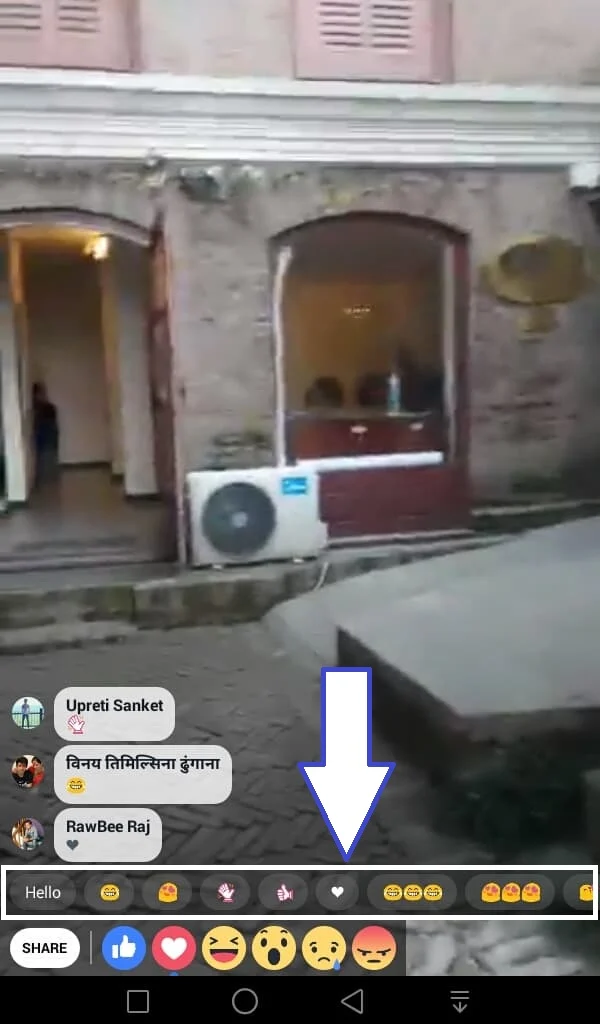
The screenshot shows the quick comment buttons as they appear in a Facebook live stream.
To confirm, he pressed a quick comment button again. It was posted again, and when he checked the comments list later, his comment was there.
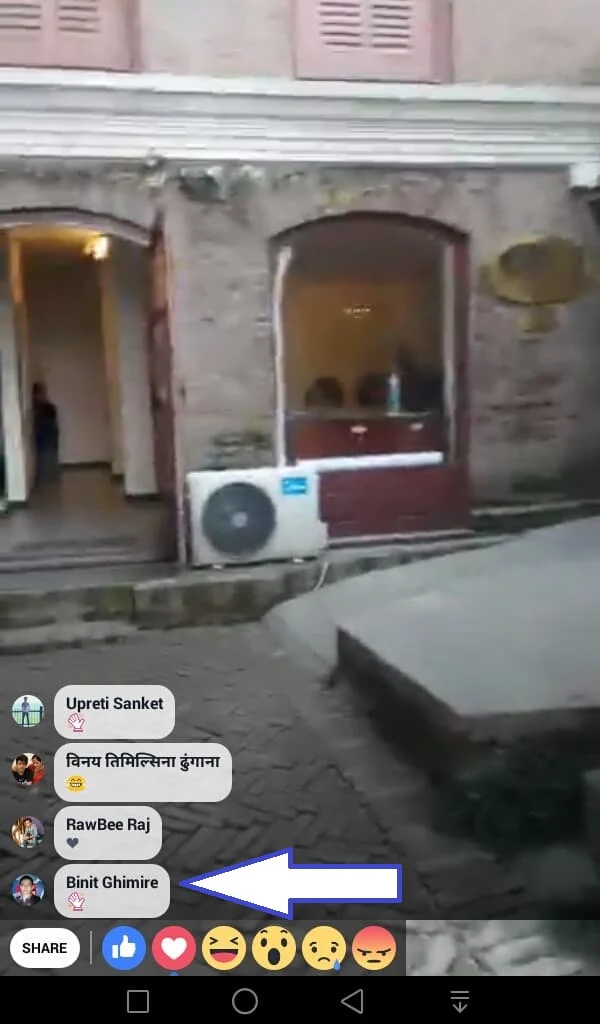
The screenshot shows his comment on the live stream of a non-friend who allows only friends to comment.
The report as submitted
He filed the report on 5 October 2018 through the Facebook Whitehat Report Vulnerability Form with these fields:
- Title: Unauthorized Comments on Facebook Live Streams
- Vulnerability Type: Privilege Escalation
- Product Area: Facebook - Android
The description he submitted:
Hello, sir! I am Binit Ghimire. I found a bug on Facebook.
Here's how I discovered the vulnerability. Suppose there is a person who isn't a friend of mine on Facebook. That person allows only "Friends" to comment in posts, pictures and videos. When that person goes live on Facebook and I watch the live stream, there appears "Share" button and reaction buttons. Just above the reaction and "Share" buttons, there appear text like "Hello", tears-of-joy emoji, heart emoji, etc. in the live stream. When I click on any of those, it gets commented, even though it wasn't meant to be commented there.
I have submitted 2 screenshots regarding this bug along with this report.
I hope this bug gets resolved soon.
My Facebook Profile: https://www.facebook.com/InternetHeroBINIT My Email: [redacted]
The reproduction steps he submitted:
Setup ===== 1. An account which isn't your friend and allows only Friends to comment on posts. 2. Your Facebook account 3. The person who isn't your friend and allows only Friends to comment on posts needs to start a live stream.
Reproduction Steps ================== 1. Open the live stream. 2. You will see Share button, reactions button and above these, you will see some text like "Hello", tears-of-joy emoji, heart emoji, etc. as shown in "photo1.jpg". What you need to do here is, click on these text for commenting.
It will be commented on the live stream with your Facebook account even though the live streamer doesn't allow outsiders to comment on his/her posts.
The attachments were photo2.jpg and photo1.jpg, the same two screenshots reproduced above.
Triage conversation
Facebook sent an automatic acknowledgement on 5 October 2018 with the report number and the usual notice about investigation time and their right to publish the report.
On 9 October the team asked for a video:
Hi Binit,
Can you provide a video showing how you a "non-friend" of the user who posted their Live Stream got access to see it to be able to click on these options?
Thanks,
Hatice Security
He replied the same day with a proof-of-concept video attached as Unauthorized Comments on Facebook Live Streams.mp4, and with this text:
Here's a video (attached with this response) where I am showing how I became able to click on these options to comment on a live stream of a user who isn't my friend and allows only friends to comment.
Attachments
🔗 Unauthorized Comments on Facebook Live Streams.mp4
The same video is embedded below:
On 12 October Hatice confirmed reproduction:
Hi Binit,
Thank you for your submission.
We've managed to reproduce your report and will get back to you once we have had a chance to investigate.
Thanks,
Hatice Security
Right after that, Aaron from the Security Team asked a scoping question:
Hi Binit,
To be clear, you are only clicking on the emoji or "Hello" buttons and cannot make arbitrary comments on the Live Stream right?
Thanks,
Aaron Security
He answered the same day:
Yes, I am able to comment only the "Hello" text and the other emojis displayed next to it.
And followed up:
I can't add my custom comments like I do in friend's posts. Just the "Hello" text and the other emojis.
This exchange fixes the limit of the bug: the bypass applied only to the fixed set of quick comments, not to arbitrary text.
Root cause
The report does not describe the server-side or client-side code, so the exact defect is not stated. What the behaviour shows is that the friends-only comment restriction was enforced on the normal comment input path, while the quick comment submission path did not apply the same authorisation check. The quick comment buttons were shown to a viewer who was not permitted to comment, and pressing one posted the comment without an error or limitation message.
Impact
A malicious Facebook user could add a comment to any live stream even when the streamer had set the stream to friends-only. The comment text was limited to the given set of quick comments, so the attacker could not post arbitrary text.
Fix
Facebook patched the issue. On 10 November 2018 Aaron wrote:
Hi Binit,
We have looked into this issue and believe that the vulnerability has been patched. Please let us know if you believe that the patch does not resolve this issue. We will follow up regarding any bounty decisions soon.
Thanks,
Aaron Security
The researcher re-tested and confirmed the patch on the same day:
Yes, I checked it again and now the vulnerability has been found to be patched. The patch also resolves the issue.
Thank you!
Outcome
On 14 November 2018 at around 8:49pm Nepal time the Security Team awarded the bounty:
Hi Binit Ghimire,
After reviewing this issue, we have decided to award you a bounty of $750. Below is an explanation of the bounty amount. Facebook fulfills its bounty awards through Bugcrowd.
This could have let a malicious user to add a comment on any live stream even if it has a friends only privacy. The comment text was limited to a given set of quick comments.
Thank you again for your report. We look forward to receiving more reports from you in the future!
Thanks, The Facebook Security Team
The message also contained the Bugcrowd claim URL, instructions for claiming, an option to donate the bounty to a recognised charity, and a link to the payout FAQ. He claimed the bounty through Bugcrowd at around 11:04pm on 14 November 2018.

The screenshot shows the time he visited the claim URL.
38 points were added to his Facebook Whitehat score. He asked to be listed on the Thanks page on 14 November, and on 27 November 2018 found his name on the 2018 list at position one-hundred and twenty-third, a position that shifts with other researchers' points.
Variants to test
- Other quick-action paths on restricted content. Try reactions, quick replies or pre-filled buttons on posts, photos or videos whose audience is restricted. A positive result is a submission that succeeds and appears in the content's list despite the restriction.
- Other clients. Repeat the quick comment on the web and mobile web versions of the same live stream. A positive result is the same bypass on a client where the normal comment box is hidden.
- Ended streams. The report lists a running or an ended live stream on the non-friend's account as a setup requirement. Test both states. A positive result is a comment accepted on an ended stream with friends-only privacy.
- Other privacy settings. Test streams restricted to specific lists or to the streamer only, not just friends-only. A positive result is a quick comment accepted where the viewer is outside the permitted audience.
- Server-side enforcement. Submit the quick comment request directly, bypassing the client UI, to see whether the check exists only in the app. A positive result is a successful response from the server for a viewer who should be denied.
What happened, in plain words
Facebook lets you watch a live video that someone is broadcasting. The person broadcasting can choose who is allowed to write comments under that video. One of the choices is "friends only": only people on the broadcaster's friend list may comment. Everyone else can watch, share and react, but not write.
Facebook also added a row of ready-made comment buttons to live streams. Instead of typing, you tap a button that already contains a word or an emoji, such as Hello, a thumbs up, a tears-of-joy emoji or a heart emoji, and that text is posted as your comment.
Binit Ghimire found that these ready-made buttons still worked for someone who was not a friend of the broadcaster, even when the broadcaster had set comments to friends only. The normal comment box was hidden from him, but the quick buttons were not, and tapping one posted a comment anyway. He reported it to Facebook on 5 October 2018, Facebook fixed it, and on 14 November 2018 the company paid him a bounty of $750.
This article walks through the whole story from the beginning, explaining each idea as it comes up, so you can follow it even if you have never looked at a security report before.
The feature and the rule it was supposed to follow
A live stream is a video that is sent out while it is happening, rather than uploaded afterwards. Viewers watch it in real time and can interact with it: they can share it with their own friends, they can react to it (the small icons such as a thumbs up or a heart that appear on a post), and, if the broadcaster allows it, they can comment.
Comments are the text messages that appear underneath a post or a video. On Facebook, the person who posts something decides who may comment. The setting used here is "Friends": only the poster's friends are allowed to comment on that person's posts, pictures and videos.
A friend, in Facebook terms, is someone who has accepted a connection request from you. If two people are not friends, neither can see the other's friends-only content in the normal way, and neither should be able to comment on it.
The quick comment buttons are a shortcut. They sit inside the live stream interface and contain pre-written text and emoji. Tapping one posts that text as a comment without any typing. The idea is convenience: one tap instead of opening a keyboard and writing something.
The rule that should hold is simple: if you are not allowed to comment, you should not be able to comment, whether you type the words yourself or tap a button that types them for you. The bug was that the rule was applied to one path (typing) and not to the other (the quick buttons).
What the researcher needed to reproduce it
The report lists three things needed to see the bug:
- His own Facebook account.
- An account that is not a friend of his and that allows only Friends to comment on posts.
- A running or an ended live stream on that non-friend's account.
Point 3 is worth pausing on. A live stream can be watched while it is happening (running) or after it has finished (ended). The report lists a running or an ended live stream as a requirement, so the test does not depend on catching the broadcast at the right moment.
The bug was seen on the Facebook Android app. The report does not give an app version or any other version detail, so there is nothing more to say about which build was affected.
How he found it
On 4 October 2018 a friend shared a live stream with him. The stream belonged to a person who was not his friend. He opened it and wanted to write something simple, such as Hello!.
The comment box did not appear at the bottom of his Android screen. That is the expected behaviour: because the streamer was not his friend, the app hid the input where he would normally type. The only actions offered to him were sharing the stream and reacting to it.
Despite the missing comment box, he found a way to post Hello!. The quick comment area, which appears in every live stream, was still there, and its buttons still worked when he tapped them.
That is the whole discrepancy in one sentence: the app hid the normal comment input from a non-friend, but left the quick comment controls active, and those controls submitted comments anyway. From a user's point of view the app said "you cannot comment here" with one hand and offered a working comment button with the other.
Reproducing it, step by step
Step 1
He visited the profile of the person who is not his friend and who allows only friends to comment on their posts.
Step 2
He scrolled down until he found a live stream on that profile and opened it.
Step 3
Inside the live stream he saw the quick comment area: pre-filled text such as Hello, a thumbs up and other emojis. He pressed one of the quick comment buttons and the comment was posted to the live stream. No error or limitation message appeared.
The screenshot shows the quick comment buttons as they appear in a Facebook live stream. This is the row of ready-made comments that any viewer sees, and it is the control that should have been disabled or hidden for a non-friend.
To be sure the first result was not a fluke, he pressed a quick comment button again. It was posted again. Later he opened the comments list and found his comment there, which confirms the comment was really stored with the stream and not just shown to him locally.
The screenshot shows his comment on the live stream of a non-friend who allows only friends to comment. Seeing the comment in the list confirmed the comment had been posted.
The report he sent to Facebook
On 5 October 2018 he filed the report through the Facebook Whitehat Report Vulnerability Form. Whitehat is Facebook's programme for people who report security problems to the company instead of misusing them; the form is the official front door for such reports.
He filled in three fields:
- Title: Unauthorized Comments on Facebook Live Streams
- Vulnerability Type: Privilege Escalation
- Product Area: Facebook - Android
"Privilege escalation" is the label for a class of bugs where someone gets a capability they should not have. A privilege is a permission, such as the permission to comment on a friends-only post. Escalation means going beyond what your account is allowed to do. Here, a non-friend gained the ability to comment, which is a permission reserved for friends, so the label fits.
The description he submitted:
Hello, sir! I am Binit Ghimire. I found a bug on Facebook.
Here's how I discovered the vulnerability. Suppose there is a person who isn't a friend of mine on Facebook. That person allows only "Friends" to comment in posts, pictures and videos. When that person goes live on Facebook and I watch the live stream, there appears "Share" button and reaction buttons. Just above the reaction and "Share" buttons, there appear text like "Hello", tears-of-joy emoji, heart emoji, etc. in the live stream. When I click on any of those, it gets commented, even though it wasn't meant to be commented there.
I have submitted 2 screenshots regarding this bug along with this report.
I hope this bug gets resolved soon.
My Facebook Profile: https://www.facebook.com/InternetHeroBINIT My Email: [redacted]
Read line by line, the description does four things. It introduces the reporter. It sets up the situation: a non-friend whose posts are friends-only. It describes what the viewer sees in the live stream: the Share button, the reaction buttons, and above them the quick comment text and emoji. And it states the result: clicking any of those posts a comment even though commenting was not meant to be allowed. The last lines mention the two screenshots and give contact details so the security team can reach the reporter.
The reproduction steps he submitted:
Setup ===== 1. An account which isn't your friend and allows only Friends to comment on posts. 2. Your Facebook account 3. The person who isn't your friend and allows only Friends to comment on posts needs to start a live stream.
Reproduction Steps ================== 1. Open the live stream. 2. You will see Share button, reactions button and above these, you will see some text like "Hello", tears-of-joy emoji, heart emoji, etc. as shown in "photo1.jpg". What you need to do here is, click on these text for commenting.
It will be commented on the live stream with your Facebook account even though the live streamer doesn't allow outsiders to comment on his/her posts.
These steps are written so that a stranger at Facebook can repeat the test without guessing. The Setup section lists the ingredients: a non-friend account with friends-only comments, your own account, and a live stream started by that non-friend. The Reproduction Steps section lists the actions: open the stream, find the quick comment text and emoji above the Share and reaction buttons, and click one. The final sentence states the expected result: the comment is posted with your account even though the streamer does not allow outsiders to comment.
The attachments were photo2.jpg and photo1.jpg, the same two screenshots reproduced above. Attaching screenshots matters because a written description can be misread; a picture of the working button and the resulting comment removes most of the doubt.
The conversation with Facebook
Facebook sent an automatic acknowledgement on 5 October 2018. It contained the report number and the usual notice that the team needs time to investigate and that Facebook reserves the right to publish the report. An automatic reply like this is not a judgement on the report; it only confirms the report arrived and was given a tracking number.
On 9 October the team asked for a video:
Hi Binit,
Can you provide a video showing how you a "non-friend" of the user who posted their Live Stream got access to see it to be able to click on these options?
Thanks,
Hatice Security
This question is about visibility, not about the comment itself. The team wanted to see how a non-friend could even see the live stream and reach the buttons. That is a fair question, because if the stream were not visible to him at all, the comment would be impossible. A video answers it in a way a screenshot cannot: it shows the sequence of taps from opening the app to the posted comment.
He replied the same day with a proof-of-concept video attached as Unauthorized Comments on Facebook Live Streams.mp4, and with this text:
Here's a video (attached with this response) where I am showing how I became able to click on these options to comment on a live stream of a user who isn't my friend and allows only friends to comment.
Attachments
🔗 Unauthorized Comments on Facebook Live Streams.mp4
A proof of concept, usually shortened to PoC, is a demonstration that the problem is real. It does not have to be polished; it has to show the steps and the result. Here the PoC is a screen recording of the app.
The same video is embedded below:
On 12 October Hatice confirmed that the team could reproduce the report:
Hi Binit,
Thank you for your submission.
We've managed to reproduce your report and will get back to you once we have had a chance to investigate.
Thanks,
Hatice Security
"We've managed to reproduce your report" is an important milestone. It means the team followed the steps and saw the same behaviour, so the report is no longer just a claim; it is a confirmed problem.
Right after that, Aaron from the Security Team asked a scoping question:
Hi Binit,
To be clear, you are only clicking on the emoji or "Hello" buttons and cannot make arbitrary comments on the Live Stream right?
Thanks,
Aaron Security
Scoping means pinning down exactly how far a bug reaches. Aaron is asking whether the attacker can write any text at all, or only the fixed set of quick comments. The difference matters for how serious the bug is: free text would let an attacker say anything, while a fixed set of buttons limits what can be posted.
He answered the same day:
Yes, I am able to comment only the "Hello" text and the other emojis displayed next to it.
And followed up:
I can't add my custom comments like I do in friend's posts. Just the "Hello" text and the other emojis.
These two answers fix the limit of the bug: the bypass applied only to the ready-made comments, not to arbitrary text. Being precise here is good practice. Overstating a bug damages your credibility with the security team; stating its exact reach helps them judge it correctly.
Why the bug happened
A modern app like Facebook is not one program but many pieces that talk to each other. The part you see and touch is the client: the Android app on your phone. The part that stores posts, comments and friend lists is the server: Facebook's computers. When you tap a button, the client sends a request to the server, and the server decides whether to accept it.
A permission check is the code that decides whether a given account may do a given thing. The right place for such a check is the server, because the client runs on the user's device, where the user has some control. If the server does not check, hiding a button in the app only hides the button; it does not stop the request.
The report does not describe the server-side or client-side code, so the exact defect is not stated. What the behaviour shows is that the friends-only restriction was enforced on the normal comment input path, while the quick comment submission path did not apply the same authorisation check. The quick comment buttons were shown to a viewer who was not permitted to comment, and pressing one posted the comment without an error or limitation message.
A useful everyday comparison is a building with two doors. The main door has a guard who checks your badge. A side door was added later for staff convenience, and nobody put a guard there. The rule ("only staff may enter") exists, but it is only enforced at one door. Anyone who finds the side door walks in. In software, every path that performs a restricted action needs its own check, or all paths must go through one shared check.
What the impact was
A malicious Facebook user could add a comment to any live stream even when the streamer had set the stream to friends-only. The comment text was limited to the given set of quick comments, so the attacker could not post arbitrary text.
It is worth being clear about what this is and is not. It is a broken privacy promise: the streamer chose "friends only" and a stranger could still write under the video. It is not a way to take over an account, read private messages or post free-form content. The limited set of comments is why the impact stays modest, and it is also why the report spends time answering Aaron's scoping question.
The fix
Facebook patched the issue. On 10 November 2018 Aaron wrote:
Hi Binit,
We have looked into this issue and believe that the vulnerability has been patched. Please let us know if you believe that the patch does not resolve this issue. We will follow up regarding any bounty decisions soon.
Thanks,
Aaron Security
A patch is a change to the software that removes the problem. Asking the reporter to re-test is normal: the person who found the bug knows best how to trigger it, so their confirmation is valuable evidence that the fix works.
The researcher re-tested and confirmed the patch on the same day:
Yes, I checked it again and now the vulnerability has been found to be patched. The patch also resolves the issue.
Thank you!
In the building comparison, you put a guard on the side door, or you make the side door lead back through the main door.
The reward
On 14 November 2018 at around 8:49pm Nepal time the Security Team awarded the bounty:
Hi Binit Ghimire,
After reviewing this issue, we have decided to award you a bounty of $750. Below is an explanation of the bounty amount. Facebook fulfills its bounty awards through Bugcrowd.
This could have let a malicious user to add a comment on any live stream even if it has a friends only privacy. The comment text was limited to a given set of quick comments.
Thank you again for your report. We look forward to receiving more reports from you in the future!
Thanks, The Facebook Security Team
A bounty is a payment a company makes to a researcher who reports a real security problem through the company's programme. Bugcrowd is a company that runs bug bounty programmes for other organisations; Facebook uses it to handle the payment side. The message also contained the Bugcrowd claim URL, instructions for claiming, an option to donate the bounty to a recognised charity, and a link to the payout FAQ.
He claimed the bounty through Bugcrowd at around 11:04pm on 14 November 2018.
The screenshot shows the time he visited the claim URL. The gap between the award message and the claim is part of the story: he was excited enough that he did not open the link for a few hours.
38 points were added to his Facebook Whitehat score. A score in a bug bounty programme is a running total of credit for accepted reports; it is used to rank researchers. He asked to be listed on the Thanks page on 14 November, and on 27 November 2018 found his name on the 2018 list at position one-hundred and twenty-third, a position that shifts as other researchers earn points.
Other places to look for the same kind of bug
Once you understand the shape of this bug, you can look for it elsewhere. The shape is: a restriction is enforced on one path to an action but not on another path to the same action. The list below is a set of places to test that idea.
- Other quick-action paths on restricted content. Try reactions, quick replies or pre-filled buttons on posts, photos or videos whose audience is restricted. A positive result is a submission that succeeds and appears in the content's list despite the restriction.
- Other clients. Repeat the quick comment on the web and mobile web versions of the same live stream. A positive result is the same bypass on a client where the normal comment box is hidden.
- Ended streams. The report lists a running or an ended live stream as a setup requirement. Test both states. A positive result is a comment accepted on an ended stream with friends-only privacy.
- Other privacy settings. Test streams restricted to specific lists or to the streamer only, not just friends-only. A positive result is a quick comment accepted where the viewer is outside the permitted audience.
- Server-side enforcement. Submit the quick comment request directly, bypassing the client UI, to see whether the check exists only in the app. A positive result is a successful response from the server for a viewer who should be denied.
The last point deserves a plain explanation. When you tap a button, the app sends a request to the server. A tool can send the same request without the app, which is what "bypassing the client UI" means. If the server accepts that request from someone who should be denied, the check was only in the app, and anyone can get around it. If the server refuses, the check is where it belongs.
Glossary
- API: the set of rules and addresses a program uses to ask another program to do something, such as "post this comment". The client app uses an API to talk to the server.
- Authorisation check: the code that decides whether a given account is allowed to perform a given action.
- Bounty: a payment made by a company to a researcher who reports a real security problem through the company's programme.
- Bug bounty programme: an organised scheme in which a company invites outside researchers to report security problems and pays for valid ones.
- Bugcrowd: a company that runs bug bounty programmes on behalf of other organisations and handles payments.
- Client: the part of a system that runs on the user's device, such as the Android app.
- Comment: a text message posted underneath a post, picture or video.
- Emoji: a small picture character, such as a heart or a tears-of-joy face, used in text.
- Friends-only: a privacy setting that limits who can see or interact with content to the poster's friends.
- Live stream: a video sent out while it is happening, which viewers watch in real time.
- Patch: a change to software that fixes a problem.
- Permission: the right to perform a particular action, such as commenting on a post.
- Privilege escalation: a bug in which someone gains a capability or permission they should not have.
- Proof of concept (PoC): a demonstration that a reported problem is real, usually by showing the steps and the result.
- Reaction: a small icon, such as a thumbs up or a heart, that a viewer can attach to a post or video.
- Reproduce: to follow the steps in a report and see the same behaviour, confirming the problem exists.
- Scoping: pinning down exactly how far a bug reaches, for example whether it allows free text or only fixed comments.
- Server: the part of a system that stores data and decides whether to accept requests, running on the company's computers rather than the user's device.
- Triage: the process a security team uses to review, confirm and prioritise incoming reports.
- Vulnerability: a weakness in software that allows someone to do something they should not be able to do.
- Whitehat: a researcher who reports security problems to the owner instead of misusing them; also the name of Facebook's reporting programme and form.
- Whitehat score: a running total of credit for accepted reports in Facebook's programme, used to rank researchers.
- Thanks page: Facebook's public list of researchers who agreed to be named for reports accepted in a given year.


