Facebook Messenger Desktop App Arbitrary File Read
The Messenger desktop app opened links from spam messages in an internal Electron window with the webview tag enabled, rather than in the external browser. An attacker could load local files through a file URI and use the webview's script execution to read their contents and send them to a server.
 Published on medium.com
I’m a daily user of Facebook Messenger on Mobile and Web, someday i got a banner in my Web version saying that Messenger is available on Desktop too.
The full write-up lives on its author's site
It belongs to its author, so we link to it rather than copy it. The other two tabs are our own rewrites, checked against it.
Context
Facebook Messenger ships as a mobile app, a web app and a desktop application. The desktop build is an Electron application, and the researcher, a daily Messenger user, received a banner in the web version announcing the desktop client and installed it to look around.
The feature that matters here is Message Requests, and specifically the Spam/Filtered Messages section. Messages that a user does not want to see are moved there, and opening that section spawns a new window that asks the user to re-authenticate by clicking Continue. That new window is where the interesting behaviour lives.
Setup
The researcher decompiled the Electron application. The write-up links to a general guide on extracting the source of an Electron app from its asar archive, which is the standard first step: unpack app.asar, read the main process and renderer code, and look at the BrowserWindow options.
Two accounts are needed to reproduce the flow: one to send a message, one to receive it and move it to Spam. No special role or privilege is described beyond ordinary Messenger accounts.
Finding it
After decompiling, the researcher reviewed how user input was handled and found that most inputs were safe, with no XSS found. Sending a link to someone opened the external browser, and there was no apparent way to get XSS or to open an HTML file.
The lead came from functionality rather than input handling. Navigating to Message Requests and then Spam/Filtered Messages opens a new window that requires re-authentication by clicking Continue. Using a second account, the researcher sent a URL, moved it to the Spam section, and then clicked the link from that window. Instead of the external browser, the link opened a new Electron window. That gives an attacker a window whose content they control, rendered inside the application rather than in the browser.
Exploitation
Step 1: Check the renderer defences
Back in the source, the researcher checked the window options. nodeIntegration and contextIsolation were both set to false. With nodeIntegration off, renderer code cannot call Node.js APIs directly, so a straightforward path to remote code execution is closed. With contextIsolation off, preload script internals share a context with page script, so overriding preload functions is theoretically possible. The researcher looked for a usable override and did not find one.
Step 2: Notice that webviewTag is enabled
The option webviewTag was set to true. That means page content can create <webview> elements. A <webview> is similar to an <iframe> but with extra capabilities, and one of those capabilities is loading file:// URIs. A tag such as:
<webview src="file:///etc/passwd"></webview>
renders the contents of the local file inside the page. The report gives this exact tag as the example of loading an internal file.
Step 3: Read the file contents with executeJavaScript
The <webview> element exposes executeJavaScript(code), which runs script in the guest page once it has loaded. Because the guest page is the local file, the script can read the rendered document and exfiltrate it. The report shows the technique in action:
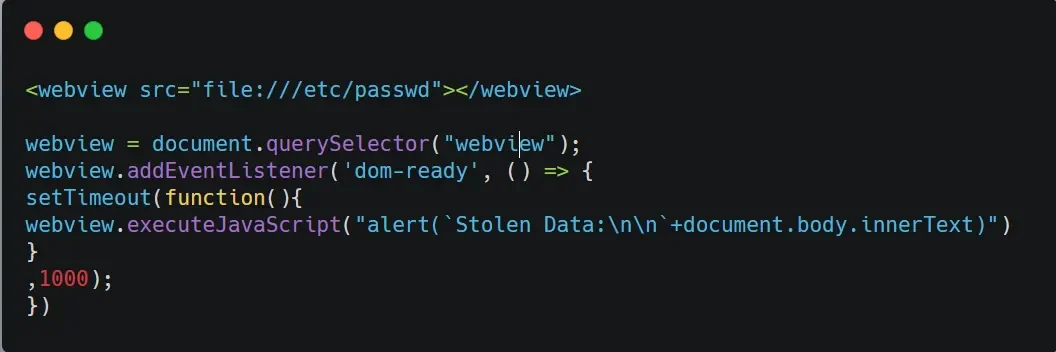
The image shows the contents of the passwd file displayed inside the page, captured with executeJavaScript.
Step 4: Chain it end to end
Putting the pieces together gives arbitrary file read with exfiltration to an attacker-controlled server. The reproduction steps as written:
- Attacker sends a malicious link to unknown victim
- Victims open Spam section and Clicks the link
- Using
<webview>we load an internal file - With
<webview>.executeJavaScript(code)we steal it's content
The report includes a photo demonstrating the chain:
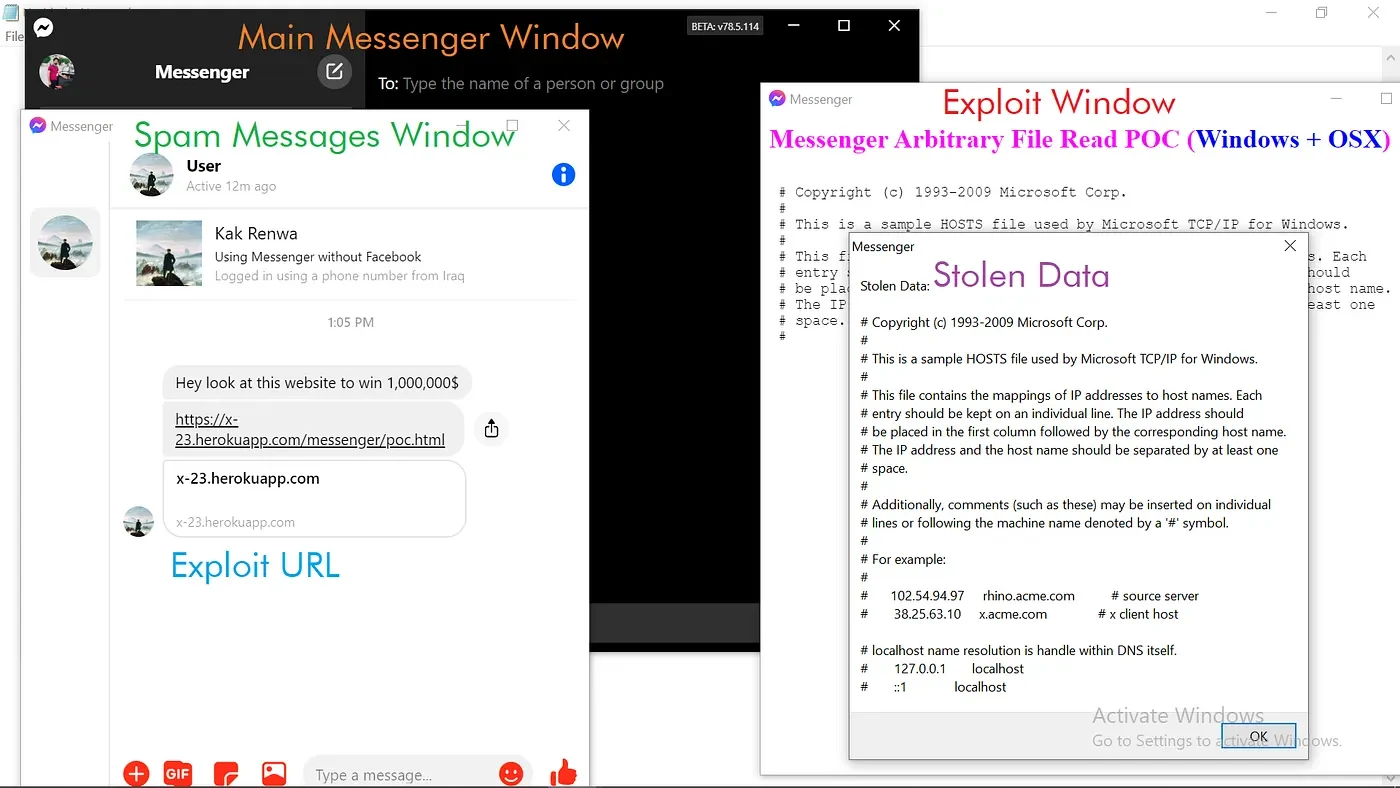
It shows the victim opening the Spam section and clicking the link, the <webview> loading an internal file, and executeJavaScript stealing its content. A video proof of concept accompanied the report.
Root cause
The renderer had webviewTag enabled while nodeIntegration and contextIsolation were disabled. Disabling nodeIntegration blocks direct Node.js access from page script, and the researcher could not find a way to abuse the disabled contextIsolation to override preload internals. But the enabled <webview> tag provides its own bridge to local resources: it can load file:// URIs, and executeJavaScript lets the embedding page run code in the loaded document and read it back. The Spam window renders attacker-supplied links inside Electron rather than handing them to the external browser, so the attacker gets script execution in a context where <webview> is available.
Impact
An attacker who can get a victim to open the Spam section and click a crafted link can read local files from the victim's machine and send their contents to a server the attacker controls. The report frames the victim as unknown, that is, any user who performs those two actions. The read is limited to files the application process can access, and the report does not describe any path from file read to code execution; the researcher notes that nodeIntegration being off blocked direct access to Node.js functions.
Meta awarded a bounty of 2,000 USD for the report.
Fix
The report does not describe the fix that was applied. The settings that made the chain possible are the ones to review: webviewTag enabled in a renderer that displays untrusted message content, and links from the Spam window opening inside Electron instead of the external browser. Disabling webviewTag where it is not required, and keeping untrusted links out of in-app windows, would remove the primitive.
Variants to test
- Check
webviewTagin theBrowserWindowoptions of any Electron app that renders untrusted content. A positive result is a page you control being able to create a<webview>element and have it load. - Try
<webview src="file:///etc/passwd"></webview>from a controlled page. A positive result is the file contents appearing in the rendered page. - Call
executeJavaScripton the loaded webview to read the document and send it out. A positive result is the file contents arriving at your listener. - Look for in-app windows that render attacker-supplied links instead of delegating to the external browser, particularly re-authentication or filtered-content windows. A positive result is a link you sent opening inside Electron.
- Where
contextIsolationisfalse, look for preload functions that can be overridden from page script. A positive result is your override being called by the application's own code.
What happened, in plain words
Facebook Messenger is a chat app. It exists as a mobile app, a website, and a program you install on your computer (the desktop app). The researcher used Messenger every day and one day saw a banner in the web version saying the desktop app was available. They downloaded it and started poking around.
The desktop app is built with a tool called Electron. Electron lets a company write one program using web technology (HTML, CSS, JavaScript, the same things websites are made of) and ship it as a normal desktop program. Many popular apps work this way. An Electron app is really a small web browser bundled with a website inside it.
The researcher unpacked the app to read its code, which is a normal thing to do when testing software. They looked at how the app handled things users type or send, and found most of it was safe. Sending a link to someone opened the link in the normal external browser, and there seemed to be no way to make the app run malicious code that way.
The interesting part was a feature called Message Requests, and inside it a section called Spam/Filtered Messages. This is where messages go when you do not want to see them. Opening that section pops up a new window and asks you to click Continue to confirm who you are. That new window turned out to behave differently from the rest of the app.
Using a second account, the researcher sent a link, moved it into the Spam section, and then clicked it from that window. Instead of opening in the external browser, the link opened inside a new Electron window. That means the attacker now has a window inside the app showing content they control, and they can put any code they like in it.
The researcher then checked two safety settings in the app's code, called nodeIntegration and contextIsolation. Both were turned off. Turning off nodeIntegration is good: it stops web page code from directly using the computer's own programming functions, which would be a straight path to taking over the machine. Turning off contextIsolation is a weakness in principle, because it lets page code reach into the app's internal helper code, but the researcher could not find a practical way to abuse it.
So they looked for another door, and found one: a setting called webviewTag was turned on. A <webview> is a tag you can put in a web page that works like a small embedded browser window inside the page, similar to an <iframe> but with extra powers. One of those powers is that it can open files stored on the computer itself, using an address that starts with file://. That let the researcher display a local file inside the page, and then use a function called executeJavaScript to run code inside that embedded window and read the file's contents out.
Putting it together: an attacker sends a link, the victim opens the Spam section and clicks it, the app opens the link inside itself, the attacker's code creates a <webview> pointing at a local file, and then reads that file and sends the contents to a server the attacker controls. Meta paid a bounty of 2,000 USD for the report.
Background you need first
A few ideas come up again and again below, so here they are in plain terms.
What Electron is. Think of a food truck: the same kitchen (the website) can be driven to different places (Windows, Mac, Linux) instead of building a separate restaurant for each. Electron bundles a browser engine with a web app so it can run as a desktop program. The app's own code is stored in a single packed file called an asar archive, a bit like a zip file. Unpacking it lets you read the source, which is what the researcher did, following a public guide on how to get the source code of any Electron application.
What a renderer is. Inside an Electron app there are two kinds of code. The main process runs the app itself (windows, menus, files). The renderer is the part that draws what you see, essentially a web page. When we say "renderer defences", we mean the safety settings that decide what that web page is allowed to do.
What nodeIntegration is. Node.js is a way to run JavaScript on a computer with access to files, network and system commands. If a web page inside an Electron app can use Node.js directly, then any script on that page can read your files or run programs. nodeIntegration is the switch for that. Off means page code cannot touch the computer directly.
What contextIsolation is. The app often has helper code (a "preload script") that sits between the page and the app's internals. contextIsolation keeps that helper code in a separate compartment from the page. When it is off, the page and the helper share one compartment, so page code might be able to replace (override) the helper's functions with its own. That is a risk, but only if a usable function can actually be replaced.
What <webview> is. A tag in HTML, like <img> or <iframe>, that embeds another web page inside the current one. An <iframe> is like a picture frame on a wall showing another room; a <webview> is similar but the app can give it extra abilities, such as opening local files. The webviewTag setting decides whether pages are allowed to create these at all.
What file:// means. Web addresses usually start with http:// or https:// and point at websites. file:// points at a file on the computer itself. If a web page can load file:// addresses, it can try to show local files.
What executeJavaScript is. A function on a <webview> that runs a piece of JavaScript inside the embedded page once it has loaded. If the embedded page is a local file, that script can read what is displayed and send it somewhere else. Sending stolen data out to a server you control is often called exfiltration.
What arbitrary file read means. A vulnerability where an attacker can make the program show or hand over files on the victim's computer that the attacker should never see. It is not the same as running programs on the machine, which is called remote code execution (RCE).
What XSS is. Cross-site scripting: tricking a website into running JavaScript that an attacker supplied, usually by putting it in something the site displays. The researcher looked for XSS in Messenger and did not find any.
Setting up
The researcher decompiled the Electron application. Decompiling here means unpacking the asar archive and reading the code inside, mainly the part that creates windows and the part that draws the interface. The write-up links to a general guide on extracting the source of an Electron app from its asar archive, which is the standard first step.
To reproduce the flow you need two accounts: one to send a message, and one to receive it and move it to Spam. Nothing beyond ordinary Messenger accounts is described.
Finding the lead
After unpacking, the researcher reviewed how user input was handled. Most inputs were safe, and no XSS was found. Sending a link to someone opened the external browser, and there was no apparent way to get XSS or to open an HTML file.
The lead came from how a feature worked, not from how input was handled. Going to Message Requests and then Spam/Filtered Messages opens a new window that asks you to re-authenticate by clicking Continue. Using a second account, the researcher sent a URL, moved it to the Spam section, and clicked the link from that window. Instead of the external browser, the link opened a new Electron window.
Why this matters: normally, when an app hands a link to your normal browser, the app is protected by the browser's safety walls. When the app opens the link inside itself, the attacker's page is now running inside the app, where the app's own settings apply. That gives an attacker a window whose content they control, rendered inside the application.
Exploitation
Step 1: Check the renderer defences
Back in the source, the researcher checked the window options. nodeIntegration and contextIsolation were both set to false.
With nodeIntegration off, renderer code cannot call Node.js APIs directly, so a straightforward path to remote code execution is closed. With contextIsolation off, preload script internals share a context with page script, so overriding preload functions is theoretically possible. The researcher looked for a usable override and did not find one.
In everyday terms: the front door (direct access to the computer) was locked, and the side door (replacing the app's helper functions) looked like it might be open but would not budge. So the researcher went looking for a window instead.
Step 2: Notice that webviewTag is enabled
The option webviewTag was set to true. That means page content can create <webview> elements. A <webview> is similar to an <iframe> but with extra capabilities, and one of those capabilities is loading file:// URIs. A tag such as:
<webview src="file:///etc/passwd"></webview>
renders the contents of the local file inside the page. The report gives this exact tag as the example of loading an internal file.
Line by line:
<webviewstarts the embedded browser element.src="file:///etc/passwd"tells it which address to open.srcis short for source.file://means a file on this computer, and/etc/passwdis a well-known file on Linux and similar systems that lists user accounts. It is a common test target because it is readable and harmless to show.></webview>closes the tag.
The result is that the contents of that file appear inside the page, as if the page had opened a little window onto the computer's disk.
Step 3: Read the file contents with executeJavaScript
The <webview> element exposes executeJavaScript(code), which runs script in the guest page once it has loaded. Because the guest page is the local file, the script can read the rendered document and send it out. The report shows the technique in action:
The image shows the contents of the passwd file displayed inside the page, captured with executeJavaScript.
Why this step is needed: simply displaying a file only helps someone sitting at the screen. To steal it, the attacker needs to read what is displayed and send it away. executeJavaScript is the function that lets the attacker's page run code inside the embedded window, read the document, and pass the text to a server.
Step 4: Chain it end to end
Putting the pieces together gives arbitrary file read with exfiltration to an attacker-controlled server. The reproduction steps as written:
- Attacker sends a malicious link to unknown victim
- Victims open Spam section and Clicks the link
- Using
<webview>we load an internal file - With
<webview>.executeJavaScript(code)we steal it's content
The report includes a photo demonstrating the chain:
It shows the victim opening the Spam section and clicking the link, the <webview> loading an internal file, and executeJavaScript stealing its content. A video proof of concept accompanied the report.
Why each step is there:
- The attacker needs the victim to receive a link. Sending it as a normal message and having it land in Spam is what makes the special window appear later.
- The victim has to open the Spam section and click the link. That is the moment the app opens the attacker's content inside itself instead of in the external browser.
- Once the attacker's code is running inside the app, it creates a
<webview>pointed at a local file, so the file is loaded and displayed. - Finally,
executeJavaScriptruns code inside that loaded file and sends the contents to the attacker.
Root cause
The renderer had webviewTag enabled while nodeIntegration and contextIsolation were disabled. Disabling nodeIntegration blocks direct Node.js access from page script, and the researcher could not find a way to abuse the disabled contextIsolation to override preload internals. But the enabled <webview> tag provides its own bridge to local resources: it can load file:// URIs, and executeJavaScript lets the embedding page run code in the loaded document and read it back. The Spam window renders attacker-supplied links inside Electron rather than handing them to the external browser, so the attacker gets script execution in a context where <webview> is available.
In plain words: the app locked the obvious doors but left a tool lying around that can open local files, and it also let attacker links run in the same room as that tool.
Impact
An attacker who can get a victim to open the Spam section and click a crafted link can read local files from the victim's machine and send their contents to a server the attacker controls. The report frames the victim as unknown, that is, any user who performs those two actions. The read is limited to files the application process can access, and the report does not describe any path from file read to code execution; the researcher notes that nodeIntegration being off blocked direct access to Node.js functions.
Meta awarded a bounty of 2,000 USD for the report.
Fix
The report does not describe the fix that was applied. The settings that made the chain possible are the ones to review: webviewTag enabled in a renderer that displays untrusted message content, and links from the Spam window opening inside Electron instead of the external browser. Disabling webviewTag where it is not required, and keeping untrusted links out of in-app windows, would remove the primitive.
Variants to test
If you want to look for similar issues yourself, these are the checks the report suggests, with what a positive result looks like:
- Check
webviewTagin theBrowserWindowoptions of any Electron app that renders untrusted content. A positive result is a page you control being able to create a<webview>element and have it load. - Try
<webview src="file:///etc/passwd"></webview>from a controlled page. A positive result is the file contents appearing in the rendered page. - Call
executeJavaScripton the loaded webview to read the document and send it out. A positive result is the file contents arriving at your listener. - Look for in-app windows that render attacker-supplied links instead of delegating to the external browser, particularly re-authentication or filtered-content windows. A positive result is a link you sent opening inside Electron.
- Where
contextIsolationisfalse, look for preload functions that can be overridden from page script. A positive result is your override being called by the application's own code.
Glossary
- API: a set of functions a program offers so other code can ask it to do things, like a menu of services at a counter.
- Arbitrary file read: a flaw that lets an attacker view files on a victim's computer that they should not be able to see.
- asar: a single archive file that packs an Electron app's source code, similar to a zip file.
- Bounty: money a company pays a researcher for reporting a security flaw responsibly.
- BrowserWindow: the Electron object that creates and configures an application window, including its safety settings.
- contextIsolation: an Electron setting that keeps the app's helper code separate from page code; when off, page code may be able to replace helper functions.
- Decompile / unpack: to extract and read the source code from a packaged application.
- Electron: a framework for building desktop programs using web technology, bundling a browser engine with a web app.
- executeJavaScript: a function on a
<webview>that runs JavaScript inside the embedded page. - Exfiltration: sending stolen data out to a server the attacker controls.
- file://: a web address that points at a file on the local computer rather than a website.
- iframe: an HTML tag that embeds one web page inside another.
- JavaScript: the programming language that runs in web pages and in Electron apps.
- Main process: the part of an Electron app that manages windows, menus and system access.
- Message Requests: a Messenger feature where messages from people you are not connected to arrive.
- nodeIntegration: an Electron setting that, when on, lets page code use Node.js and therefore the computer's files and commands directly.
- Node.js: a way to run JavaScript on a computer with access to files, network and system commands.
- Override: to replace an existing function with your own version so the program calls yours instead.
- Preload script: helper code in an Electron app that sits between the page and the app's internals.
- RCE (remote code execution): a flaw that lets an attacker run their own programs on the victim's machine.
- Renderer: the part of an Electron app that draws the interface, essentially a web page.
- Spam/Filtered Messages: the Messenger section where messages the user does not want to see are moved.
- URI / URL: an address for a resource, such as a web page or a local file.
- webview: an HTML tag that embeds another page inside the current one with extra abilities, such as loading local files.
- webviewTag: an Electron setting that decides whether pages may create
<webview>elements. - XSS (cross-site scripting): tricking a site into running JavaScript an attacker supplied, usually through content the site displays.





