How I could have accessed all your private videos/photos saved inside your device without even unlocking it?
A locked Android phone allowed a Messenger Room call participant to access the device's private photos and videos through the in-call chat's gallery option without unlocking the phone. An attacker could view and post stories from the victim's Facebook account using the locked device.
 Published on samiparyal.medium.com
infosecwriteups.com](https://infosecwriteups.com/users-private-watched-videos-list-saved-videos-etc-30faa8610b33)
The full write-up lives on its author's site
It belongs to its author, so we link to it rather than copy it. The other two tabs are our own rewrites, checked against it.
Context
Facebook Messenger Rooms let a host open a room and invite other Facebook users into it. Attendees can join from a phone or a desktop, and once inside a room they can start a call with the other attendees. The report looks at what an attendee can reach from that call screen when the phone receiving the call is locked.
The researcher had previously reported a related issue in the Facebook Whitehat Program in October 2020: through the Watch Together feature in a Messenger call, a user's private saved videos and watch history could be exposed from a locked Android device. In that case an intruder could call the victim's account, have the call answered from the victim's locked phone, and then use Watch Together from the call screen without unlocking. Facebook patched it, along with similar issues, by requiring the phone to be unlocked before such sensitive features can be used from a locked Android phone.
This write-up asks two follow-up questions: what happens with a Room call instead of a normal Messenger call, and whether a room call exposes a similar sensitive feature that can be reached from outside the lock screen.

Setup
The test used two Facebook accounts and two devices:
| Role | Account | Device | State |
|---|---|---|---|
| Victim | UserA | Android phone | Locked |
| Attacker | UserB | PC | Logged in |
No other tools or versions are described in the report. The precondition is simply that the victim's Android phone is locked and that the victim's Facebook account is logged in on it, and that the attacker can invite that account into a Messenger Room.
Finding it
The researcher hosted a room from UserB and invited UserA, then called UserA from the invited users section. The call rang on UserA's locked Android phone and was answered from that locked state. The previously known sensitive features, Watch Together and Add People, all required the phone to be unlocked first, so the earlier fix appeared to be holding.
What stood out was an icon at the top right corner of the call screen: a chat option for the group formed between the room attendees. That group chat was reachable from the call itself, and the call had been answered without unlocking the phone.

Exploitation
Step 1: Prepare the two accounts
- Create two test Facebook accounts.
- Log UserA (the victim) into the Android phone and lock the phone.
- Log UserB (the attacker) into a PC.
Step 2: Host a room and invite the victim
From UserB, host a Messenger Room, invite UserA to the room, and join the room as well.
Step 3: Call the victim from the room
From UserB, call UserA from the invited users section. After a few seconds the call rings on UserA's locked Android phone.
Step 4: Answer from the locked phone and probe the known features
Answer the call from the locked phone and try the previously known sensitive features, Watch Together and Add People. Both require the phone to be unlocked before they can be used, so the earlier protection is still in place for them.
Step 5: Open the room group chat
Use the chat option at the top right corner of the call, which opens the group chat for the room attendees. The chat opens without the phone being unlocked.

Step 6: Use the gallery option next to the text box
Inside the chat there is a gallery option beside the text box. Selecting it opens the device's media picker from the locked state.

Step 7: Read private media and post stories
From that picker, all private photos and videos on the device can be accessed without unlocking the phone. The edit option on any media also allows posting a story to the victim's logged-in Facebook account from the same locked state.

Root cause
The flaw is a sensitive feature, the room group chat with its gallery attachment picker, reachable from a call answered on a locked Android device. The earlier fix had put an unlock requirement in front of specific features such as Watch Together and Add People, but the room chat and its media picker were not behind that same gate.
Impact
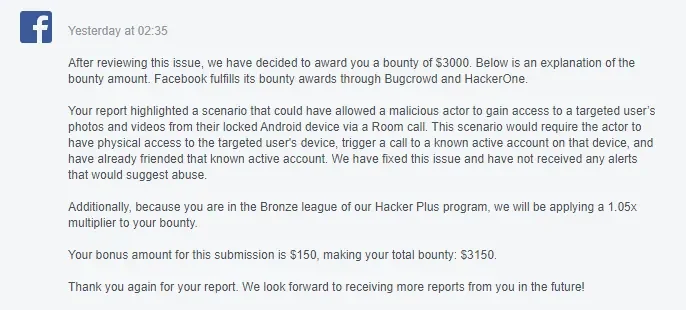
An attacker who can get a victim to answer a room call on a locked Android phone can read the private photos and videos stored on that device, and can post stories to the victim's logged-in Facebook account, all without the phone being unlocked. The attack requires physical reach to the victim's device, since the call has to be answered from the locked phone. The researcher notes that the bounty was awarded with that limitation in mind, based on the impact the issue would have had among Android Facebook users.
Fix
Facebook made a hot fix on the client side and also made changes on the server side so that previously vulnerable versions were patched. According to the report this was done in less than a day after triage. The report does not describe the specific code changes.
Variants to test
- Other call surfaces with their own chat or attachment controls: answer a call on a locked device and check whether any in-call chat, attachment or media picker opens without an unlock prompt. A positive result is any picker that lists device media from the locked state.
- Features added after a lock-screen fix: enumerate every control reachable from an answered call and test each one individually, since a per-feature gate leaves anything not explicitly listed open. A positive result is a control that works without unlocking while its siblings prompt for the unlock.
- Story or post creation from in-call flows: check whether media selected from a locked device can be published to the logged-in account. A positive result is a published story or post created without an unlock.
- Group chat entry points from other call types: repeat the room chat test on normal Messenger calls and other group call types. A positive result is the same group chat and gallery access from a locked phone.
The report links to a POC video that was sent with it.
What happened, in plain words
A security researcher found that a feature inside Facebook Messenger Rooms could let someone see all the private photos and videos stored on a locked Android phone, and even post stories to the victim's Facebook account, without ever unlocking the phone. The attack required the victim to answer a call on the locked phone, so the attacker needed physical access to the device. The researcher reported it to Facebook, which fixed it quickly and paid a bounty.
This article explains the whole story from scratch, for readers who are new to security. It covers the same steps, the same concepts, and the same images as the original write-up, but in simpler language.
Background: what is Messenger Rooms?
Facebook Messenger Rooms is a feature that lets a host create a virtual room and invite other Facebook users to join. Think of it like a video conference room: the host opens the room, sends invitations, and people join from their phones or computers. Once inside, attendees can start a call with each other.
The researcher had previously reported a related issue in October 2020. In that case, the "Watch Together" feature in a normal Messenger call could expose a user's private saved videos and watch history from a locked Android phone. The attacker could call the victim, the call would ring on the locked phone, and if answered, the attacker could use Watch Together without unlocking. Facebook fixed that by requiring the phone to be unlocked before using such sensitive features.
This new write-up asks two questions:
- What if the call is a Room call instead of a normal Messenger call?
- Is there a similar sensitive feature in a room call that can be reached from the lock screen without unlocking?
Setting up the test
The researcher used two Facebook accounts and two devices:
| Role | Account | Device | State |
|---|---|---|---|
| Victim | UserA | Android phone | Locked |
| Attacker | UserB | PC | Logged in |
No other tools or versions are mentioned. The only precondition is that the victim's Android phone is locked and has the victim's Facebook account logged in, and that the attacker can invite that account into a Messenger Room.
Finding the flaw
The researcher hosted a room from UserB, invited UserA, and then called UserA from the invited users section. The call rang on UserA's locked Android phone and was answered from that locked state. The previously known sensitive features, Watch Together and Add People, all required the phone to be unlocked first, so the earlier fix seemed to be working.
What caught the researcher's attention was an icon at the top right corner of the call screen: a chat option for the group formed between the room attendees. That group chat was reachable from the call itself, and the call had been answered without unlocking the phone.
Exploitation steps
Step 1: Prepare the two accounts
- Create two test Facebook accounts.
- Log UserA (the victim) into the Android phone and lock the phone.
- Log UserB (the attacker) into a PC.
Step 2: Host a room and invite the victim
From UserB, host a Messenger Room, invite UserA to the room, and join the room as well.
Step 3: Call the victim from the room
From UserB, call UserA from the invited users section. After a few seconds, the call rings on UserA's locked Android phone.
Step 4: Answer from the locked phone and probe the known features
Answer the call from the locked phone and try the previously known sensitive features, Watch Together and Add People. Both require the phone to be unlocked before they can be used, so the earlier protection is still in place for them.
Step 5: Open the room group chat
Use the chat option at the top right corner of the call, which opens the group chat for the room attendees. The chat opens without the phone being unlocked.
Step 6: Use the gallery option next to the text box
Inside the chat there is a gallery option beside the text box. Selecting it opens the device's media picker from the locked state.
Step 7: Read private media and post stories
From that picker, all private photos and videos on the device can be accessed without unlocking the phone. The edit option on any media also allows posting a story to the victim's logged-in Facebook account from the same locked state.
Why it worked
The flaw is a sensitive feature, the room group chat with its gallery attachment picker, reachable from a call answered on a locked Android device. The earlier fix had put an unlock requirement in front of specific features such as Watch Together and Add People, but the room chat and its media picker were not behind that same gate.
Impact
An attacker who can get a victim to answer a room call on a locked Android phone can read the private photos and videos stored on that device, and can post stories to the victim's logged-in Facebook account, all without the phone being unlocked. The attack requires physical reach to the victim's device, since the call has to be answered from the locked phone. The researcher notes that the bounty was awarded with that limitation in mind, based on the impact the issue would have had among Android Facebook users.
Fix
Facebook made a hot fix on the client side and also made changes on the server side so that previously vulnerable versions were patched. According to the report this was done in less than a day after triage. The report does not describe the specific code changes.
Variants to test
- Other call surfaces with their own chat or attachment controls: answer a call on a locked device and check whether any in-call chat, attachment or media picker opens without an unlock prompt. A positive result is any picker that lists device media from the locked state.
- Features added after a lock-screen fix: enumerate every control reachable from an answered call and test each one individually, since a per-feature gate leaves anything not explicitly listed open. A positive result is a control that works without unlocking while its siblings prompt for the unlock.
- Story or post creation from in-call flows: check whether media selected from a locked device can be published to the logged-in account. A positive result is a published story or post created without an unlock.
- Group chat entry points from other call types: repeat the room chat test on normal Messenger calls and other group call types. A positive result is the same group chat and gallery access from a locked phone.
The report links to a POC video that was sent with it.
Glossary
- API: Application Programming Interface; a set of rules that lets one piece of software talk to another. Think of it as a waiter taking your order to the kitchen.
- Cookie: a small piece of data stored by your browser that helps a website remember you, like a name tag at a party.
- Token: a digital key that proves who you are, similar to a wristband at an event.
- Vulnerability: a weakness in software that can be exploited to cause harm.
- Broken authorisation: a flaw where the system fails to check if a user is allowed to do something.
- Logic flaw: a mistake in the way the software is designed to work, not a coding error.
- Lock screen: the screen that appears when a device is locked, requiring a PIN, pattern, or biometric to unlock.
- Media picker: a feature that lets you choose photos or videos from your device.
- POC: Proof of Concept; a demonstration that a vulnerability exists, often a video or code.
- Bounty: a reward paid by a company to a researcher who reports a security issue.
- Triage: the process of reviewing and prioritising a reported issue.
- Hot fix: an urgent fix applied to a live system.
- Client-side: changes made in the app or software on the user's device.
- Server-side: changes made on the company's servers.
- Watch Together: a Facebook feature that lets people watch videos together during a call.
- Add People: a feature to invite more people to a call or room.
- Story: a temporary post on Facebook that disappears after 24 hours.


