Reading Local Files from Facebook's Internal Network
A file upload feature on Facebook's server allowed an attacker to upload a ZIP archive containing a symbolic link, which when extracted could read local files such as /etc/passwd. The attacker could potentially access sensitive files on the server.
 Published on josipfranjkovic.blogspot.com
The original lives on josipfranjkovic.blogspot.com
We do not hold its text, so we link to it rather than copy it. The other two tabs are our own rewrites, checked against it.
What the report shows
The target is Facebook's server-side handling of uploaded zip archives. The researcher, Josip Franjković, demonstrated that a zip file containing a symbolic link could be used to read local files from the server. The report is short and does not describe the upload endpoint, the feature that processed the archive, or the exact response that came back.
The core of the finding is two shell commands. First, a symlink is created that points at a local file:
ln -s /etc/passwd link
Then the symlink is packed into a zip archive. The --symlinks flag tells zip to store the link itself rather than following it and storing the contents of the target file:
zip --symlinks test.zip link
The resulting archive was uploaded to Facebook. The archive was uploaded to Facebook, and the local file was read from the server. The screenshot shows the local file being read from the server, which is how the researcher illustrated the behaviour.
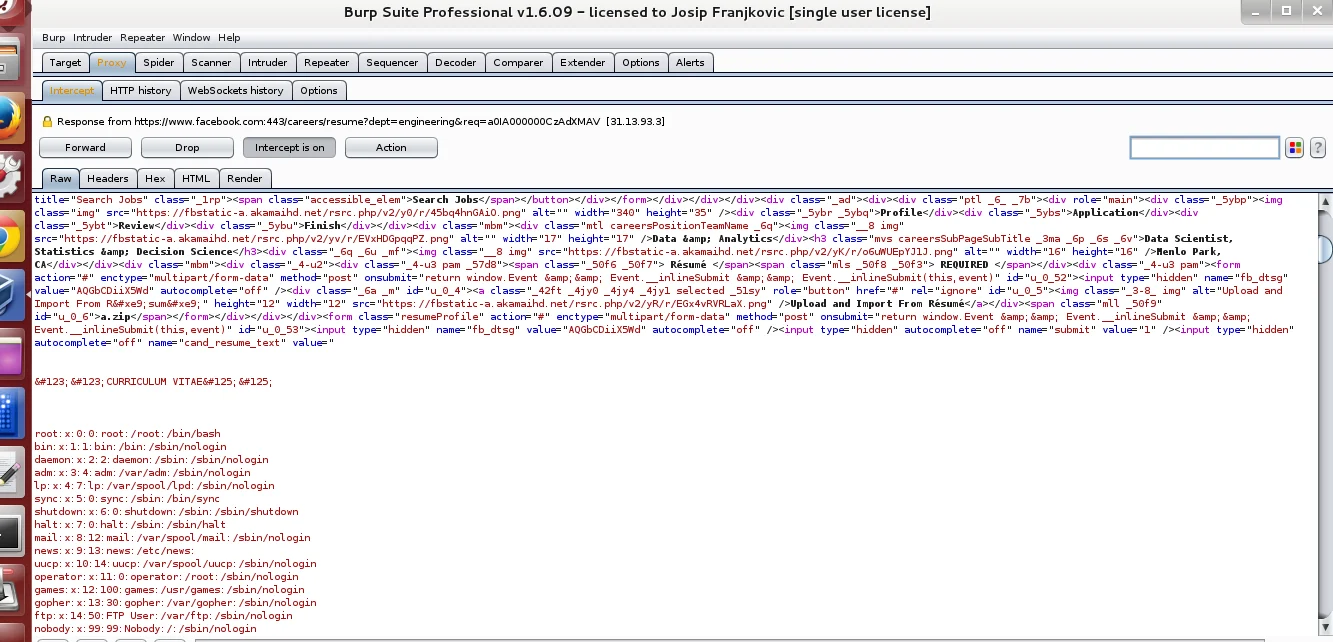
The report does not state a bounty amount, a severity rating, or a CVE. The title marks the issue as fixed. The report also credits prior reading: the researcher says he would never have thought of uploading the zip with symlinks without Facebook's blog, and points to a list of Facebook bugs compiled by Philippe.
Root cause
A plausible root cause is that the archive extraction step preserved symbolic links from the uploaded zip and later code read the extracted files without checking whether an entry was a link pointing outside the extraction directory. A zip entry can carry a Unix mode that marks it as a symlink, with the link target stored as the entry's content. An extractor that honours that mode recreates the link on disk. Any later read of that path resolves through the link to whatever file it names, so a file the uploader should never see becomes readable.
Impact
Within the report's own framing, the impact is local file disclosure from the Facebook server: the researcher caused the server to read a local file, /etc/passwd. The report does not enumerate which files were reachable or what else the primitive allowed, so the impact should be read as read access to local files rather than anything broader.
How this kind of bug works
Archive formats store more than file contents. Zip entries carry metadata including a Unix mode, and a mode with the symlink bit set means the entry's data is the target path of a link, not file content. Extractors differ in how they treat this. Some refuse symlinks outright, some recreate them, and some follow them and write the target's content into the archive output. The dangerous combination is an extractor that recreates links plus downstream code that opens the extracted paths.
The same class of problem appears whenever untrusted archives are unpacked: symlink entries, absolute paths, and ../ sequences in entry names can all place or resolve files outside the intended directory. The defence is to treat every entry as untrusted: reject symlink entries, reject absolute and parent-traversing paths, extract into a fresh directory, and resolve each final path to confirm it stays inside that directory before reading it.
How to test for it
- Find features that accept archives: importers, bulk uploads, theme or plugin installers, backup restore, document conversion, and anything that unpacks a zip server-side.
- Build a benign archive first to confirm the feature works and to learn how it reports results.
- Add an entry that is a symbolic link to a well-known local file, and upload it. If the feature echoes, previews, converts, or returns extracted content, look for the target file's contents in the response.
- Try variants: a link to a path outside the extraction directory, an entry name containing
../, and an absolute path as the entry name. Each tests a different weakness in the same extraction step. - A positive result is the content of a file you did not upload appearing in a response, a download, or a converted document. A negative result is an error about unsupported entries, or the link being stored as a plain file containing the target path as text.
Common false positives: the server may store the archive without extracting it, in which case nothing resolves; the response may echo the link target string rather than the file's contents; or the feature may extract into a sandbox where the target path does not exist. Confirm you are seeing real file content, not the path you supplied.
How it is fixed
The standard fix is to make extraction reject or neutralise dangerous entries. Refuse symlink entries and any entry whose resolved path leaves the extraction root. Extract into a per-request temporary directory, canonicalise each path, and verify it is still inside that directory before use. Where the archive format allows it, strip mode bits on extraction so links cannot be recreated. Serving extracted files through a handler that only reads regular files inside the root closes the remaining gap.
Hunting notes
This bug class hides in features that bridge an upload and a filesystem: archive importers, document converters, package installers, and backup restores. Recon signals include upload forms that accept .zip, .tar, or similar, error messages that mention extraction paths, and features that return a preview or converted output of uploaded content. To make a report land, show the exact archive you uploaded, the response containing content you could not otherwise obtain, and a clear statement of which file was read and why that file should not be reachable. Keep the demonstration to a harmless file such as /etc/passwd and avoid reading anything sensitive.
What happened, in plain words
Facebook runs a lot of software on its servers. Some of that software lets people upload a zip file, a single file that holds other files inside it, a bit like a cardboard box packed with smaller boxes. The server then opens the zip and works with what is inside.
Josip Franjković found that this unpacking step could be tricked. If a zip contains not a normal file but a symbolic link, the server could end up reading whatever the link pointed at. A symbolic link (often shortened to symlink) is a shortcut: a small file whose only job is to say "the real file is over there". On a normal computer, a shortcut on your desktop that opens a document in another folder is the same idea.
The trick let the researcher make Facebook's server read a file from its own local disk, a file the uploader was never meant to see. The report is short. It does not say which upload feature was involved, what the server sent back, or how the response looked. The title marks the issue as fixed.
The two commands
The whole demonstration rests on two shell commands. A shell is the text window where you type commands to a computer instead of clicking.
The first command creates the shortcut:
ln -s /etc/passwd link
ln means link, and -s means symbolic, so this makes a shortcut rather than a second name for the same file. /etc/passwd is a well-known file on Unix-like systems that lists user accounts; it is a common harmless target for showing that a file can be read. link is the name of the shortcut being created. After this line, the folder contains an entry called link that points at /etc/passwd.
The second command packs the shortcut into a zip:
zip --symlinks test.zip link
zip builds the archive, test.zip is the archive's name, and link is what goes inside. The --symlinks flag matters: by default zip would follow the shortcut and store the contents of /etc/passwd as an ordinary file, which would only prove the researcher can read their own machine. With the flag, the archive stores the shortcut itself, target path and all. That is the payload: a zip whose entry is a link, not a file.
The screenshot shows the local file being read from Facebook's server, which is how the researcher illustrated the behaviour.
Why it worked
A zip entry carries more than bytes. It also carries metadata, including a Unix mode, a number that tells the operating system what kind of thing the entry is: a regular file, a folder, or a link. When the mode marks the entry as a link, the entry's data is not file content but the path the link points to.
Unpacking programs disagree about this. Some refuse links outright, some recreate them, and some follow them and write the target's content into the output. The server ended up reading /etc/passwd from its own disk. Reading a path that is a link means reading whatever the link names, so the server ended up reading /etc/passwd from its own disk.
The researcher notes that the bug was not quite what it first appeared to be, and credits prior reading: he says he would never have thought of uploading the zip with symlinks without Facebook's blog, and points to a list of Facebook bugs compiled by Philippe.
In general, how this kind of bug works
The pattern is called a symlink attack. It appears wherever a program unpacks an archive it did not create. Three kinds of entry are dangerous: a link pointing outside the folder where extraction happens, an entry name that is an absolute path such as /etc/passwd, and an entry name containing ../, which means "go up one folder". All three can make the unpacker place or reach files outside the intended directory.
The defence is to treat every entry as untrusted. Reject link entries. Reject absolute and parent-traversing names. Extract into a fresh, empty directory. Then resolve each final path and confirm it still sits inside that directory before anything reads it. Serving extracted files through a handler that only reads regular files inside the root closes the remaining gap.
In general, how to test for it
- Find features that accept archives: importers, bulk uploads, theme or plugin installers, backup restore, document conversion, anything that unpacks a zip on the server.
- Build a harmless archive first to confirm the feature works and to see how it reports results.
- Add an entry that is a link to a well-known local file and upload it. If the feature previews, converts or returns extracted content, look for the target file's contents in the response.
- Try variants: a link outside the extraction directory, an entry name with
../, and an absolute path as the entry name. Each tests a different weakness in the same step. - A positive result is content of a file you did not upload appearing in a response, a download or a converted document. A negative result is an error about unsupported entries, or the link stored as a plain file containing the target path as text.
Watch for false positives. The server may store the archive without unpacking it, so nothing resolves. The response may echo the link target string rather than the file's contents. The feature may unpack into a sandbox where the target does not exist. Confirm you are seeing real file content, not the path you supplied.
When reporting, show the exact archive you uploaded, the response containing content you could not otherwise obtain, and a clear statement of which file was read and why it should not be reachable. Keep the demonstration to a harmless file such as /etc/passwd and avoid reading anything sensitive.
Glossary
- Zip archive: a single file that packs other files and folders inside it.
- Symbolic link (symlink): a shortcut file that points at another file or folder.
- Shell: a text interface where you type commands to a computer.
ln -s: the command that creates a symbolic link.zip --symlinks: the command that builds a zip, storing links as links instead of following them./etc/passwd: a well-known Unix file listing user accounts, often used as a harmless test target.- Unix mode: metadata on a file or archive entry saying what kind of thing it is, such as a regular file or a link.
- Extraction: the act of unpacking an archive onto a disk.
- Path traversal (
../): using "go up one folder" sequences in a name to reach outside the intended directory. - Absolute path: a path starting from the root of the filesystem, such as
/etc/passwd. - Sandbox: an isolated environment where files outside it are not reachable.
- False positive: a result that looks like a bug but is not, such as seeing your own supplied path echoed back.
- Local file disclosure: a bug where a server reveals a file from its own disk to someone who should not see it.