Turning self XSS into non self XSS via authorization issue at paypal
The PayPal Technical Support and Brand Central portals had file upload validation issues that allowed stored cross-site scripting. An attacker could submit a ticket without logging in, upload a malicious SVG or inject script into a file name, and the script would execute when the victim opened the ticket.

Please kindly visit this simple paper directly to looking this release (for a simple look — November, 2017 Article):
The full write-up lives on its author's site
It belongs to its author, so we link to it rather than copy it. The other two tabs are our own rewrites, checked against it.
Context
PayPal runs two separate support portals for its merchants and customers.
The first is the PayPal Technical Support Portal at https://www.paypal-techsupport.com. Merchants use it to talk to PayPal about integration questions, request new features, or report technical issues they run into.
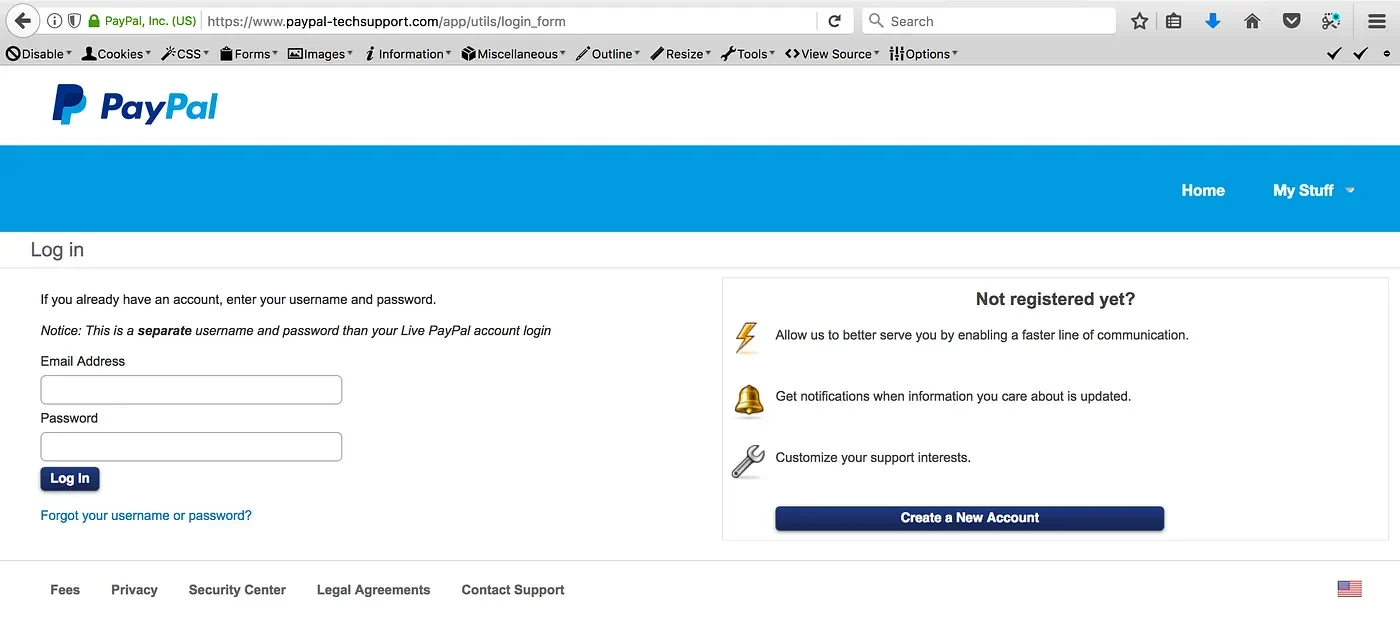
Figure 1: the PayPal Technical Support Portal.
The second is the PayPal Brand Central Portal at https://www.paypal-brandcentral.com. Customers use it to ask permission to use the PayPal logo in their business.
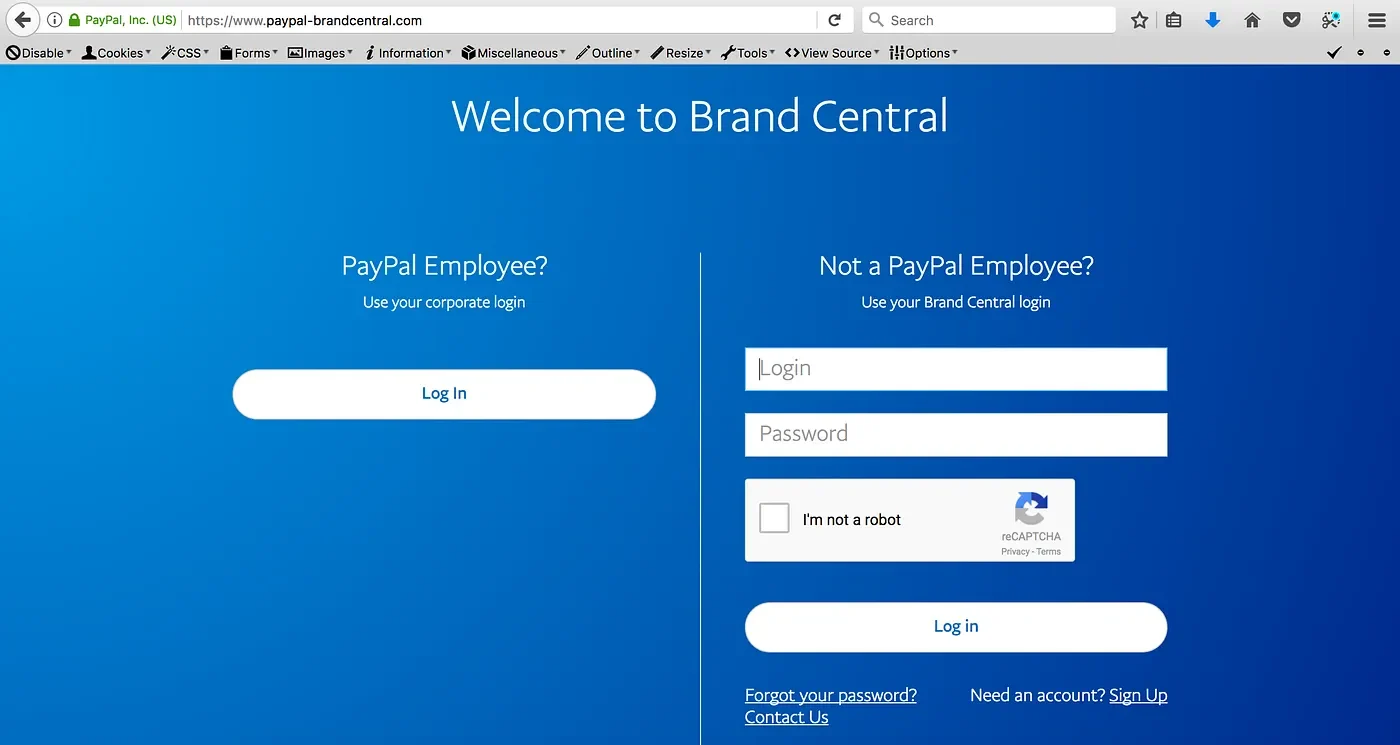
Figure 2: the PayPal Brand Central Portal.
Both portals offer a file upload feature so that a merchant or customer can attach documents that help PayPal understand their situation. The upload feature is where the problem sits: the Technical Support Portal does not validate the content of uploaded files, and the Brand Central Portal does not validate the file name. Either gap lets an attacker store client-side script that runs when a victim opens the ticket. The report frames the outcome as redirecting a user to a phishing page or getting them to download malware.
A note on Brand Central registration: the portal used to be open for public registration, and anyone could activate an account with the activation link PayPal provided. The researcher says that activation could be bypassed and that a separate paper on it would follow; the forgot password feature with the account [redacted] was a starting point for that test. At the time of writing, every registration on this portal has to be approved manually by PayPal.
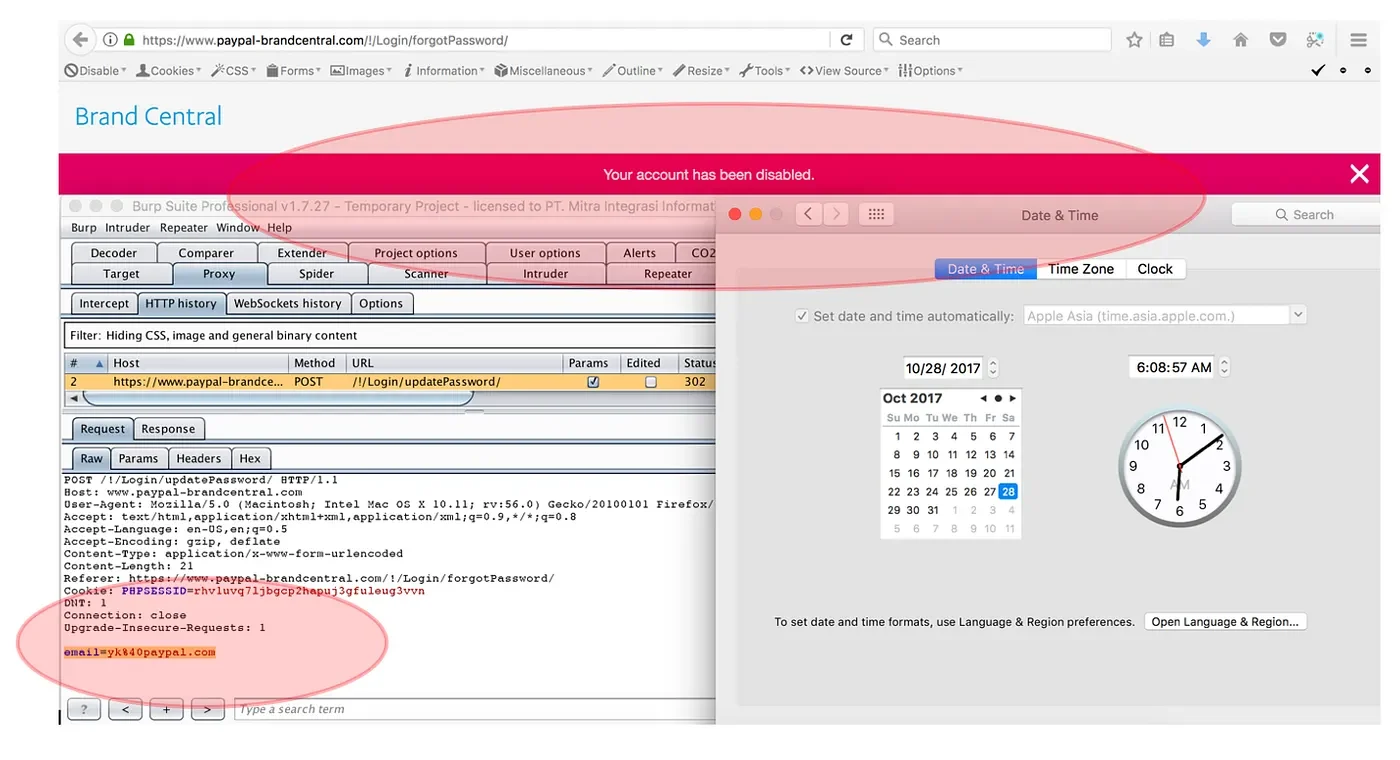
Figure 3: bypassing the PayPal activation link at PayPal Brand Central.
Setup
The report does not list specific tool versions. The work is done with a browser, a proxy to intercept and modify requests (the screenshots show request interception), and a registered account on the Technical Support Portal for the logged-in flow. The attack flows need no login on the attacker side: an anonymous user can submit a ticket addressed to a registered email address.
Two preconditions matter:
- The attacker knows the victim's registered email address on the portal.
- The victim opens the ticket that the attacker created.
Finding it
The researcher starts from the normal ticket submission flow on the Technical Support Portal, at https://www.paypal-techsupport.com/app/ask. There are two ways to submit a ticket.
With a login, the user goes to the Contact Support feature and the first field presented is Subject.
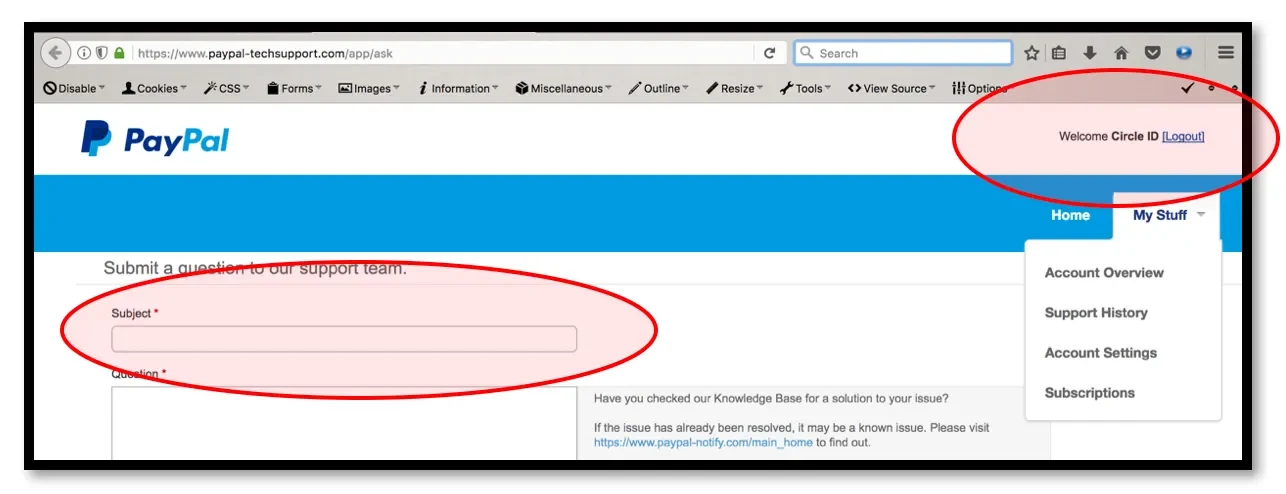
Figure 4: Contact Support after login.
Without a login, the user goes straight to the Contact Support feature and the first field presented is Email Address.
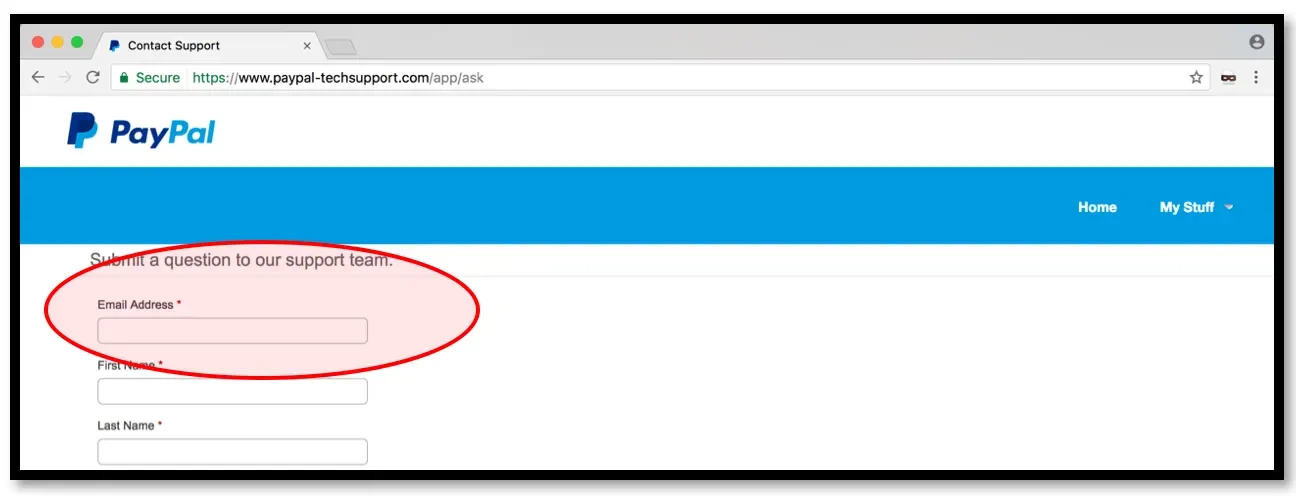
Figure 5: Contact Support page without login.
In both flows the user can attach documents. The allowed extensions are .txt, .doc, .docx, .xls, .xlsx, .pdf, .jpg, .png, .bmp, .ppt and .pptx. The .svg format is not allowed.

Figure 6: .SVG is not allowed to be uploaded.
The interesting part is what happens when the submission process is manipulated. The attacker can use the ticket submission without login and bypass the .svg upload protection. On top of that, the Technical Support Portal does not validate the content of the .svg file, so the attacker can put whatever client-side script they like inside it.
The proof-of-concept content used throughout the report is:
<?xml version=”1.0″ encoding=”UTF-8″ standalone=”yes”?><svg onload=”window.location=’http://www.google.com'”xmlns="http://www.w3.org/2000/svg"> </svg>
The report credits @BruteLogic for the research on file-upload XSS at https://brutelogic.com.br/blog/file-upload-xss/.
To make the submission flow clear, the researcher draws a mind map of the normal process. With login, everything looks like a common support portal, and the user can upload the whitelisted extensions as supporting documents.
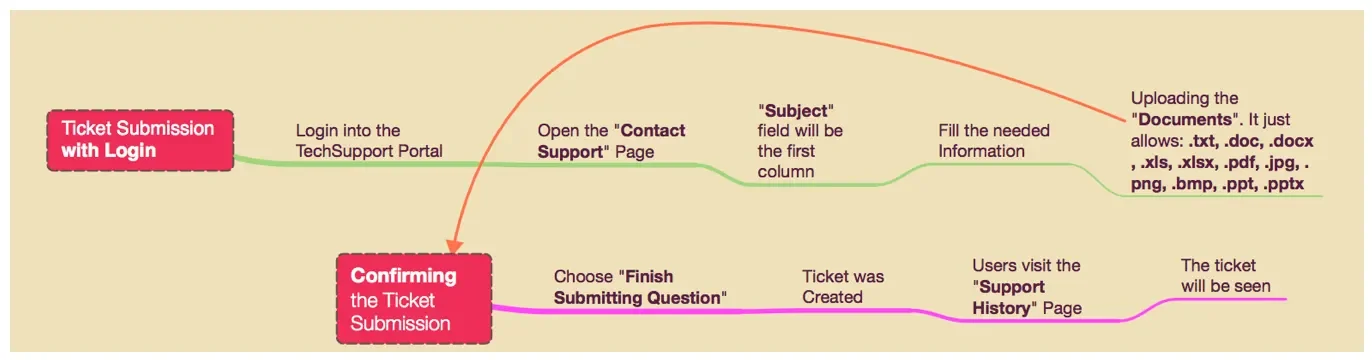
Figure 7: ticket submission with login.
Without login, the user has to fill in the email address they want to use to interact with the submitted ticket.
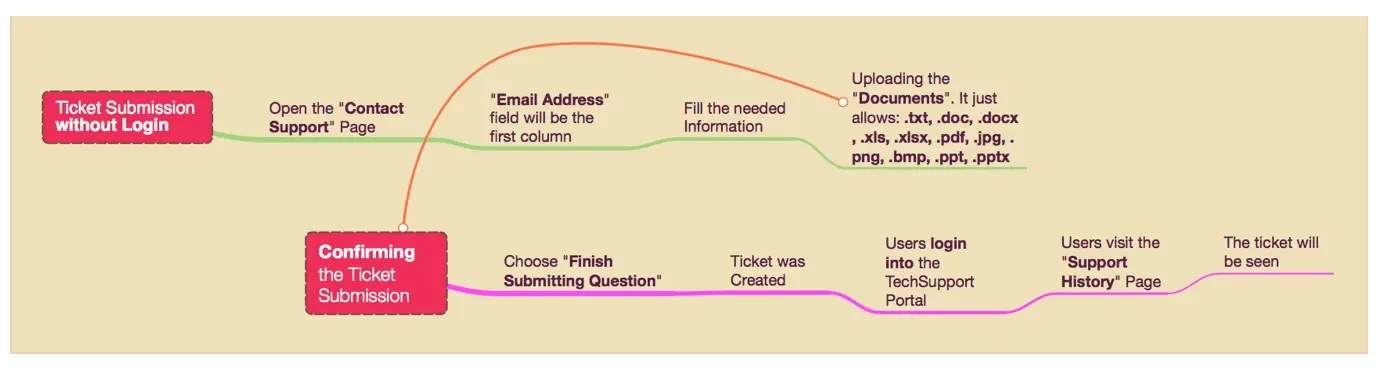
Figure 8: ticket submission without login.
After the question is submitted, the user has to log in to the portal to interact with their own question.
The summary of the issue is a validation gap on content (Technical Support Portal) and on file name (Brand Central Portal), combined with an authorisation issue on both applications. The authorisation issue is what turns what would otherwise be a self-XSS into a stored XSS that fires for someone else.
Exploitation
Technical Support Portal: submit a ticket to someone else
Looking back at the without-login flow, there is an authorisation issue: any anonymous user can submit a ticket to a registered user on the portal. All the attacker needs is to know the registered email ID.
That is enough to create a new ticket and upload the malicious .svg file, which triggers the XSS at the target. Because the XSS is stored, the attacker only has to wait until the target opens the created ticket.
There is no CAPTCHA on the ticket submission feature, so the email field can be brute-forced with a list of emails. A token exists and expires after some period, but the researcher notes it can still be used.
The report adds a caveat: this ticket submission method is probably a deliberate business process that PayPal thought through, so PayPal did not fix it. All PayPal fixed was the XSS problem.
Technical Support Portal: the attack flow
Before going to the proof of concept, the researcher maps the attack. The attacker uses the ticket submission without login process and bypasses the file upload protection to upload the malicious .svg file.
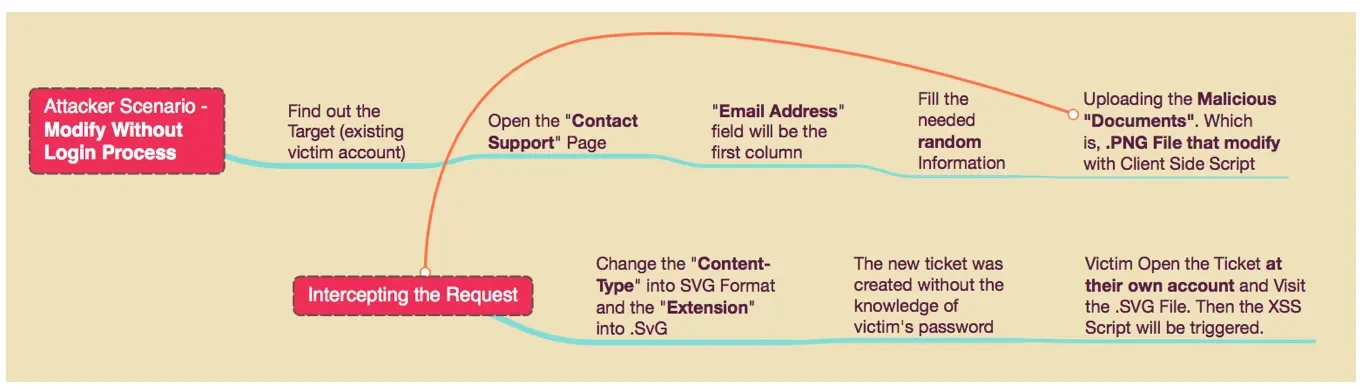
Figure 9: mind map of the attack.
As in the without-login flow, the email address the attacker fills in is the existing victim's email account on the Technical Support Portal.
Step 1: prepare the malicious SVG
After the form is filled, the attacker uploads the malicious .svg file containing the client-side script. The sample used as a PoC is the same payload shown earlier:
<?xml version=”1.0″ encoding=”UTF-8″ standalone=”yes”?><svg onload=”window.location=’http://www.google.com'”xmlns="http://www.w3.org/2000/svg"> </svg>
The onload handler on the <svg> element runs as soon as the file is rendered, and here it redirects the browser to http://www.google.com. The XML declaration and the xmlns attribute make it a well-formed SVG document.
Step 2: bypass the client-side extension check
The client-side protection still has to be bypassed. The upload form only accepts the restricted set of extensions, and .svg is not among them.
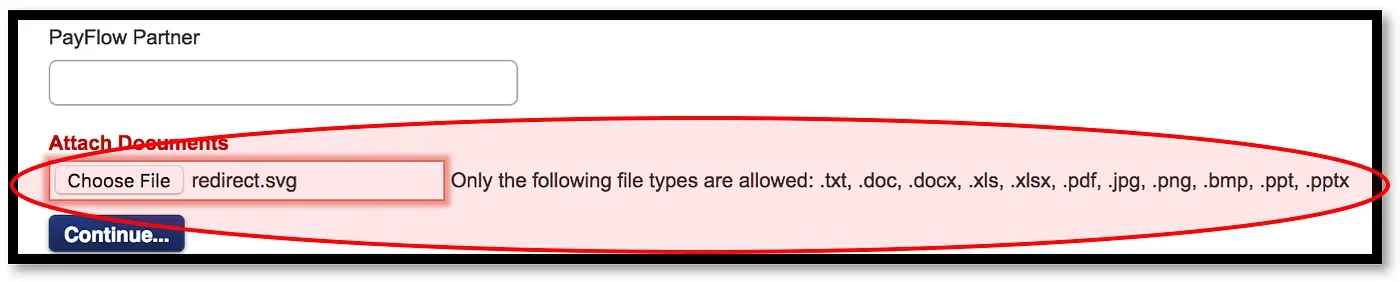
Figure 10: restricted files only, .SVG is not allowed.
The attacker renames the .svg file to an allowed extension such as .png.
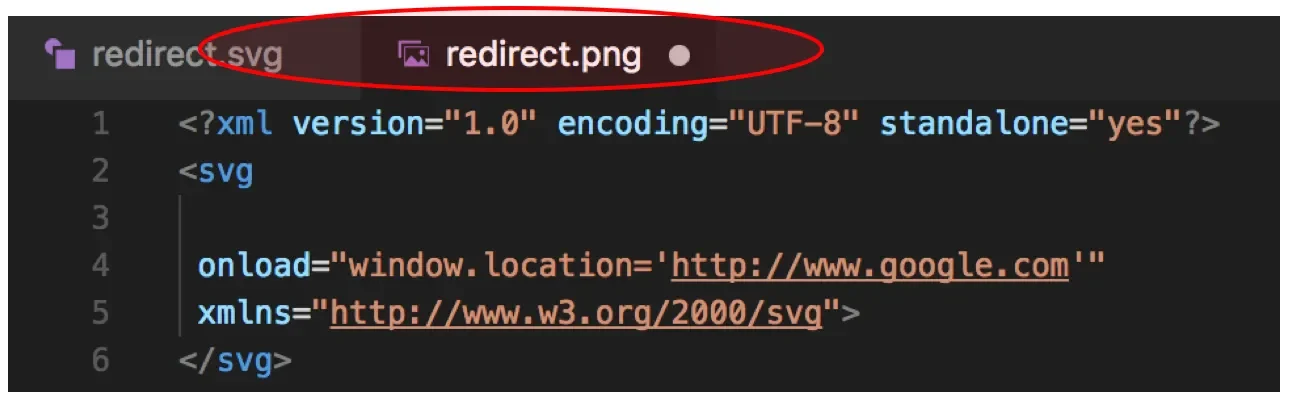
Figure 11: changing the extension to the .png format.
Step 3: intercept and rewrite the request
With the malicious .png file selected, the next step is to intercept the request before it reaches the server. In the intercepted request, the content type and the extension are changed back to the .svg file format and .svg extension.
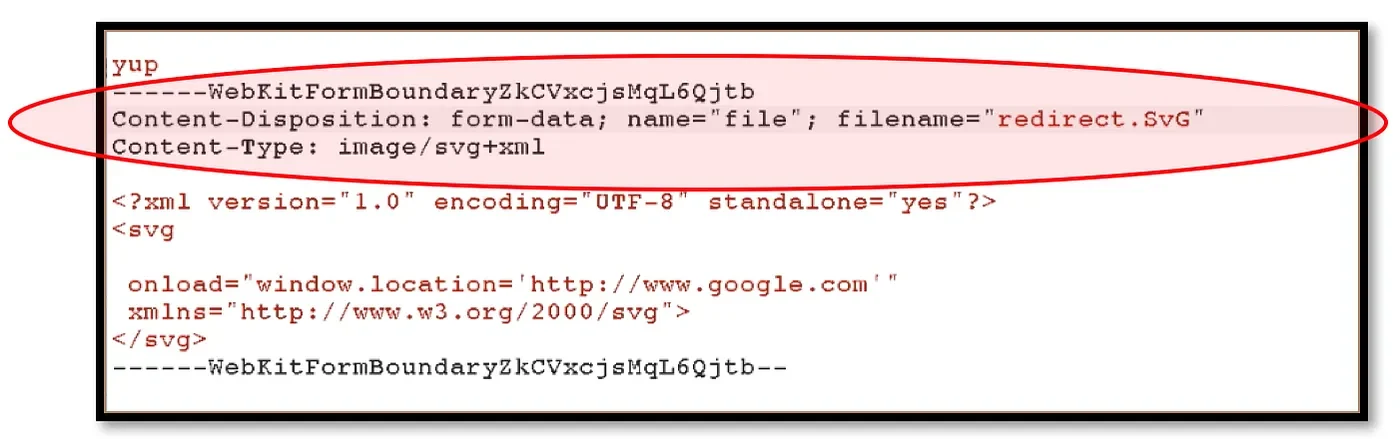
Figure 12: changing the Content-Type and extension of the file.
Step 4: forward and confirm the upload
After everything is set up, the request is forwarded. If the .SvG extension has been uploaded, the result is a success.
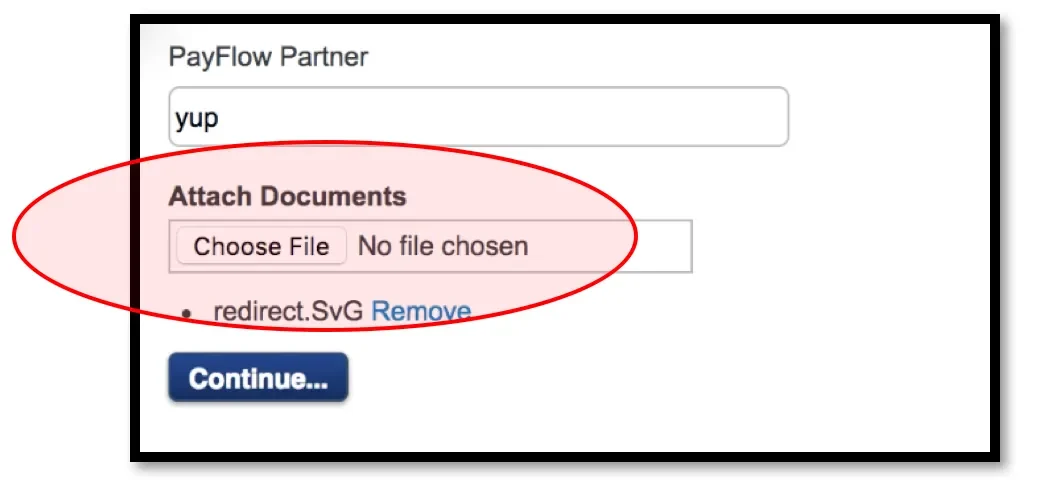
Figure 13: success uploading the .SvG file.
Step 5: wait for the victim
The last part is to wait for the victim to open the ticket and open the .svg file the attacker uploaded. When the .svg file is opened, the XSS triggers.
Brand Central Portal: submit a ticket to someone else
The Brand Central Portal has the same authorisation issue. Any anonymous user can submit a ticket to a registered user on the portal, and all they need is to know the registered email ID.
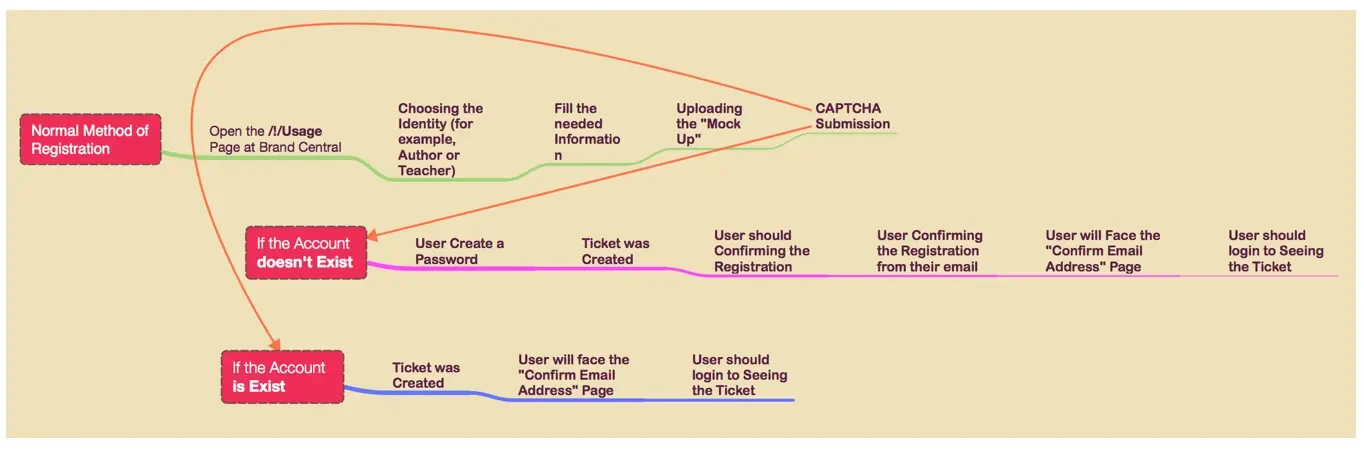
Figure 14: normal method of registration, ticket submission at Brand Central Portal.
The registration process on Brand Central has two outcomes depending on whether the account exists:
- If the account exists, the registration process turns into ticket submission without knowledge of the user's password.
- If the account does not exist, the registration process works as normal registration.
Brand Central Portal: the attack flow
The attack uses the same shape as the Technical Support Portal. The attacker uses ticket submission without login and uploads any file name to be changed later to trigger the XSS.
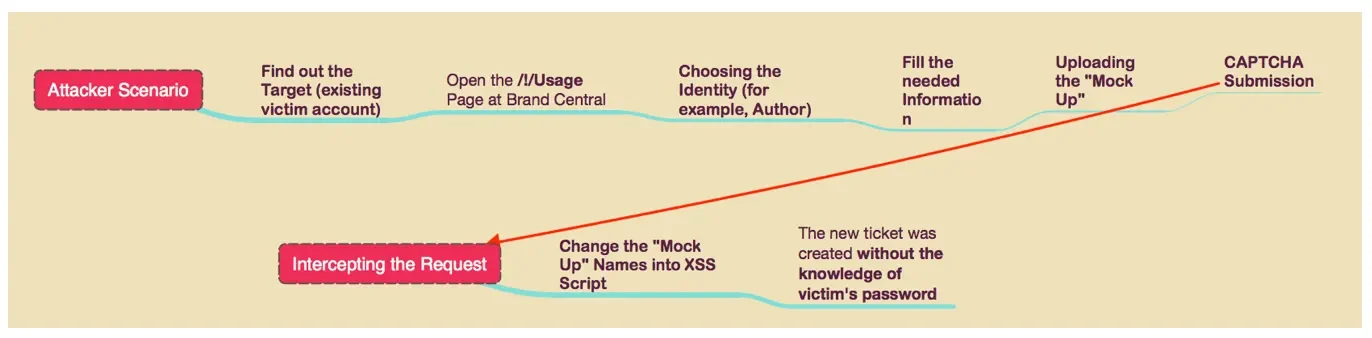
Figure 15: mind map of the attack on PayPal Brand Central.
As before, the email address filled in is the existing victim's email account on the Brand Central Portal.

Figure 16: uploading the file with "cmd" as the name.
Step 1: pick a first payload
Before sending the request to the server, the attacker intercepts it to change the file name into the malicious script to be triggered on the victim's side. A simple proof that the issue works is this pop-up alert payload:
><img src=x onerror=prompt(1)>
The leading > closes whatever markup the file name is placed into, and the <img> with a broken src fires onerror, which calls prompt(1).
Step 2: work around the file name filter
A pop-up is not enough to raise the risk level of the issue, so the payload should be changed to something like a URL redirection or a program download. At that point the researcher finds another restriction: the file name on this portal is restricted from the dot, quote, equal and slash characters, that is . " / =.
The bypass is to use HTML character references for the restricted characters:
<img src=a onerror=document.location="http://google.com">
Here . is a dot, = is =, " is a double quote and / is a slash. The browser decodes them before the handler runs, so document.location is assigned "http://google.com" even though the raw file name contains none of the filtered characters.
The final setup is visible in the intercepted request:
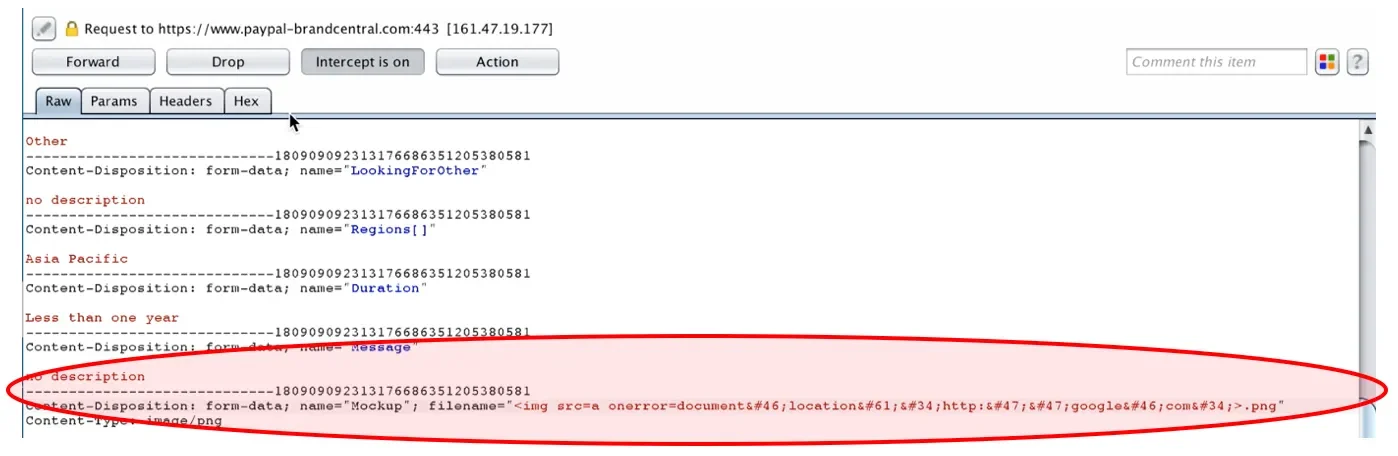
Figure 17: intercepting the request and changing the file name.
Step 3: wait for the victim
The last part is to wait for the victim to open the ticket. When the ticket is opened, the page executes the script injected into the file name.
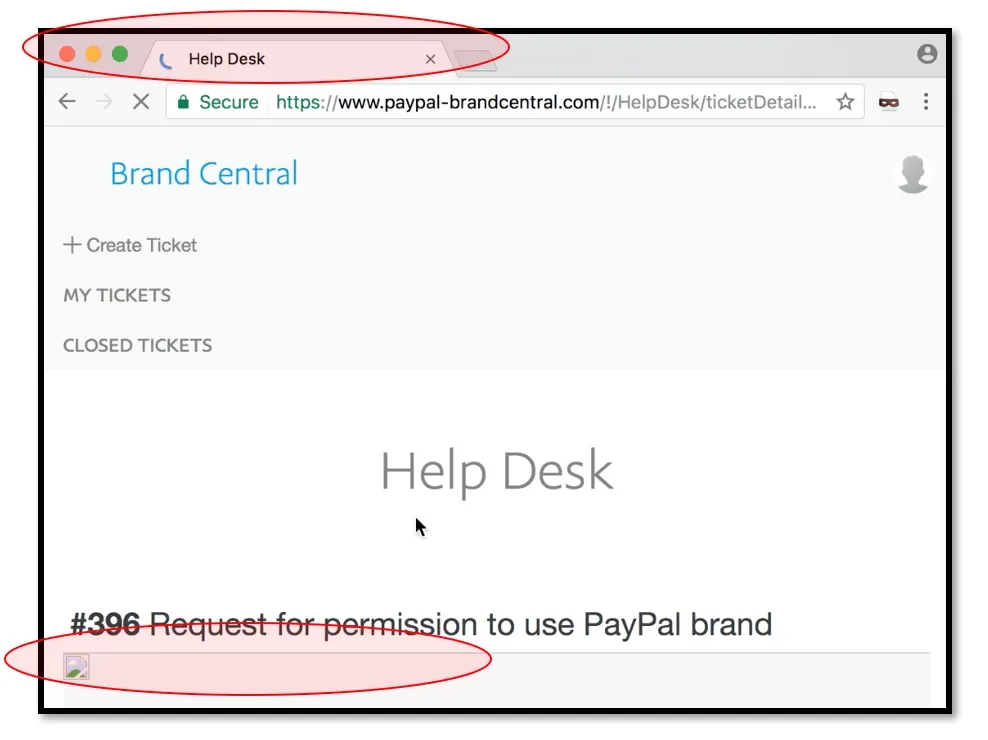
Figure 18: the page executes the script injected into the file name.
Videos
The report includes two videos of the scenarios:
- Stored XSS via malicious SVG file at the Technical Support Portal: https://youtu.be/7Au-As7jrQs
- Stored XSS via file name injection at the Brand Central Portal: https://youtu.be/XwynfNOxIlI
Root cause
The report identifies two validation gaps and one authorisation gap.
On the Technical Support Portal, the upload check is only on the client side and only on the extension. Renaming the file to .png satisfies the browser-side check, and rewriting the content type and extension in the intercepted request satisfies the server side. The Technical Support Portal does not validate the content of the .svg file, so the onload handler inside the SVG survives.
On the Brand Central Portal, the file name is rendered into the ticket page, and the page executes the script injected there. The filter blocks the dot, quote, equal and slash characters, and the bypass uses HTML character references that the browser decodes later.
On both portals, the authorisation gap is what makes the stored XSS reachable by an attacker. Ticket submission without login lets an anonymous user address a ticket to any registered email address, so the stored payload is delivered to a victim who never submitted it. Without that gap, the same payloads would only fire for the person who uploaded them, which is a self-XSS.
Impact
An attacker who knows a victim's registered email address on either portal can create a ticket addressed to that victim and store a script in it. When the victim opens the ticket, the script runs in the context of the PayPal portal. The report describes the possible outcomes as redirecting the user to a phishing page or getting them to download malware.
The Technical Support Portal variant requires the victim to open the uploaded .svg file. The Brand Central variant fires as soon as the ticket is opened, because the payload sits in the file name rendered on the page.
Because there is no CAPTCHA on ticket submission, the email field can be brute-forced with a list of addresses, subject to a token that expires after some period. The report notes that the token can still be used.
The report does not assign a severity or CVSS score. It records that PayPal rewarded the Technical Support Portal issue and marked the Brand Central issue as "Not Actionable". The researcher attributes the latter to a lack of information sent to PayPal about Brand Central, compared with the mind maps of the process and of the attack provided for the Technical Support Portal. Since PayPal changed the registration process at Brand Central, the Brand Central issue is no longer applicable.
Fix
The report gives three recommendations:
- Protect the ticket submission process by disabling ticket submission without login.
- Check the uploaded file not only on the client side but also when the request reaches the server.
- Check the file name that is uploaded to the server.
What PayPal actually changed, according to the report, is the XSS problem on the Technical Support Portal, which was rewarded. The ticket submission method itself was left in place, on the view that it is a deliberate business process. The Brand Central registration process was changed so that every registration is approved manually by PayPal, and the report says the Brand Central issue is no longer applicable.
Variants to test
- Support portals that accept anonymous tickets. Submit a ticket without logging in, addressed to a known registered email, and attach a benign marker file. A positive result is that the ticket appears in the victim's account and the marker is visible to them.
- Client-side-only extension checks. Rename an SVG to an allowed extension, intercept the request and restore the
.svgextension and content type. A positive result is a server response confirming the.svgupload. - SVG content validation. Upload an SVG containing an
onloadhandler and open it from the ticket. A positive result is the handler executing in the portal's origin. - File name reflection. Upload a file with a name containing angle brackets and an event handler, then open the ticket. A positive result is the handler executing when the page renders.
- Character blacklists on file names. When dot, quote, equal or slash are filtered, try HTML character references such as
.,=,"and/. A positive result is the browser decoding them and the handler running the intended navigation. - Missing CAPTCHA on ticket submission. Attempt repeated submissions against a list of email addresses. A positive result is many accepted submissions within the token's lifetime.
What happened, in plain words
PayPal runs two websites where people can send it messages and attach files. On both of them, someone could send a message to another person's account without knowing that person's password, and could hide a small piece of code in the message. When the other person opened the message, that code ran inside PayPal's website. This kind of hidden code is called Cross Site Scripting, or XSS. The report shows how the researcher turned a trick that normally only affects the person who does it (a "self-XSS") into one that affects somebody else (a stored XSS).
Before going further, a few words that come up constantly:
- Client side means the part of the work your own browser does. Server side means the part the website's computers do after your browser sends them something.
- A request is the message your browser sends to a website when you click a button or submit a form. A proxy is a program that sits between your browser and the website so you can look at that message and change it before it is sent.
- A token is a short random value the website gives your browser to prove that a form really came from its own pages. It is like a numbered ticket you get at a counter: the counter only accepts the form if you hand back the matching number.
- A CAPTCHA is the little puzzle that proves a human is filling in the form rather than a program doing it thousands of times.
The two portals
PayPal runs two separate support portals for its merchants and customers.
The first is the PayPal Technical Support Portal at https://www.paypal-techsupport.com. Merchants use it to talk to PayPal about integration questions, request new features, or report technical issues they run into.
Figure 1: the PayPal Technical Support Portal.
The second is the PayPal Brand Central Portal at https://www.paypal-brandcentral.com. Customers use it to ask permission to use the PayPal logo in their business.
Figure 2: the PayPal Brand Central Portal.
Both portals offer a file upload feature so that a merchant or customer can attach documents that help PayPal understand their situation. Think of it like the attachment button in an email: you pick a file from your computer and it travels with your message.
The upload feature is where the problem sits. The Technical Support Portal does not check what is inside an uploaded file, and the Brand Central Portal does not check the name of the uploaded file. Either gap lets an attacker store a piece of code that runs in the victim's browser when the victim opens the ticket. The report describes the possible results as sending the user to a fake login page (phishing) or making them download malicious software (malware).
A note on Brand Central registration: the portal used to be open for public registration, and anyone could activate an account with the activation link PayPal provided. The researcher says that activation could be bypassed and that a separate paper on it would follow; the forgot password feature with the account [redacted] was a starting point for that test. At the time of writing, every registration on this portal has to be approved manually by PayPal.
Figure 3: bypassing the PayPal activation link at PayPal Brand Central.
What you need to try it
The report does not list specific tool versions. The work is done with a browser, a proxy to intercept and modify requests (the screenshots show request interception), and a registered account on the Technical Support Portal for the logged-in flow. The attack flows need no login on the attacker side: an anonymous user can submit a ticket addressed to a registered email address.
Two preconditions matter:
- The attacker knows the victim's registered email address on the portal.
- The victim opens the ticket that the attacker created.
Finding it
The researcher starts from the normal ticket submission flow on the Technical Support Portal, at https://www.paypal-techsupport.com/app/ask. There are two ways to submit a ticket.
With a login, the user goes to the Contact Support feature and the first field presented is Subject.
Figure 4: Contact Support after login.
Without a login, the user goes straight to the Contact Support feature and the first field presented is Email Address.
Figure 5: Contact Support page without login.
In both flows the user can attach documents. The allowed extensions are .txt, .doc, .docx, .xls, .xlsx, .pdf, .jpg, .png, .bmp, .ppt and .pptx. The .svg format is not allowed.
Figure 6: .SVG is not allowed to be uploaded.
An extension is the part of a file name after the last dot, such as .png in photo.png. Your computer and the website use it to guess what kind of file it is. An SVG is a picture format that is written as text, and text files can contain instructions that a browser will follow. That is why an SVG is a risky thing to let people upload.
The interesting part is what happens when the submission process is manipulated. The attacker can use the ticket submission without login and bypass the .svg upload protection. On top of that, the Technical Support Portal does not validate the content of the .svg file, so the attacker can put whatever client-side script they like inside it.
The proof-of-concept content used throughout the report is:
<?xml version=”1.0″ encoding=”UTF-8″ standalone=”yes”?><svg onload=”window.location=’http://www.google.com'”xmlns="http://www.w3.org/2000/svg"> </svg>
Line by line:
<?xml version=”1.0″ encoding=”UTF-8″ standalone=”yes”?>is the standard opening line of an XML document. It tells the browser which version of the format is used and how the text is encoded. XML is a way of writing structured text that both people and programs can read.<svg ...>starts the picture. Thexmlnsattribute says which standard the picture follows, so the browser knows to treat it as an SVG image.onload=”window.location=’http://www.google.com'”is the dangerous part.onloadmeans "when this thing has finished loading, do the following".window.locationis the address bar of the browser. Assigning a new address to it makes the browser navigate there. So as soon as the picture is shown, the browser is sent tohttp://www.google.com.</svg>closes the picture.
The report credits @BruteLogic for the research on file-upload XSS at https://brutelogic.com.br/blog/file-upload-xss/.
To make the submission flow clear, the researcher draws a mind map of the normal process. A mind map here is simply a diagram of the steps, drawn so a reader can follow the path from start to finish. With login, everything looks like a common support portal, and the user can upload the whitelisted extensions as supporting documents.
Figure 7: ticket submission with login.
Without login, the user has to fill in the email address they want to use to interact with the submitted ticket.
Figure 8: ticket submission without login.
After the question is submitted, the user has to log in to the portal to interact with their own question.
The summary of the issue is a validation gap on content (Technical Support Portal) and on file name (Brand Central Portal), combined with an authorisation issue on both applications. Authorisation is the check that decides whether you are allowed to do something. The authorisation issue is what turns what would otherwise be a self-XSS into a stored XSS that fires for someone else. A self-XSS only runs in the browser of the person who typed the code, so it harms nobody else. A stored XSS is saved on the website and runs for whoever opens the page later.
Exploitation
Technical Support Portal: submit a ticket to someone else
Looking back at the without-login flow, there is an authorisation issue: any anonymous user can submit a ticket to a registered user on the portal. All the attacker needs is to know the registered email ID.
That is enough to create a new ticket and upload the malicious .svg file, which triggers the XSS at the target. Because the XSS is stored, the attacker only has to wait until the target opens the created ticket.
There is no CAPTCHA on the ticket submission feature, so the email field can be brute-forced with a list of emails. Brute-forcing means trying many values automatically, one after another, until one works. A token exists and expires after some period, but the researcher notes it can still be used.
The report adds a caveat: this ticket submission method is probably a deliberate business process that PayPal thought through, so PayPal did not fix it. All PayPal fixed was the XSS problem.
Technical Support Portal: the attack flow
Before going to the proof of concept, the researcher maps the attack. The attacker uses the ticket submission without login process and bypasses the file upload protection to upload the malicious .svg file.
Figure 9: mind map of the attack.
As in the without-login flow, the email address the attacker fills in is the existing victim's email account on the Technical Support Portal.
Step 1: prepare the malicious SVG
After the form is filled, the attacker uploads the malicious .svg file containing the client-side script. The sample used as a PoC is the same payload shown earlier:
<?xml version=”1.0″ encoding=”UTF-8″ standalone=”yes”?><svg onload=”window.location=’http://www.google.com'”xmlns="http://www.w3.org/2000/svg"> </svg>
The onload handler on the <svg> element runs as soon as the file is rendered, and here it redirects the browser to http://www.google.com. The XML declaration and the xmlns attribute make it a well-formed SVG document. A handler is a piece of code attached to an event, such as "the picture has loaded"; when the event happens, the browser runs the code.
Step 2: bypass the client-side extension check
The client-side protection still has to be bypassed. The upload form only accepts the restricted set of extensions, and .svg is not among them.
Figure 10: restricted files only, .SVG is not allowed.
The attacker renames the .svg file to an allowed extension such as .png.
Figure 11: changing the extension to the .png format.
Renaming a file does not change what is inside it. The browser's check looks only at the name, so a file called picture.png that actually contains SVG text passes the check. This is why checking only on the client side is not enough: the browser belongs to the attacker, who can make it say anything.
Step 3: intercept and rewrite the request
With the malicious .png file selected, the next step is to intercept the request before it reaches the server. In the intercepted request, the content type and the extension are changed back to the .svg file format and .svg extension.
Figure 12: changing the Content-Type and extension of the file.
The Content-Type is a label in the request that tells the server what kind of file is being sent, for example image/png for a PNG picture. Changing it back to the SVG type, together with the .svg extension, means the server receives the file as an SVG even though the browser had been told it was a PNG.
Step 4: forward and confirm the upload
After everything is set up, the request is forwarded. If the .SvG extension has been uploaded, the result is a success.
Figure 13: success uploading the .SvG file.
Step 5: wait for the victim
The last part is to wait for the victim to open the ticket and open the .svg file the attacker uploaded. When the .svg file is opened, the XSS triggers.
Brand Central Portal: submit a ticket to someone else
The Brand Central Portal has the same authorisation issue. Any anonymous user can submit a ticket to a registered user on the portal, and all they need is to know the registered email ID.
Figure 14: normal method of registration, ticket submission at Brand Central Portal.
The registration process on Brand Central has two outcomes depending on whether the account exists:
- If the account exists, the registration process turns into ticket submission without knowledge of the user's password.
- If the account does not exist, the registration process works as normal registration.
Brand Central Portal: the attack flow
The attack uses the same shape as the Technical Support Portal. The attacker uses ticket submission without login and uploads any file name to be changed later to trigger the XSS.
Figure 15: mind map of the attack on PayPal Brand Central.
As before, the email address filled in is the existing victim's email account on the Brand Central Portal.
Figure 16: uploading the file with "cmd" as the name.
Step 1: pick a first payload
Before sending the request to the server, the attacker intercepts it to change the file name into the malicious script to be triggered on the victim's side. A simple proof that the issue works is this pop-up alert payload:
><img src=x onerror=prompt(1)>
Line by line:
>closes whatever HTML tag the file name was placed inside. If the page wrote the file name inside something like<a href="...">, this>ends that tag early and lets new markup start.<img src=x onerror=prompt(1)>inserts a picture.src=xpoints at a picture calledx, which does not exist, so the picture fails to load.onerror=prompt(1)is the handler for that failure: when the picture cannot load, the browser runsprompt(1), which shows a small pop-up box with the number 1 in it. Seeing that box proves the code ran.
Step 2: work around the file name filter
A pop-up is not enough to raise the risk level of the issue, so the payload should be changed to something like a URL redirection or a program download. At that point the researcher finds another restriction: the file name on this portal is restricted from the dot, quote, equal and slash characters, that is . " / =.
The bypass is to use HTML character references for the restricted characters:
<img src=a onerror=document.location="http://google.com">
Line by line:
<img src=a onerror=...>again inserts a picture that will fail to load, becauseais not a real picture, and attaches code to the failure.document.locationisdocument.locationwritten with a character reference..is the code for a dot.document.locationis the address bar of the page.=is the code for=, so the browser reads it as an assignment."is the code for a double quote, and/is the code for a slash. Together they spell"http://google.com".
A character reference is a way of writing a character using its numeric code, starting with &# and ending with ;. The browser turns it back into the real character before running anything. The filter looks at the raw text of the file name and sees no dot, quote, equal or slash, so it lets the name through. The browser then decodes the references and the code does what it was meant to do: it sends the visitor to http://google.com.
The final setup is visible in the intercepted request:
Figure 17: intercepting the request and changing the file name.
Step 3: wait for the victim
The last part is to wait for the victim to open the ticket. When the ticket is opened, the page executes the script injected into the file name.
Figure 18: the page executes the script injected into the file name.
Videos
The report includes two videos of the scenarios:
- Stored XSS via malicious SVG file at the Technical Support Portal: https://youtu.be/7Au-As7jrQs
- Stored XSS via file name injection at the Brand Central Portal: https://youtu.be/XwynfNOxIlI
Root cause
The report identifies two validation gaps and one authorisation gap.
On the Technical Support Portal, the upload check is only on the client side and only on the extension. Renaming the file to .png satisfies the browser-side check, and rewriting the content type and extension in the intercepted request satisfies the server side. The Technical Support Portal does not validate the content of the .svg file, so the onload handler inside the SVG survives.
On the Brand Central Portal, the file name is rendered into the ticket page, and the page executes the script injected there. Reflected here means the page takes the name you gave and writes it straight into the page it shows. The filter blocks the dot, quote, equal and slash characters, and the bypass uses HTML character references that the browser decodes later.
On both portals, the authorisation gap is what makes the stored XSS reachable by an attacker. Ticket submission without login lets an anonymous user address a ticket to any registered email address, so the stored payload is delivered to a victim who never submitted it. Without that gap, the same payloads would only fire for the person who uploaded them, which is a self-XSS.
Impact
An attacker who knows a victim's registered email address on either portal can create a ticket addressed to that victim and store a script in it. When the victim opens the ticket, the script runs in the context of the PayPal portal. Running "in the context of the portal" means the code is treated as part of PayPal's own page, so it can do things a PayPal page could do. The report describes the possible outcomes as redirecting the user to a phishing page or getting them to download malware.
The Technical Support Portal variant requires the victim to open the uploaded .svg file. The Brand Central variant fires as soon as the ticket is opened, because the payload sits in the file name rendered on the page.
Because there is no CAPTCHA on ticket submission, the email field can be brute-forced with a list of addresses, subject to a token that expires after some period. The report notes that the token can still be used.
The report does not assign a severity or CVSS score. CVSS is a standard scoring system for how serious a security flaw is. It records that PayPal rewarded the Technical Support Portal issue and marked the Brand Central issue as "Not Actionable". The researcher attributes the latter to a lack of information sent to PayPal about Brand Central, compared with the mind maps of the process and of the attack provided for the Technical Support Portal. Since PayPal changed the registration process at Brand Central, the Brand Central issue is no longer applicable.
Fix
The report gives three recommendations:
- Protect the ticket submission process by disabling ticket submission without login.
- Check the uploaded file not only on the client side but also when the request reaches the server.
- Check the file name that is uploaded to the server.
What PayPal actually changed, according to the report, is the XSS problem on the Technical Support Portal, which was rewarded. The ticket submission method itself was left in place, on the view that it is a deliberate business process. The Brand Central registration process was changed so that every registration is approved manually by PayPal, and the report says the Brand Central issue is no longer applicable.
Variants to test
- Support portals that accept anonymous tickets. Submit a ticket without logging in, addressed to a known registered email, and attach a harmless marker file. A positive result is that the ticket appears in the victim's account and the marker is visible to them.
- Client-side-only extension checks. Rename an SVG to an allowed extension, intercept the request and restore the
.svgextension and content type. A positive result is a server response confirming the.svgupload. - SVG content validation. Upload an SVG containing an
onloadhandler and open it from the ticket. A positive result is the handler executing in the portal's origin. - File name reflection. Upload a file with a name containing angle brackets and an event handler, then open the ticket. A positive result is the handler executing when the page renders.
- Character blacklists on file names. When dot, quote, equal or slash are filtered, try HTML character references such as
.,=,"and/. A positive result is the browser decoding them and the handler running the intended navigation. - Missing CAPTCHA on ticket submission. Attempt repeated submissions against a list of email addresses. A positive result is many accepted submissions within the token's lifetime.
Glossary
- Authorisation: the check that decides whether you are allowed to do an action, such as sending a ticket to a particular account.
- Brute-forcing: trying many values automatically, one after another, until one works.
- CAPTCHA: a small puzzle that proves a human is filling in a form rather than a program.
- Character reference: a way of writing a character by its numeric code, such as
.for a dot, which the browser turns back into the real character. - Client side: the part of the work done by your own browser.
- Content-Type: a label in a request or response that says what kind of file is being sent, for example
image/png. - Cross Site Scripting (XSS): a flaw that lets an attacker get their own code to run inside someone else's website in a visitor's browser.
- CVSS: a standard scoring system for how serious a security flaw is.
- Extension: the part of a file name after the last dot, such as
.png, used to guess the file type. - Handler: a piece of code attached to an event, such as "the picture has loaded", which the browser runs when the event happens.
- HTML: the language web pages are written in, made of tags such as
<img>. - Malware: software written to do harm, such as stealing data or taking control of a computer.
- Mind map: a diagram of the steps in a process, drawn so a reader can follow the path from start to finish.
- Phishing: a fake page or message that pretends to be a real service in order to steal a password or other information.
- Proxy: a program that sits between your browser and a website so you can look at and change the messages going back and forth.
- Reflected: a value you supplied is written straight into the page that is shown back to you.
- Request: the message your browser sends to a website when you click a button or submit a form.
- Self-XSS: code that only runs in the browser of the person who entered it, so it harms nobody else.
- Server side: the part of the work done by the website's own computers after your browser sends them something.
- Stored XSS: code that is saved on the website and runs for whoever opens the affected page later.
- SVG: a picture format written as text, which a browser can be told to follow instructions from.
- Token: a short random value a website gives your browser to prove a form came from its own pages, like a numbered ticket at a counter.
- XML: a way of writing structured text that both people and programs can read.