Reflected XSS di Portal Dokumen Pemerintah [REDACTED] via Parameter Tahun
A government document portal reflected the value of the 'tahun' URL parameter into the HTML page without proper output encoding. An attacker could craft a link that runs arbitrary JavaScript in a victim's browser, potentially stealing session cookies or redirecting the user.
 Published on icikiwirsol.medium.com
Bug Hunter
The full write-up lives on its author's site
It belongs to its author, so we link to it rather than copy it. The other two tabs are our own rewrites, checked against it.
Context
The target is a public service portal belonging to the Government of [REDACTED], specifically the document detail page that renders a "Ringkasan Dokumen" (document summary) view. The page exposes a filter driven by a URL parameter named tahun (year), which the application reflects back into the HTML response. The researcher, Primandito Adi Setiya, was testing this filter feature when the reflection caught his attention.
The bug is a reflected cross-site scripting (XSS) issue in that tahun parameter. The author classifies it as Medium severity and records it as unfixed at the time of publication.
Setup
No accounts, roles, tooling or software versions are described. The testing was manual: the researcher opened the document detail page in a browser, changed the tahun value in the URL, and observed the result. The only precondition is that the victim visits a crafted URL pointing at the portal.
Finding it
On 12 November 2025, while performing vulnerability testing against the portal, the researcher was working on the filter feature of the "Ringkasan Dokumen" page. The value supplied in tahun is echoed back into the HTML page, and it is not sanitised correctly before being written into the response. That reflection is what made the parameter look wrong: any HTML or JavaScript placed in the value becomes part of the page the browser parses.
Exploitation
Step 1: Identify the target
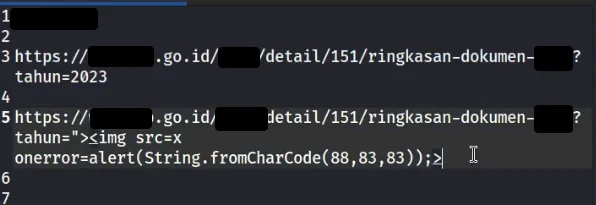
The starting point is the document detail page, with a normal year value in the filter:
The path points at the document detail page; tahun=2023 is the normal filter value.
Step 2: Inject the payload
Replace the value of tahun with the following payload:
tahun="><img src=x onerror=alert(String.fromCharCode(88,83,83));>
The payload uses "> to break out of the surrounding markup, then opens an img element whose src is the non-existent x. When the image fails to load, the onerror handler runs. The handler calls alert with String.fromCharCode(88,83,83), which builds the string "XSS" at runtime from its character codes. The researcher used that trick deliberately, to avoid basic sanitisation filters that might block the literal keyword.
Step 3: Execute and verify
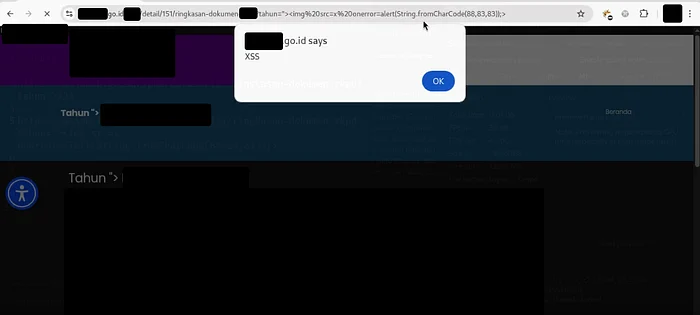
When the crafted URL is opened, the browser processes the payload and an alert box appears showing "XSS", which confirms that the JavaScript executed.
Step 4: Post-fix status
As of 3 October 2026, the responsible party had not responded and the vulnerability was not fixed. The same payload still executed. A re-check on 5 October 2026 confirmed the issue remained unfixed.
Root cause
The application takes input from the tahun URL parameter and reflects it into the HTML response without proper output encoding. Because the value is reflected without proper output encoding, an attacker can inject HTML and JavaScript into the page. The String.fromCharCode construction was used to avoid basic sanitisation filters that might block the literal keyword. The report does not describe the server-side code, so the exact escaping or filtering logic that failed is not known.
Impact
A reflected XSS in this parameter lets an attacker execute arbitrary JavaScript in the browser of a victim who opens a crafted link. The author lists four consequences:
- Cookie/session theft: stealing the session cookie of a logged-in user, leading to account takeover.
- Phishing: manipulating the page's appearance to trick users into entering sensitive data.
- Defacement: temporarily altering the page's appearance.
- Malicious redirect: sending users to an attacker-controlled site.
These outcomes depend on a victim visiting the crafted URL, and on what the session cookie's protections allow; the report does not analyse cookie flags.
Fix
No fix was applied. The report recommends three measures:
- Output encoding: always apply HTML entity encoding (converting
<,>,",',&) to every input that is rendered back into an HTML page. - Input validation: restrict the characters allowed in the search parameter and reject suspicious input.
- Content Security Policy: deploy a strong CSP to mitigate the impact of XSS if it occurs.
Variants to test
- Other reflected parameters on the same portal: try the same
">breakout andonerrorpattern in any parameter that is echoed into the page. A positive result is an alert box firing from the crafted URL. - Different HTML contexts: if the value lands inside an attribute rather than between tags, try breaking out with a quote and adding an event handler. A positive result is script execution without a visible markup error.
- Keyword-filter bypasses: where a literal
alertorscriptis blocked, build strings at runtime, as this report does withString.fromCharCode. A positive result is the same alert appearing despite the filter. - Filter features elsewhere: year, date and category filters are commonly reflected; test each with a benign marker first to see whether the value is echoed unencoded, then escalate to an executing payload.
What happened, in plain words
A security researcher found a bug on a government website. The website has a page that shows a summary of a document, and that page has a filter where you can pick a year. The year you pick is written into the address bar of your browser, at the end of the link, after the word tahun (which is Indonesian for "year").
The problem is that the website takes whatever you typed after tahun and pastes it straight back into the page it shows you, without cleaning it first. That means if you put a piece of computer code there instead of a year, the website will happily paste that code into the page too, and your browser will run it as if the website itself had written it.
This kind of bug is called reflected cross-site scripting, usually shortened to XSS. "Scripting" means small programs (JavaScript) that run inside your browser. "Cross-site" means the code did not come from the website itself but from somewhere else, in this case from the link someone sent you. "Reflected" means the bad input bounces off the server and comes straight back to you in the page, like a shout echoing off a wall.
A simple comparison: imagine a café where you write your name on a card and the barista shouts it out to the room. If you write "John", they shout "John". If you write "John, and also everyone gets a free cake", they shout that too, and the kitchen might actually start baking. The website is the barista: it repeats your input without checking whether it is just a name or something more.
The researcher, Primandito Adi Setiya, rated the bug as Medium severity and reported it. At the time he published his write-up, nobody had replied and the bug was still there.
The target and the feature
The target is a public service portal belonging to the Government of [REDACTED]. A portal like this is a website where citizens go to look up official information and documents. The specific page involved is the document detail page, which shows a view called "Ringkasan Dokumen", meaning "document summary".
On that page there is a filter driven by a URL parameter named tahun. A URL parameter is the part of a web address that comes after a question mark. It is a little labelled box of information that the browser sends to the server along with the page request. In ?tahun=2023, the label is tahun and the value is 2023. The server reads that value and uses it to decide what to show, for example only documents from the year 2023.
The researcher was testing this filter when he noticed that the value he put in came back inside the page. That is the moment the bug became visible.
Setting up
The report does not describe any accounts, roles, tools or software versions. The testing was done by hand: the researcher opened the document detail page in an ordinary browser, changed the tahun value in the address bar, and watched what happened. The only thing needed for the attack to work is that a victim opens a crafted link pointing at the portal.
Step 1: Identify the target
The starting point is the normal document detail page, with an ordinary year in the filter:
Line by line, in plain words:
https://is the secure version of the protocol browsers use to fetch web pages. Thesstands for secure, meaning the traffic is encrypted.redacted.go.idis the domain name of the portal. The ending.go.idis the Indonesian country domain used by government sites./[REDACTED]/detail/151/ringkasan-dokumen-[REDACTED]is the path. It tells the server which page you want. The151identifies a particular document, andringkasan-dokumenmeans "document summary".?tahun=2023is the parameter. The question mark starts the list of parameters,tahunis the name, and2023is the value.
Why this step matters: before you can show that a value is dangerous, you need to see the page working normally. This URL is the honest version of the request, the one a regular visitor would produce by picking the year 2023 in the filter. It gives you a baseline to compare against.
Step 2: Inject the payload
Next, replace the value of tahun with the following payload:
tahun="><img src=x onerror=alert(String.fromCharCode(88,83,83));>
A payload is simply the piece of input an attacker sends to trigger the bug. This one is short, but it does several things at once. Here is each part:
tahun=is the parameter name, unchanged. The attack lives in the value, not the name.">is the breakout. The">is the breakout: it closes the surrounding markup early so whatever comes next is treated as new markup. The"closes that attribute early, and the>closes the tag itself. After those two characters, the browser thinks the tag is finished and whatever comes next is new markup. This is the key trick: the attacker is not just writing text on the page, he is writing the page's structure.<img src=x onerror=...>is a new HTML tag the attacker adds.imgmeans image.src=xtells the browser to load the image from a location calledx, which does not exist.onerroris an event handler: a piece of JavaScript the browser runs when something goes wrong, in this case when the image fails to load. Becausexnever loads, the error fires immediately and the handler runs.alert(...)is a built-in browser function that pops up a small box with a message. It is the classic way to prove that code ran, because if you see the box, the code executed.String.fromCharCode(88,83,83)builds the text "XSS" from the numbers 88, 83 and 83, which are the character codes for the letters X, S and S. The researcher did this on purpose: a basic filter might look for the literal word "XSS" or the literal wordalertand block it, but it is much less likely to recognise the numbers. The browser assembles the word at the last moment, when the code runs.
Why this step matters: it turns a harmless filter value into a small program. If the page runs it, the website is executing code that a stranger supplied through a link.
Step 3: Execute and verify
When the crafted URL is opened, the browser processes the payload and an alert box appears showing "XSS". That box is the proof: the JavaScript ran inside the page, in the browser, as if the portal had put it there itself.
Why this step matters: seeing the box is the difference between suspecting a bug and demonstrating one. It is also the moment to think about what else that same slot could run. An alert is harmless; the same mechanism could carry code that reads data from the page or sends it elsewhere.
Step 4: Post-fix status
As of 3 October 2026, the responsible party had not responded and the vulnerability was not fixed. The same payload still executed. A re-check on 5 October 2026 confirmed the issue remained unfixed.
Why the bug exists
The application takes input from the tahun URL parameter and reflects it into the HTML response without proper output encoding. Output encoding means converting special characters into safe stand-ins before putting them on a page, so that a < becomes something the browser displays as text rather than treats as the start of a tag. When that step is skipped, the value is written into a place in the HTML where the surrounding markup can be broken out of with ">, and the attacker ends up controlling the structure of the page, not just the words on it.
The String.fromCharCode construction was used to avoid basic sanitisation filters that might block the literal keyword. The report does not describe the server-side code, so the exact escaping or filtering logic that failed is not known.
A comparison: output encoding is like a museum putting a valuable letter behind glass. You can still read every word, but you cannot reach through and rearrange the exhibit. Without the glass, a visitor can pull out a pen and add a sentence of their own.
What an attacker could do with it
A reflected XSS in this parameter lets an attacker run arbitrary JavaScript in the browser of a victim who opens a crafted link. The author lists four consequences:
- Cookie/session theft. A cookie is a small piece of data a website stores in your browser so it can remember who you are between page loads. A session cookie is the one that says "this person is logged in". If code running on the page can read it, the attacker can take it and use it to act as the victim, which is called account takeover. Think of it as someone copying the wristband that lets you back into a festival: the door staff only check the band, not the face.
- Phishing. The attacker can change how the page looks, for example by adding a fake login form, to trick users into typing sensitive data.
- Defacement. The attacker can temporarily alter the page's appearance, for example by replacing text or images, which damages trust in the site.
- Malicious redirect. The attacker can redirect users to a malicious site controlled by the attacker.
These outcomes depend on a victim visiting the crafted URL, and on what protections the session cookie has.
How to fix it
No fix was applied. The report recommends three measures:
- Output encoding. Always apply HTML entity encoding to every input that is rendered back into an HTML page. That means converting the characters
<,>,",'and&into safe representations, so the browser shows them as text instead of treating them as instructions. - Input validation. Restrict the characters allowed in the search parameter and reject suspicious input. Restrict the characters allowed in the search parameter and reject suspicious input.
- Content Security Policy. A Content Security Policy, or CSP, is a set of rules a website sends to the browser saying which sources of code are allowed to run. It does not remove the bug, but it can stop an injected script from executing, which limits the damage if something slips through.
Other places to look
- Other reflected parameters on the same portal. Try the same
">breakout andonerrorpattern in any parameter that is echoed into the page. A positive result is an alert box firing from the crafted URL. - Different HTML contexts. If the value lands inside an attribute rather than between tags, try breaking out with a quote and adding an event handler. A positive result is script execution without a visible markup error.
- Keyword-filter bypasses. Where a literal
alertorscriptis blocked, build strings at runtime, as this report does withString.fromCharCode. A positive result is the same alert appearing despite the filter. - Filter features elsewhere. Year, date and category filters are commonly reflected. Test each with a harmless marker first to see whether the value comes back unencoded, then escalate to a payload that executes.
Glossary
- XSS (cross-site scripting): a bug where a website lets someone else's code run inside a visitor's browser, as if the site had written it.
- Reflected XSS: a type of XSS where the bad input bounces off the server and comes straight back in the page you requested, usually via a link.
- Payload: the piece of input an attacker sends to trigger a bug.
- URL parameter: the labelled value after a question mark in a web address, such as
tahun=2023, sent to the server with the request. - HTML: the language that describes the structure of a web page, made of tags such as
<img>. - Tag: a piece of HTML markup, usually in angle brackets, that tells the browser what to build.
- Attribute: a setting written inside an HTML tag, usually wrapped in quotes, such as
src=x. - Event handler: a piece of JavaScript attached to an element that runs when something happens, such as
onerrorwhen an image fails to load. - JavaScript: the programming language browsers run to make pages interactive.
alert: a built-in browser function that shows a pop-up box with a message, often used to prove code ran.String.fromCharCode: a JavaScript function that builds text from character codes, used here to assemble "XSS" without writing the word literally.- Output encoding: converting special characters into safe stand-ins before displaying user input on a page, so they are shown as text and not treated as instructions.
- Input validation: checking and restricting what a user is allowed to submit, for example allowing only digits in a year field.
- Sanitisation: cleaning input so that anything dangerous is removed or neutralised.
- Cookie: a small piece of data a website stores in your browser to remember something about you.
- Session cookie: the cookie that identifies you as logged in.
- Session hijacking / account takeover: stealing a logged-in user's session so the attacker can act as that user.
- Phishing: tricking someone into entering sensitive data, often by imitating a trusted page.
- Defacement: changing a website's appearance without permission.
- CSP (Content Security Policy): rules a site sends to the browser saying which sources of code may run, used to limit the damage of XSS.
- Severity: a rating of how serious a bug is, here Medium.
- Responsible disclosure: reporting a bug to the owner and giving them time to fix it before publishing details.



