Stored XSS in Pages SEO dialog Name field (concrete5 8.1.0)
The Name field in the SEO dialog was not properly sanitised, allowing an attacker to inject an HTML attribute with an inline JavaScript event handler. A low-privileged user could store a payload that executes in a higher-privileged user's browser when they open the SEO dialog or Page Search.

- Fixed in 39 days
- Disclosed after 2 months
Intro
First things first, so... Crayons, crayons everywhere :)
Type of issue: Core CMS issue Level of severity: Internal Attack Vector Concrete5 version: 8.1.0
Summary
There is Stored XSS vulnerability in Name field (SEO dialog) for pages. Malicious user is able to prepare payload which is then executed in SEO dialog and on Page Search (index.php/dashboard/sitemap/search).
Steps to reproduce
- login into Concrete5 instance
- go to Dashboard -> Full Sitemap
- on Pages list, select one and click. Popup with options will show up
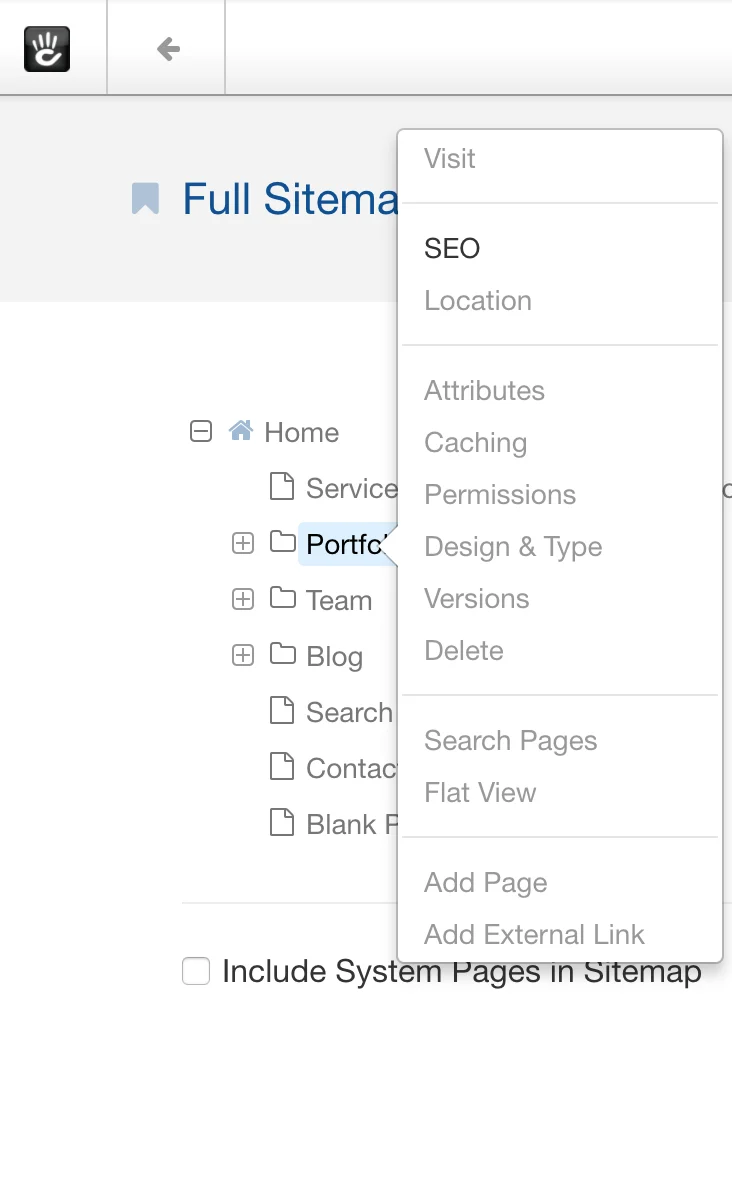
- select SEO option. SEO dialog will show up on the screen
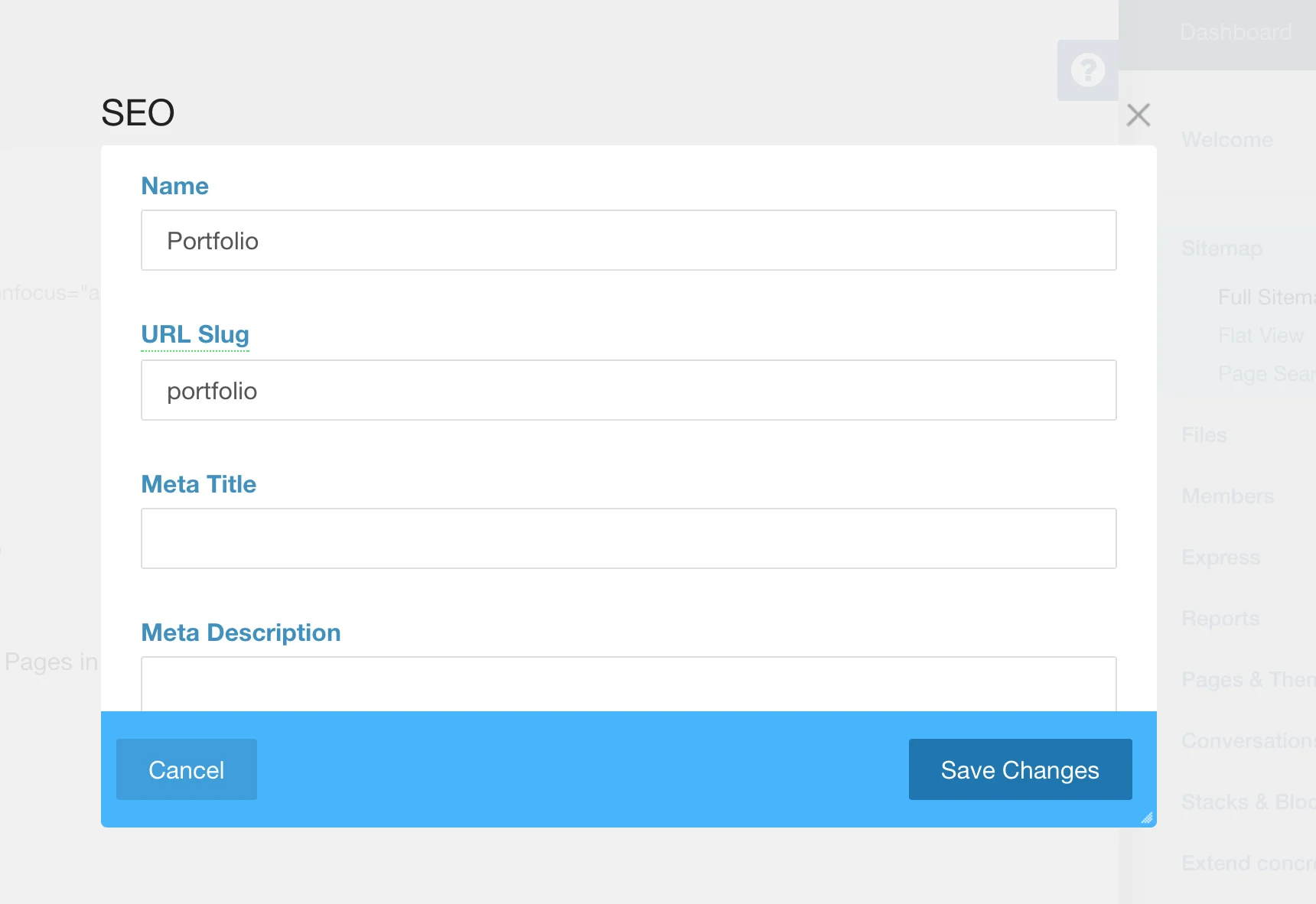
- in
Namefield, put following payload, right after Page name:
" onmouseover="alert('Stored XSS in SEO Name field')"
- click
Save changes
Now, there are two places, where injected payload is retrieved from database and executed:
- SEO dialog box, when user mouse-over
Namefield - Page Search, when user mouse-over infected Page name:
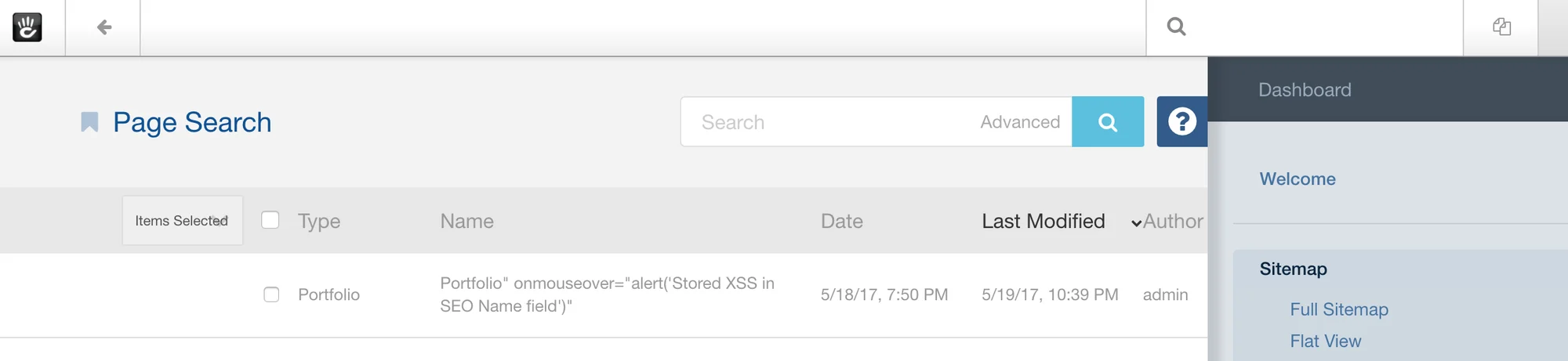
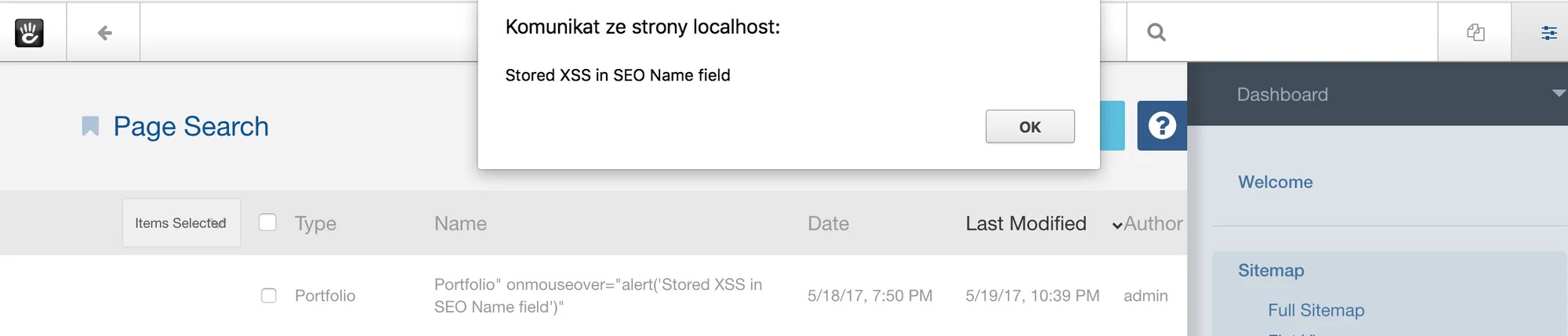
In first execution (SEO dialog), it is possible to inject payload which will execute without any user interaction:
" onfocus="alert('Stored XSS in SEO Name field')" autofocus="true"
(Warning: injecting this payload will cause XSS execution every time when SEO dialog for infected page will appear on screen. It blocks any possibility to edit Name and reverts changes)
Technical details
This vulnerability exists, because there is not enough sanitization of cName property read from request $_POST,and then use in update() method in Page class (concrete5-8.1.0/concrete/src/Page/Page.php, line 1882 - some fragments of code are removed, I've left only cName processing here, I'm pretty sure you know source code well enough to get the point):
public function update($data)
    {
        (...)

        $cName = $this->getCollectionName();

        (...)

        if (isset($data['cName'])) {
            $cName = $data['cName'];
        }

        (...)
        $txt = Core::make('helper/text');
        $isHomePage = $this->isHomePage();

        (...)
        $cName = $txt->sanitize($cName);    // line 1950

        if ($this->isGeneratedCollection()) {
            if (isset($data['cFilename'])) {
                $cFilename = $data['cFilename'];
            }
            // we only update a subset
            $v = [$cName, $cHandle, $cDescription, $cDatePublic, $cvID, $this->cID];
            $q = 'update CollectionVersions set cvName = ?, cvHandle = ?, cvDescription = ?, cvDatePublic = ? where cvID = ? and cID = ?';
            $r = $db->prepare($q);
            $r->execute($v);
        } else {

        (...)
In line 1950, method sanitize() from Text class is called (concrete5-8.1.0/concrete/src/Utility/Service/Text.php)
public function sanitize($string, $max_length = 0, $allowed = '')
    {
        $text = trim(strip_tags($string, $allowed));            // line 97
        if ($max_length > 0) {
            if (function_exists('mb_substr')) {
                $text = mb_substr($text, 0, $max_length, APP_CHARSET);
            } else {
                $text = substr($text, 0, $max_length);
            }
        }
        if ($text == null) {
            return ""; // we need to explicitly return a string otherwise some DB functions might insert this as a ZERO.
        }

        return $text;
    }
In line 97, strip_tags() method is called, which prevents cName from being infected by HTML tags, like <script>, however it does not protect against presented attack vector, where HTML attribute is injected, with inline JavaScript event handler.
string strip_tags ( string $str [, string $allowable_tags ] )

This function tries to return a string with all NULL bytes, HTML and PHP tags stripped from a given str. It uses the same tag stripping state machine as the fgetss() function.
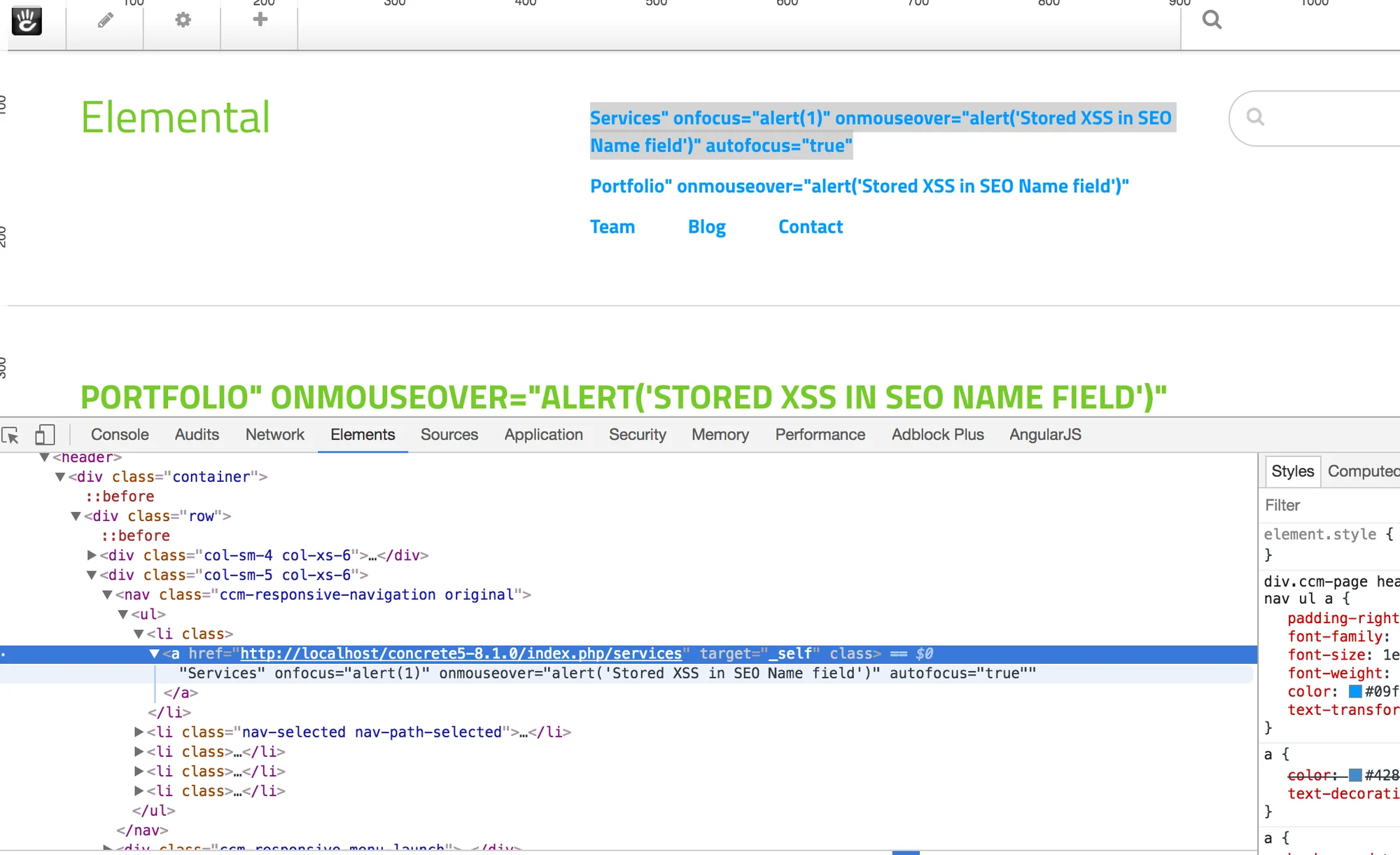
Webiste itself is protected well, and XSS payload is not executed (printed cName is sanitized correctly):
Testing environment
System:
- Concrete5 version 8.1.0, installed localy
- PHP ver. 5.6.30
- Apache HTTP Server 2.4.25 for macOS
- MySQL ver. 5.7.13 for macOS
This vulnerability was tested on macOS Sierra 10.12.5 with following browsers:
- Chrome 58
- Chromium build 60.0.3104.0
- Safari 10.1.1
XSS Auditor build in WebKit/Blink based browsers does not prevent against this injection. I am pretty sure this vulnerability will work in any browser, in any version including the newest ones.
Impact
Although this attack vector is internal only (Name attribute is sanitized when displayed on page while browsing the website), there is still possible for malicious user with eg. lower privileges, to inject such payload and trick other user(s) with higher privileges (like site admin) to open infected SEO dialog or Page Search, which will execute payload in such user context. I assume here that Concrete5 CMS is used to build website, where many users have permissions to add or edit content.
Wrap up
I hope my report will help keep Concrete5 safe in the future.
Best Regards,
Rafal 'bl4de' Janicki
Not written yet. The AI write-up for this report has not been written yet. The Original tab links to the source.
How it worked
Impact
A low-privileged user could store a payload that executes in the browser of a higher-privileged user when they open the SEO dialog or Page Search, potentially allowing actions in that user's context; the attack is internal only because the Name attribute is sanitised when displayed on the public site.
What the attacker needed
A Concrete5 account with page edit rights; victim opens SEO dialog or Page Search
How it was found
- Log in to the Concrete5 instance.
- Go to Dashboard -> Full Sitemap.
- Select a page from the list and click it to open the popup with options.
- Choose the SEO option to open the SEO dialog.
- In the Name field, append a payload that injects an event handler after the page name.
- Click Save changes.
Explained by bugbounty.wiki with AI from the original and checked against quotes from it; it can still be wrong. Read the original before relying on a detail.
Not written yet. The AI write-up for this report has not been written yet. The Original tab links to the source.
A stored cross-site scripting (XSS) flaw lets an attacker save malicious code in a website's database. When another user later views the affected page, their browser runs that code as if it came from the site itself. Here, the page name field in a CMS dialog accepted a crafted value that included a JavaScript event handler, so the code ran when someone hovered over or focused the field.
What is XSS?
Script an attacker supplies runs in another user's browser, on the target's origin, with that user's session.





