Stored XSS vulnerability in RSS Feeds Description field
The RSS Feeds Description field in Concrete5 did not properly sanitise user input, allowing a stored cross-site scripting payload to be saved. When a user later viewed the feed, the malicious JavaScript executed in their browser.

- Disclosed after 39 days
Intro
"Pirates of the Crayons"
Type of issue: Core CMS issue Level of severity: Internal Attack Vector Concrete5 version: 8.2.0 RC2 rev. b54f2b451f0a0804699c4cf9f0b3a8fef0e407db (July 10th)
Summary
There is Stored XSS vulnerability in RSS Feeds Description property. Value of the textarea is not properly sanitized and malicious JavaScript code can be saved and executed every time user visits Feed screen.
Steps to reproduce
- log in to concrete5 instance
- go to RSS Feeds and click on Add Feed button
- in feed
Descriptiontextarea put following payload:
Description
</textarea>
<script>alert('XSS!')</script>
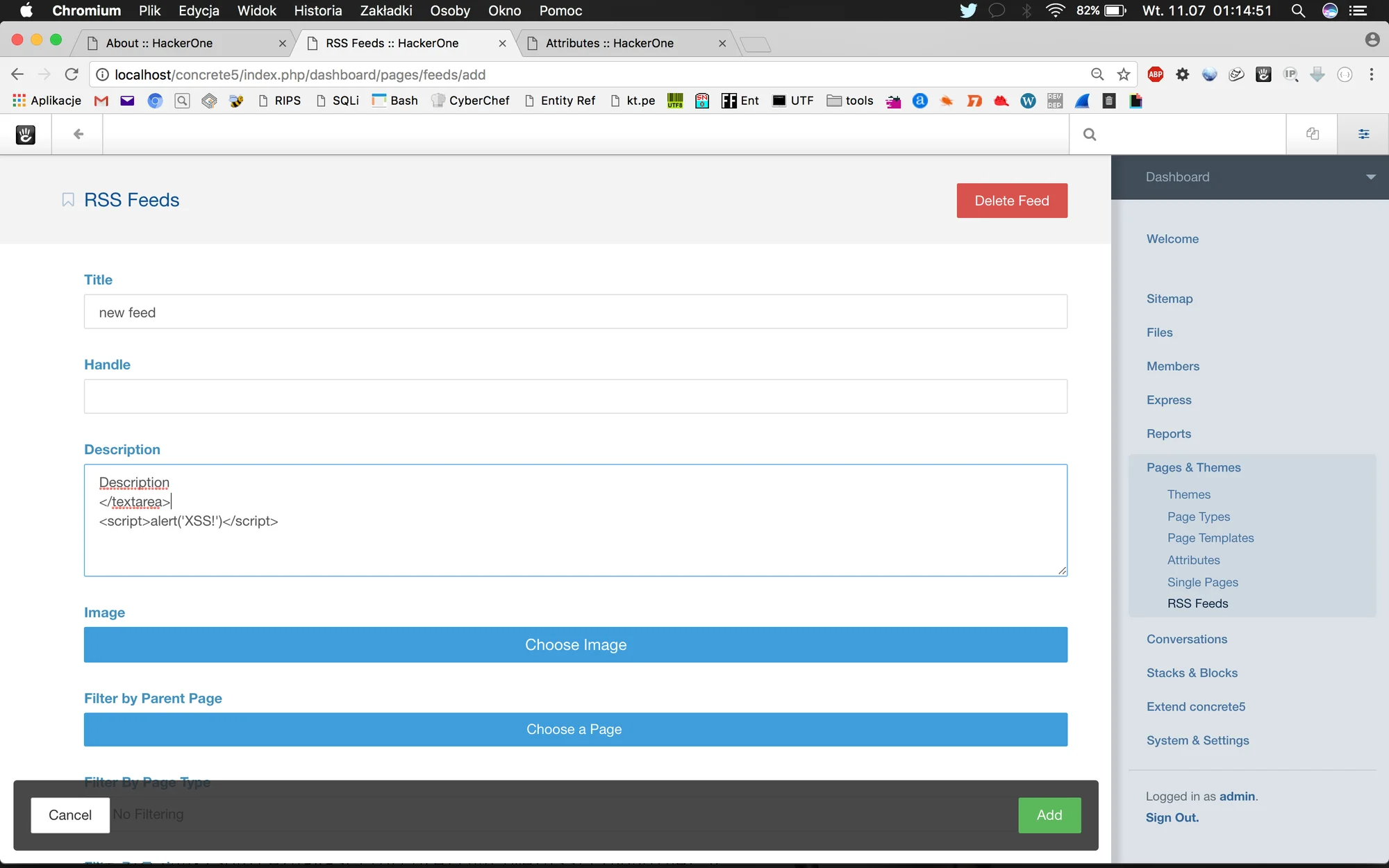
- click
Addbutton
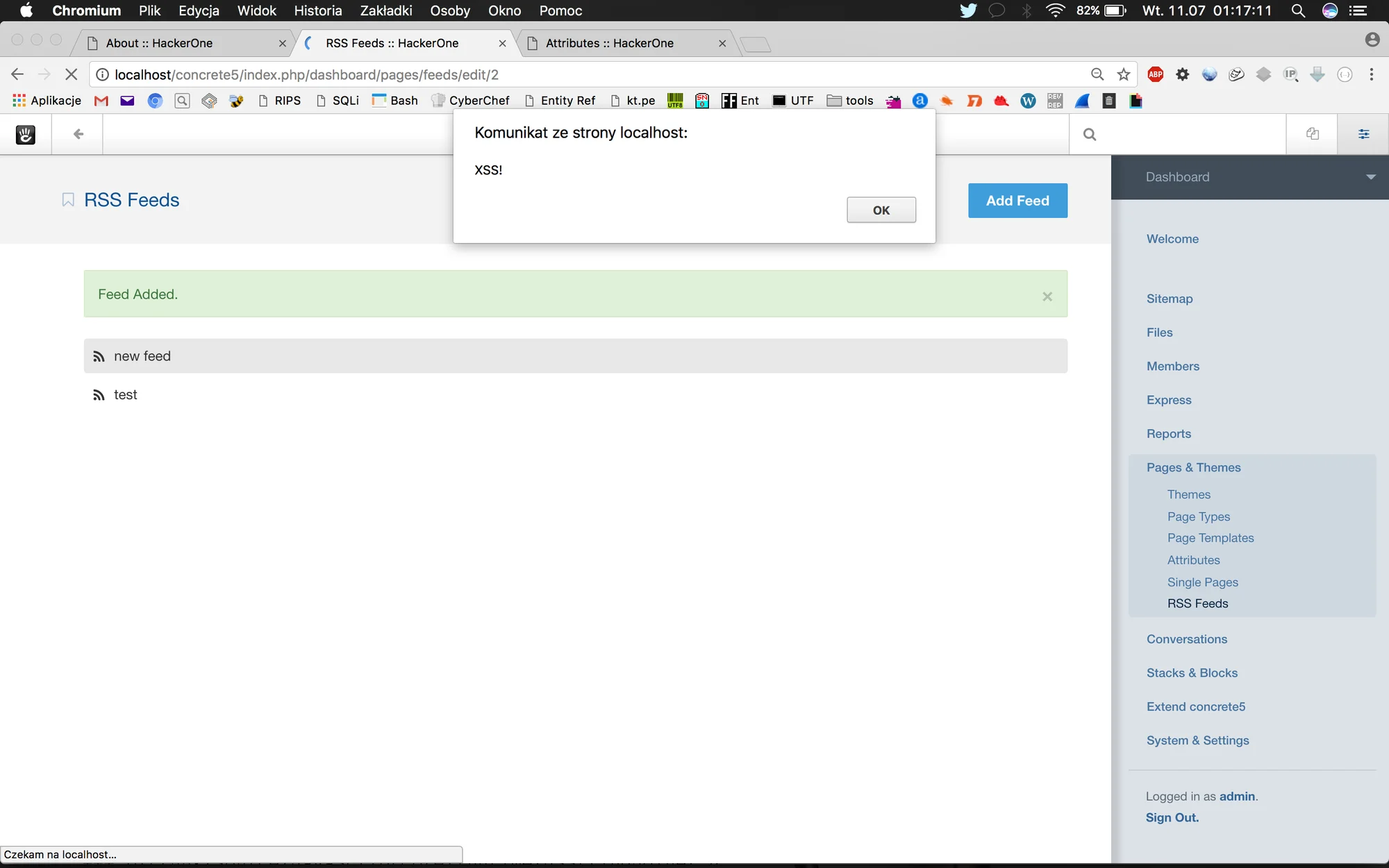
Now, select added feed from RSS Feeds list. JavaScript payload will execute.
Impact
Although this issue has no such big impact as previously reported by Corben Douglas (@sxcurity) report https://hackerone.com/reports/221380 (Stored XSS in RSS Feeds Title (Concrete5 v8.1.0)) because it requires user to enter into feed edit form - this issue introduces internal attack vector on any concrete5 user as well.
Testing environment
System:
- Concrete5 version 8.2.0 RC2, commit b54f2b451f0a0804699c4cf9f0b3a8fef0e407db (July 10th), installed localy
- PHP ver. 5.6.30
- Apache HTTP Server 2.4.25 for macOS
- MySQL ver. 5.7.13 for macOS
This vulnerability was tested on macOS Sierra 10.12.5 with following browsers:
- Chrome 59.0.3071.115
- Chromium build 61.0.3131.0
- Opera 46.0.2597.32
Wrap up
I hope my report will help keep Concrete5 safe in the future.
Best Regards,
Rafal 'bl4de' Janicki
Not written yet. The AI write-up for this report has not been written yet. The Original tab links to the source.
How it worked
Impact
An attacker could execute JavaScript in the browser of a Concrete5 user who views the affected feed screen, though this requires the user to enter the feed edit form, making it an internal attack vector.
What the attacker needed
Log in to a Concrete5 instance; ability to add or edit RSS feeds; victim visits the feed screen
How it was found
- Log in to the Concrete5 instance.
- Go to RSS Feeds and click Add Feed.
- Enter a payload in the Description textarea that closes the textarea and injects a script tag.
- Click Add to save the feed.
- Select the newly added feed from the RSS Feeds list; the JavaScript payload executes.
Explained by bugbounty.wiki with AI from the original and checked against quotes from it; it can still be wrong. Read the original before relying on a detail.
Not written yet. The AI write-up for this report has not been written yet. The Original tab links to the source.
This is a stored cross-site scripting (XSS) bug. A user with access to the RSS Feeds feature could type special code into the Description box, and that code was saved without being cleaned. Later, anyone who opened that feed page would run the code in their own browser, which could let an attacker do things as that user.
What is XSS?
Script an attacker supplies runs in another user's browser, on the target's origin, with that user's session.





