Ability to add your scopes to the app + text injection in OAuth
The OAuth application creation form did not validate the scopes parameter, allowing an attacker to inject arbitrary text as scopes. This text was then displayed on the OAuth authorization page, enabling a phishing attack to trick users into granting a token.

GitLab
Originally disclosed on GitLab
- Fixed in 2.6 years
- Disclosed after 2.6 years
HackerOne report #494530 by executor on 2019-02-11, assigned to dappelt:
Hello again! Found that in applications (https://gitlab.com/profile/applications) the scope that we pass in the request when creating and editing the application is not checked. It turns out that we can pass your scope, with its text. I decided to try it and I did it!
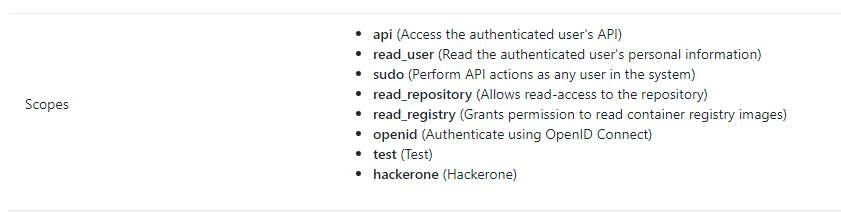
But it didn't give any strong result..
Then I got the idea, and what if the scope to write the text that it was displayed OAuth authorization
The first problem I encountered was a problem. Any space between the two words shared a single scope on several scopes.
The solution to this problem came almost immediately, I decided to try to replace the space with another space (alt+255 on numpad keyboard)

Request
POST /oauth/applications HTTP/1.1
Host: gitlab.com
Cache-Control: max-age=0
Origin: https://gitlab.com
Upgrade-Insecure-Requests: 1
User-Agent: Mozilla/5.0 (Windows NT 10.0; Win64; x64) AppleWebKit/537.36 (KHTML, like Gecko) Chrome/70.0.3538.102 Safari/537.36 OPR/57.0.3098.116
Accept: text/html,application/xhtml+xml,application/xml;q=0.9,image/webp,image/apng,*/*;q=0.8
Referer: https://gitlab.com/profile/applications
Accept-Encoding: gzip, deflate, br
Accept-Language: ru-RU,ru;q=0.9,en-US;q=0.8,en;q=0.7
Cookie: _gitlab_session=session;
Content-Length: 967
Content-Type: application/x-www-form-urlencoded
Connection: keep-alive

utf8=%E2%9C%93&authenticity_token=token&doorkeeper_application%5Bname%5D=govon&doorkeeper_application%5Bredirect_uri%5D=http%3A%2F%2Flocalhost&doorkeeper_application%5Bscopes%5D%5B%5D=api&doorkeeper_application%5Bscopes%5D%5B%5D=read_user&doorkeeper_application%5Bscopes%5D%5B%5D=sudo&doorkeeper_application%5Bscopes%5D%5B%5D=read_repository&doorkeeper_application%5Bscopes%5D%5B%5D=read_registry&doorkeeper_application%5Bscopes%5D%5B%5D=After%C2%A0clicking%C2%A0on%C2%A0the%C2%A0%22Authorize%22%C2%A0you%C2%A0will%C2%A0receive%C2%A0a%C2%A0gold%C2%A0tariff&doorkeeper_application%5Bscopes%5D%5B%5D=You%C2%A0will%C2%A0receive%C2%A0the%C2%A0tariff%C2%A0only%C2%A0after%C2%A0clicking%C2%A0on%C2%A0the%C2%A0%22authorize%22&doorkeeper_application%5Bscopes%5D%5B%5D=All%C2%A0rights%C2%A0that%C2%A0you%C2%A0have%C2%A0requested%C2%A0will%C2%A0not%C2%A0be%C2%A0used%C2%A0after%C2%
Then I decided to check all this on OAuth authorization
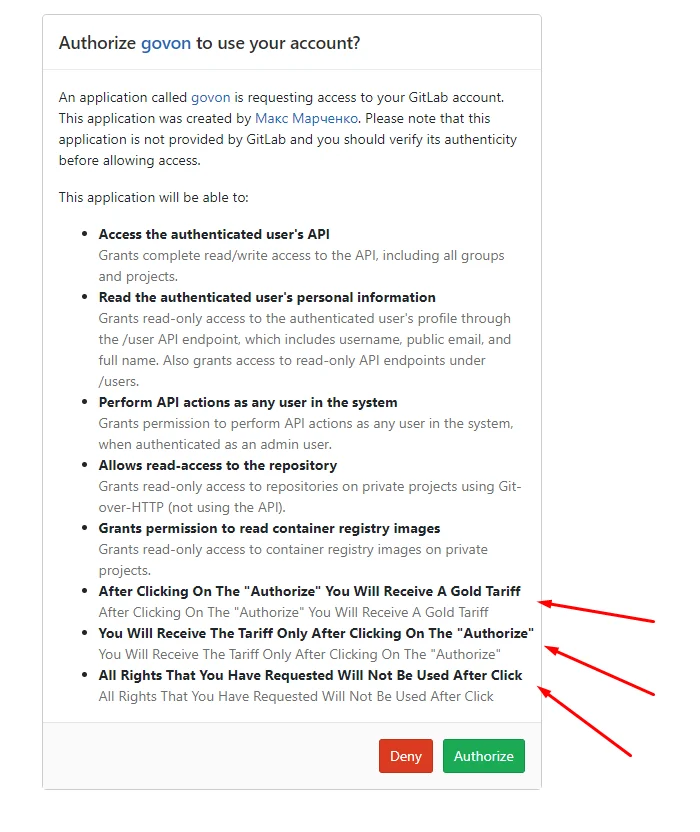
Everything works fine, as seen in the screenshot.
<details><summary>Proof of Concept</summary>ATTENTION: This PoC is a real app that will get your GitLab API token if you click Authorize. If you open it, either close the window or click Deny.
https://goo.gl/8qTxRE
Impact
Inattentive user can read only the bottom lines and lead to phishing. As a result, we will have a victim token.
Attachments
Warning: Attachments received through HackerOne, please exercise caution!
Not written yet. The AI write-up for this report has not been written yet. The Original tab links to the source.
How it worked
Root cause
Likely the application did not validate the scopes parameter against a whitelist of allowed scopes, allowing arbitrary text to be stored and later displayed.
Impact
An inattentive user could be tricked into authorizing the application, resulting in the attacker obtaining the victim's token.
What the attacker needed
Attacker can create an OAuth application; victim visits the authorization page
How it was found
- Create an OAuth application and intercept the request.
- Modify the scopes parameter to include arbitrary text, using non-breaking spaces to avoid splitting.
- Submit the request to create the application.
- Visit the OAuth authorization page for the application to see the injected text displayed.
Explained by bugbounty.wiki with AI from the original and checked against quotes from it; it can still be wrong. Read the original before relying on a detail.
Not written yet. The AI write-up for this report has not been written yet. The Original tab links to the source.
When you create an OAuth application, you specify scopes that define what access the app requests. The server should only allow predefined scopes, but here it accepted any text. An attacker could put misleading instructions in the scope field, which would appear on the authorization page, tricking users into approving the app and giving away their token.
What is OAuth / SSO?
Mistakes in OAuth, OpenID Connect, SAML or token handling that leak codes and tokens or link an attacker's identity to a victim's account.



