Access Projects And create projects in gitlab pre production server
The pre-production GitLab server allowed anyone to register an account, which then gave access to internal projects and groups created by GitLab employees. An attacker could view those projects and also create their own groups and projects on the server.
 Originally disclosed on HackerOne
- Triaged in 7 days
- Fixed in 8 days
- Paid in 8 days
- Disclosed after 4 months
Steps to reproduce
Go to https://pre.gitlab.com
Here any one can register and can view the pre production projects of gitlab developers.
I have registered in https://pre.gitlab.com/users/sign_in
and have created one test group and test project
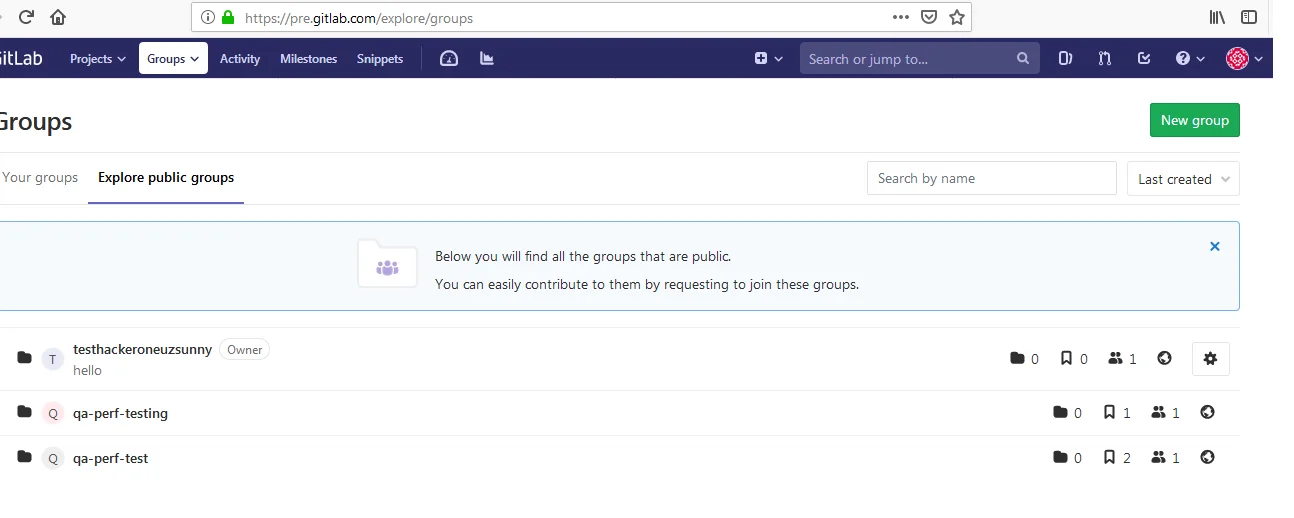
go to https://pre.gitlab.com/explore/groups
i have created one test group
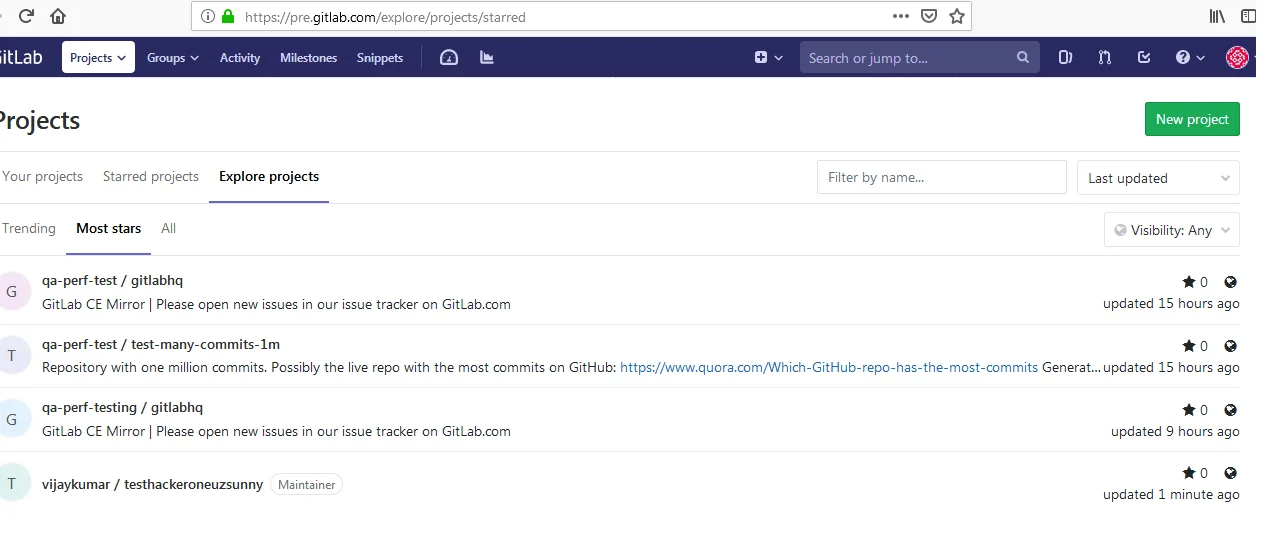
And i have created one test project
I went to look for gitlab project members https://pre.gitlab.com/qa-perf-testing/gitlabhq/project_members
I have seen it was created by your gitlab employee Ramya Authappan
https://pre.gitlab.com/rauthappan
The attacker not only access the internal projects of gitlab but he can also create groups and projects in pre production server of gitlab.
Impact
Attacker will access the pre production server of gitlab and he access the groups and projects created by gitlab employees.
Attacker will also create the projects and groups in pre production server of gitlab.
Context
GitLab runs a pre-production instance at https://pre.gitlab.com, separate from the main gitlab.com service. The report concerns that pre-production server: its registration flow, its public exploration pages and the groups and projects that GitLab employees create there. The feature at issue is ordinary account registration combined with the group and project exploration views, which together expose what is hosted on the pre-production instance.
Setup
No special tooling, role or version is described. The only precondition is that the pre-production instance allows anyone to register an account through its sign-in page:
https://pre.gitlab.com/users/sign_in
After registering, the researcher had a normal user account on the pre-production server.
Finding it
The researcher went to https://pre.gitlab.com and noticed that anyone can register there and can then view the pre-production projects belonging to GitLab developers. That is the core observation: the pre-production instance is reachable and self-service registration is open, so an outside user lands inside an environment that holds internal work.
Exploitation
Step 1: Register on the pre-production instance
The researcher registered through the standard sign-in page:
https://pre.gitlab.com/users/sign_in
This produced a working account on the pre-production server without any invitation or approval.
Step 2: Create a test group and a test project
With the account in place, the researcher created one test group and one test project. The group is visible on the public exploration page:
https://pre.gitlab.com/explore/groups
The screenshot shows the test group the researcher created on the instance. The test project was created as well:
The point of these two steps is that an ordinary registered user is not restricted to reading: they can create groups and projects on GitLab's pre-production server.
Step 3: Browse GitLab's own projects and members
The researcher then looked for GitLab project members at:
https://pre.gitlab.com/qa-perf-testing/gitlabhq/project_members
The researcher opened this page to look for GitLab project members. The researcher saw that the project had been created by a GitLab employee, Ramya Authappan, whose profile is reachable at:
https://pre.gitlab.com/rauthappan
So an outside account could reach an internal project page and the profile of the GitLab employee who created the project.
Root cause
The report does not describe the underlying code or configuration. What it establishes is a design and deployment problem: the pre-production instance is publicly reachable, self-registration is open, and the groups and projects created there by GitLab employees are visible to any registered user. On this instance, registration alone was enough to view internal projects and to create new groups and projects. Why the existing defences did not prevent this is not stated in the report.
Impact
As the researcher puts it, an attacker can access the pre-production server of GitLab and reach the groups and projects created by GitLab employees. The attacker can also create projects and groups on that pre-production server. The exposure covers internal project pages, and the write side allows an outsider to add content to the instance. The report is rated low severity.
Fix
The report does not state what was changed.
Variants to test
- Register on other pre-production, staging or QA hosts of the same organisation and check whether the exploration pages list internal groups and projects.
- After registering, attempt to create a group and a project. A positive result is a successful creation, visible afterwards in the public exploration listings.
Hunting notes
This kind of issue tends to hide on non-production hosts: pre-production, staging and QA instances that mirror the main product but are treated as less sensitive. During recon, the signals are a reachable host with an open registration page, public exploration or directory pages that list groups and projects, and project paths that look like internal QA or performance-testing work. The researcher demonstrated impact by registering, creating a group and a project, and then reaching an internal project page and an employee profile. That combination of read and write access from a self-registered account is what makes the case concrete.
What happened, in plain words
GitLab is a website where software teams keep their code, track tasks and manage who can see or change what. Like most companies, GitLab runs more than one copy of its own website. The one everybody uses is gitlab.com. There is also a second copy, called a pre-production server, at https://pre.gitlab.com. A pre-production (or staging) server is a rehearsal copy: the company tests new versions and runs internal experiments there before those changes reach the real site. Because it is a rehearsal, teams often treat it as less sensitive than the live site, even though it holds real internal work.
This report is about that rehearsal copy. The researcher found that anyone on the internet could sign up for an account on it, look at pre-production projects of GitLab developers, and also create their own groups and projects. A group is a folder-like container for projects, and a project is a single repository of code with its own settings and members. The researcher rated the issue low severity.
Context
GitLab runs a pre-production instance at https://pre.gitlab.com, separate from the main gitlab.com service. The report concerns that pre-production server: its registration flow, its public exploration pages and the groups and projects that GitLab employees create there. The feature at issue is ordinary account registration combined with the group and project exploration views, which together expose what is hosted on the pre-production instance.
Two ideas are worth unpacking before the steps make sense.
Registration flow. When you sign up on a website, the site creates an account for you and gives your browser a small piece of data called a session cookie. Think of the cookie as a wristband at an event: you show it at every door and the staff know who you are without asking again. If a site lets anyone collect a wristband at the entrance, then anyone can walk around inside.
Exploration pages. GitLab has pages whose job is to list what exists on the instance, such as all groups or all projects.
Setup
No special tooling, role or version is described. The only precondition is that the pre-production instance allows anyone to register an account through its sign-in page:
https://pre.gitlab.com/users/sign_in
Line by line: this is a web address. https:// means the connection is encrypted. pre.gitlab.com is the rehearsal server. /users/sign_in is the page where you log in or, in this case, sign up. The researcher did not need a special program, a special permission level or a particular software version. The only thing needed was that this page accepted new registrations from the public.
After registering, the researcher had a normal user account on the pre-production server. A normal user account means the same kind of account any visitor could make: no administrator rights, no invitation from GitLab.
Finding it
The researcher went to https://pre.gitlab.com and noticed that anyone can register there and can then view the pre-production projects belonging to GitLab developers. That is the core observation: the pre-production instance is reachable and self-service registration is open, so an outside user lands inside an environment that holds internal work.
Self-service registration means the site hands out accounts on request, with no approval step. The comparison is a building with a public front door and a sign-up sheet at reception: if the sheet is open to all, the rooms behind it need their own locks. Here the rooms held GitLab's internal projects.
Exploitation
Step 1: Register on the pre-production instance
The researcher registered through the standard sign-in page:
https://pre.gitlab.com/users/sign_in
Line by line: the same address as in the setup. The researcher opened it in a browser, filled in the sign-up form and submitted it. This produced a working account on the pre-production server without any invitation or approval. The reason for this step is simple: everything that follows needs a signed-in session, the wristband described earlier.
Step 2: Create a test group and a test project
With the account in place, the researcher created one test group and one test project. The group is visible on the public exploration page:
https://pre.gitlab.com/explore/groups
Line by line: /explore/groups is the page that lists groups on the instance.
The screenshot shows the test group the researcher created on the instance.
The test project was created as well:
The point of these two steps is that an ordinary registered user is not restricted to reading: they can create groups and projects on GitLab's pre-production server. Creating content is the write side of the problem, as opposed to the read side of simply viewing things.
Step 3: Browse GitLab's own projects and members
The researcher then looked for GitLab project members at:
https://pre.gitlab.com/qa-perf-testing/gitlabhq/project_members
Line by line: this address points at a specific project. qa-perf-testing is the group, gitlabhq is the project inside it, and /project_members is the page that lists the people who belong to that project.
The researcher opened this page to look for GitLab project members. The researcher saw that the project had been created by a GitLab employee, Ramya Authappan, whose profile is reachable at:
https://pre.gitlab.com/rauthappan
Line by line: /rauthappan is a user profile page, the kind of page every account on the site has.
So an outside account could reach an internal project page and the profile of the GitLab employee who created the project.
Root cause
Root cause means the underlying reason the problem exists, as opposed to the symptom you see. The report does not describe the underlying code or configuration. What it establishes is a design and deployment problem: the pre-production instance is publicly reachable, self-registration is open, and the groups and projects created there by GitLab employees are visible to any registered user. On this instance, registration alone was enough to view internal projects and to create new groups and projects. Why the existing defences did not prevent this is not stated in the report.
Access control is the set of rules deciding who may see or do what. When those rules are missing or too loose, the weakness is classed as improper access control, which is how this report is labelled. The everyday comparison is a shared office where the front desk gives a key to anyone who asks, and the key opens the filing cabinets as well as the front door.
Impact
As the researcher puts it, an attacker can access the pre-production server of GitLab and reach the groups and projects created by GitLab employees. The attacker can also create projects and groups on that pre-production server. The exposure covers internal project pages, and the write side allows an outsider to add content to the instance. The report is rated low severity.
Severity is a rough score of how much damage an issue could cause. The report is rated low severity.
Fix
The report does not state what was changed. In plain terms: either stop handing out wristbands at the door, or move the door somewhere only staff can reach.
Variants to test
Variants means other places where the same mistake might appear. These are the checks the report suggests, each with the reason behind it.
- Register on other pre-production, staging or QA hosts of the same organisation and check whether the exploration pages list internal groups and projects. The reason: if one rehearsal server is open, its siblings often are too.
- After registering, attempt to create a group and a project. A positive result is a successful creation, visible afterwards in the public exploration listings. The reason: this tests the write side, not just reading.
- The reason: member lists reveal who works on what.
- The reason: a reachable profile turns a name into a picture of a person's activity.
Hunting notes
Hunting notes are tips for people looking for similar issues. This kind of issue tends to hide on non-production hosts: pre-production, staging and QA instances that mirror the main product but are treated as less sensitive. During recon, the signals are a reachable host with an open registration page, public exploration or directory pages that list groups and projects, and project paths that look like internal QA or performance-testing work. Recon means the early survey of a target: which hosts exist, what they run, what is open to the public.
The researcher demonstrated impact by registering, creating a group and a project, and then reaching an internal project page and an employee profile. That combination of read and write access from a self-registered account is what makes the case concrete: it is not just that a page was visible, but that an outsider could both see internal material and add their own.
Glossary
- Pre-production server: a rehearsal copy of a website used to test changes before they reach the live service.
- Staging / QA instance: other names for rehearsal or testing copies of a service.
- Instance: one running copy of a piece of software, here one deployment of GitLab at a particular address.
- Group: a container that holds projects and members, similar to a folder.
- Project: a single code repository with its own settings, members and pages.
- Registration flow: the sequence of pages and steps a site uses to create a new account.
- Self-service registration: sign-up that anyone can complete without an invitation or approval.
- Session cookie: a small piece of data stored by the browser that tells the site who is signed in, like a wristband at an event.
- Exploration page: a page that lists what exists on the instance, such as all groups or all projects.
- Member page: a page listing the people who belong to a project.
- Profile page: a page showing a user's details and activity.
- Access control: the rules that decide who may see or do what.
- Improper access control: a weakness where those rules are missing or too loose, letting people reach things they should not.
- Read access: the ability to view something.
- Write access: the ability to create or change something.
- Root cause: the underlying reason a problem exists, rather than the visible symptom.
- Impact: the practical harm an issue could cause.
- Severity: a rough score of how serious an issue is.
- Recon: the early survey of a target to learn which hosts exist and what is open to the public.
- Variant: another place where the same kind of mistake might appear.



