CSP-bypass XSS in project settings page
The deployment key title was inserted into the page without sanitisation, allowing an attacker to store HTML that executes script despite the Content Security Policy. An attacker with maintainer access could run arbitrary JavaScript in a victim's browser when the victim viewed the protected branches settings.

- Triaged in 15 hours
- Fixed in 30 days
- Paid in 5 days
- Disclosed after 6 months
Summary
This javascript function is vulnerable:
  deployKeyRowHtml(key, isActive) {
    const isActiveClass = isActive || '';

    return `
      <li>
        <a href="#" class="${isActiveClass}">
          <strong>${key.title}</strong>
          <p>
            ${sprintf(
              __('Owned by %{image_tag}'),
              {
                image_tag: `{{media:2}}`,
              },
              false,
            )}
            <strong class="dropdown-menu-user-full-name gl-display-inline">${escape(
              key.fullname,
            )}</strong>
            <span class="dropdown-menu-user-username gl-display-inline">${key.username}</span>
          </p>
        </a>
      </li>
    `;
  }
It is used to render a deployment key in a dropdown item. Because the deployment title is controlled by users, it can be any html content, such as, <script>alert(document.domain)</script>. Furthermore, the html content will be rendered using jQuery, so the <script> tag will be executed despise of CSP with script-src having 'strict-dynamic' value:
  renderMenu(html) {
    if (this.options.renderMenu) {
      return this.options.renderMenu(html);
    }
    return $('<ul>').append(html);
  }
Steps to reproduce
- In an existing project or create a new one, goto
Settings/Repository. Then fill the form inDeploy keysas the following:
Title:test <script>alert(document.domain)</script>Key:ssh-rsa AAAAB3NzaC1yc2EAAAADAQABAAABAQCkhkyrQJvb30Q5lLZzxeALqCyBrLOh+QzRYWh+gPGpqi2efyGMf5beN2zda66OI6DaclB31SJ0jYzaYKgKXQw7rzu/IYazONdy5lz5O2iUB2BkDzJYZ+BObTaTCjyDgSvNNuezUqNXXqoXftEMa1l0+FRSkTusH5F2P3JCV3Tf1BBQImrbDIpdc6ps+UxsiX7S/dT+7bNIVXblC8s8k+AK4CWsC2KmfMToK35pk+sa9JI+rb26hzv8IHA8n7cqXOmR5qAj2qX962p1kOLNXCyHJAKAIfRXCuDPbXiB+kjnu478eIcudOPveo3CK3G6hBI0hPSRfoyAUIubcddnnbhRGrant write permissions to this key: Checked
Then click Add key button to save the form.
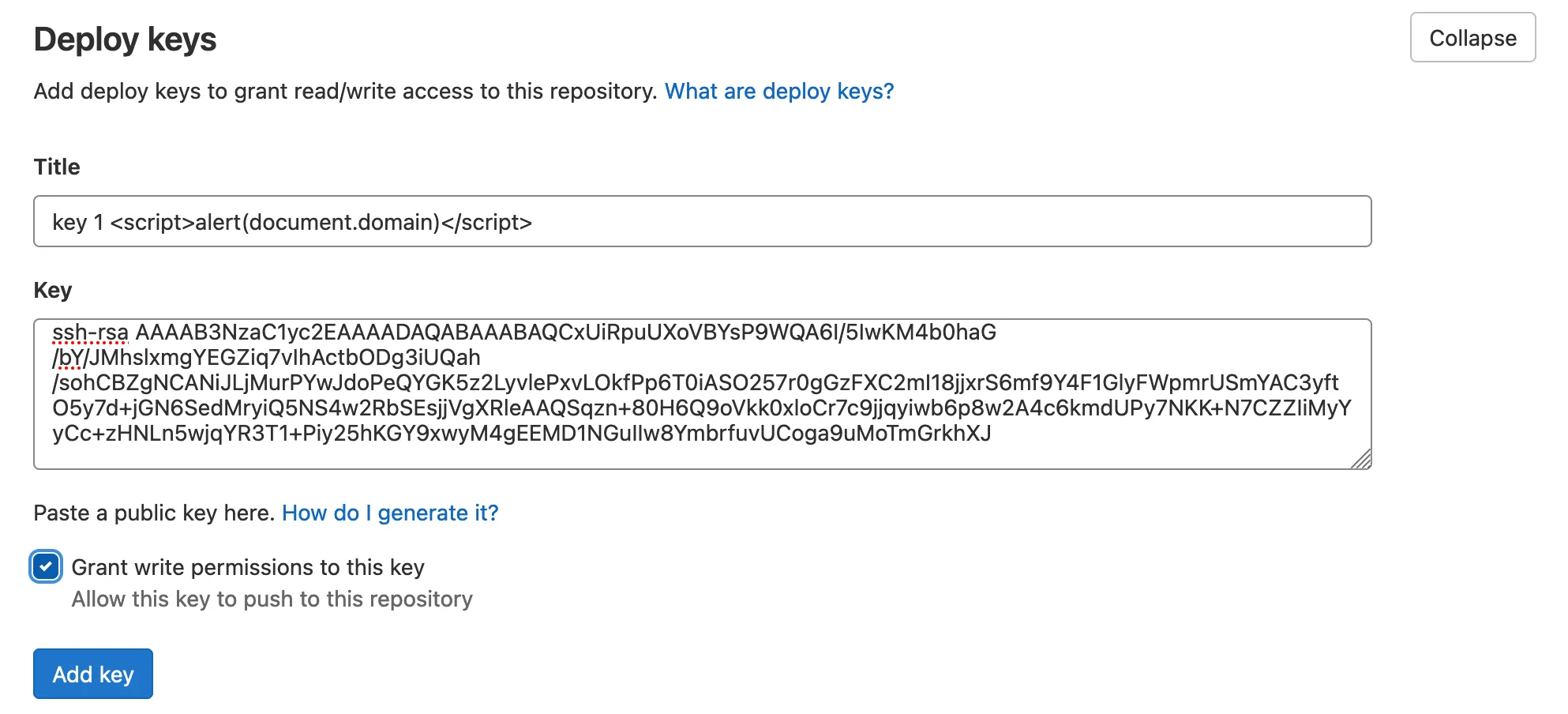
NOTE:
Titlecan be any HTML content that represents the attack payload. In the example above, we just show an alert containing the current domain.Keycan be any valid SSH public key. In the example above, I give you a random key so that you can copy-paste into the form without the need to generate a key
- Always in the
Settings/Repositorypage, click onProtected brancheslink to expand its form - Click on the dropdown box under
Allowed to push, you should see an alert that was generated when the payload above being executed
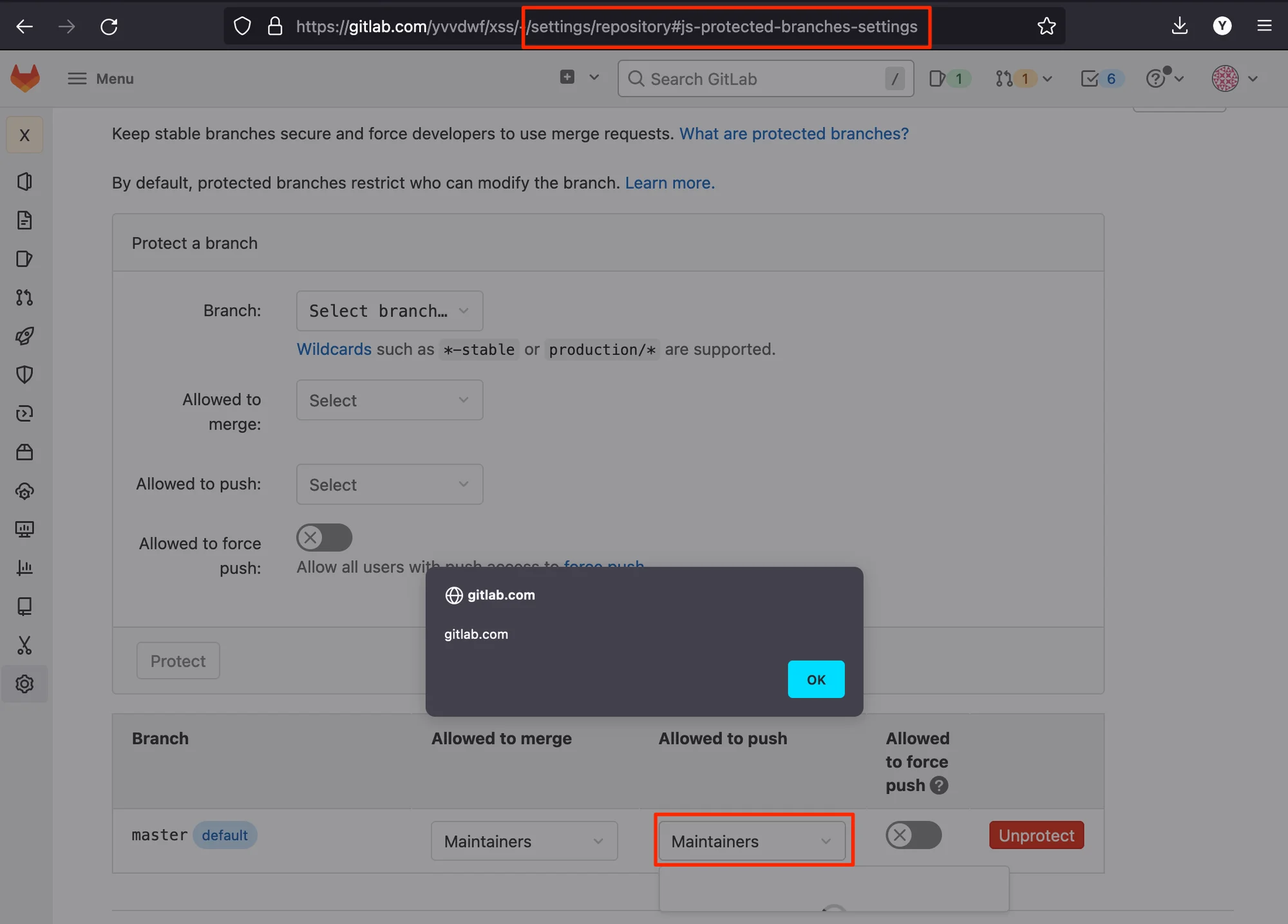
NOTE:
- This is not self-XSS as any project maintainer can access to the settings page. Furthermore a victim can be added as a project maintainer without their explicit acceptation
- The Step 2 can be ignored by accessing directly within
#js-protected-branches-settingson the url, for example,https://gitlab.com/yvvdwf/xss/-/settings/repository#js-protected-branches-settings
Impact
XSS with CSP bypass allows attacks to perform arbitrary malicious requests on behalf of victims on HTTP client side, such as, do an API request to access to private resources, etc.
Examples
https://gitlab.com/yvvdwf/xss/-/settings/repository#js-protected-branches-settings
What is the current bug behavior?
Deployment title is not sanitized
What is the expected correct behavior?
Deployment title should be sanitized
Output of checks
This bug happens on GitLab.com
Impact
XSS with CSP bypass allows attacks to perform arbitrary malicious requests on behalf of victims on HTTP client side, such as, do an API request to access to private resources, etc.
Not written yet. The AI write-up for this report has not been written yet. The Original tab links to the source.
How it worked
Root cause
The deployment key title was inserted into HTML without escaping, and the HTML was rendered via jQuery, which executes script tags even under a strict-dynamic CSP.
Impact
An attacker could perform arbitrary malicious requests on behalf of a victim, such as API requests to access private resources, though the victim must be a project maintainer who views the settings page.
What the attacker needed
Attacker has maintainer access to a project; victim is a project maintainer; victim views the repository settings page
The fix
The deployment key title should be sanitised before being inserted into the page.
How it was found
- Go to Settings/Repository and fill the Deploy keys form with a title containing HTML and a valid SSH key, then save.
- On the same page, expand the Protected branches section.
- Click the dropdown under 'Allowed to push' to trigger the script.
Explained by bugbounty.wiki with AI from the original and checked against quotes from it; it can still be wrong. Read the original before relying on a detail.
Not written yet. The AI write-up for this report has not been written yet. The Original tab links to the source.
A deployment key is a way to let a server access a project. The title of that key was placed into the web page without cleaning it, so someone could put a script in the title. When another user opened a certain settings page, the script ran in their browser, even though the site had a protection called CSP that is meant to stop scripts.
What is XSS?
Script an attacker supplies runs in another user's browser, on the target's origin, with that user's session.





