Persistent XSS in Note objects
The report describes a persistent cross-site scripting (XSS) vulnerability in GitLab's Note objects. An attacker can import a crafted project export where the note_html field contains a malicious script and the cached_markdown_version is set to a specific value, causing the script to execute when the discussion is viewed.

- Fixed in 10 hours
- Paid in 3 months
- Disclosed after 4 months
Summary: Some cache invalidation and project import logic issues enable an attacker to import a project with XSS payloads in places like MR discussions and similar places where a Note object exists.
Description:
There are basically 3 issues causing the XSS here:
All attributes of Note objects are controllable in project.json, for example note_html and cached_markdown_version.
Now I can control the value of note_html to contain my XSS payload, but the problem is that the value of this field is a CacheMarkdownField, it's regenerated from the value of note during new object creation (when note_object.note_html_invalidated? returns true). The next question is how to trick GitLab that the field does not need to be regenerated.
in app/models/concerns/cache_markdown_field.rb
      define_method(invalidation_method) do
        changed_fields = changed_attributes.keys
        invalidations  = changed_fields & [markdown_field.to_s, *INVALIDATED_BY]
        invalidations.delete(markdown_field.to_s) if changed_fields.include?("#{markdown_field}_html")

        !invalidations.empty? || !cached_html_up_to_date?(markdown_field)
      end
There are 2 checks here (also the last 2 issues): the first one is:
        INVALIDATED_BY = %w[author project].freeze
...
        invalidations  = changed_fields & [markdown_field.to_s, *INVALIDATED_BY]
        invalidations.delete(markdown_field.to_s) if changed_fields.include?("#{markdown_field}_html")
note_object.changed_attributes.keys
=> ["note", "noteable_type", "author_id", "created_at", "updated_at", "project_id", "line_code", "position", "original_position", "note_html", "cached_markdown_version", "change_position", "attachment"]
This check is, unfortunately, voided because
- Neither
authornorprojectis in the changed_attributes list, butauthor_idandproject_id noteis deleted frominvalidationsbecausenote_htmlis also changed
So invalidations is empty.
and the other one is:
!cached_html_up_to_date?(markdown_field)
It basically checks whether attribute cached_markdown_version equals to latest_cached_markdown_version
This is really interesting, because I found that latest_cached_markdown_version is always 917504 in my GitLab instance (also gitlab.com). Looks like local_version is always 0 for at least Notes in MR.
  def latest_cached_markdown_version
    @latest_cached_markdown_version ||= (CacheMarkdownField::CACHE_COMMONMARK_VERSION << 16) | local_version
  end

  def local_version
    return local_markdown_version if has_attribute?(:local_markdown_version)

    settings = Gitlab::CurrentSettings.current_application_settings

    if settings.respond_to?(:local_markdown_version)
      settings.local_markdown_version
    else
      0
    end
  end
Finally, I could set note_html to the XSS payload, and cached_markdown_version to the magic number to avoid my payload being overwritten by GitLab. :P
Steps To Reproduce:
(Add details for how we can reproduce the issue)
- Create an export of a project with at least 1 discussion in at least 1 merge request.
- Modify the project.json, add field
note_htmlandcached_markdown_version
      "notes": [
        {
          "id": 1,
          "note": "interesting note here",
          "note_html": "<img src=\"test\" onerror=\"alert(document.domain)\"></img>html overwritten",
          "cached_markdown_version": 917504,
- Import the modified project
- View the only discussion of the imported project.
Supporting Material/References:
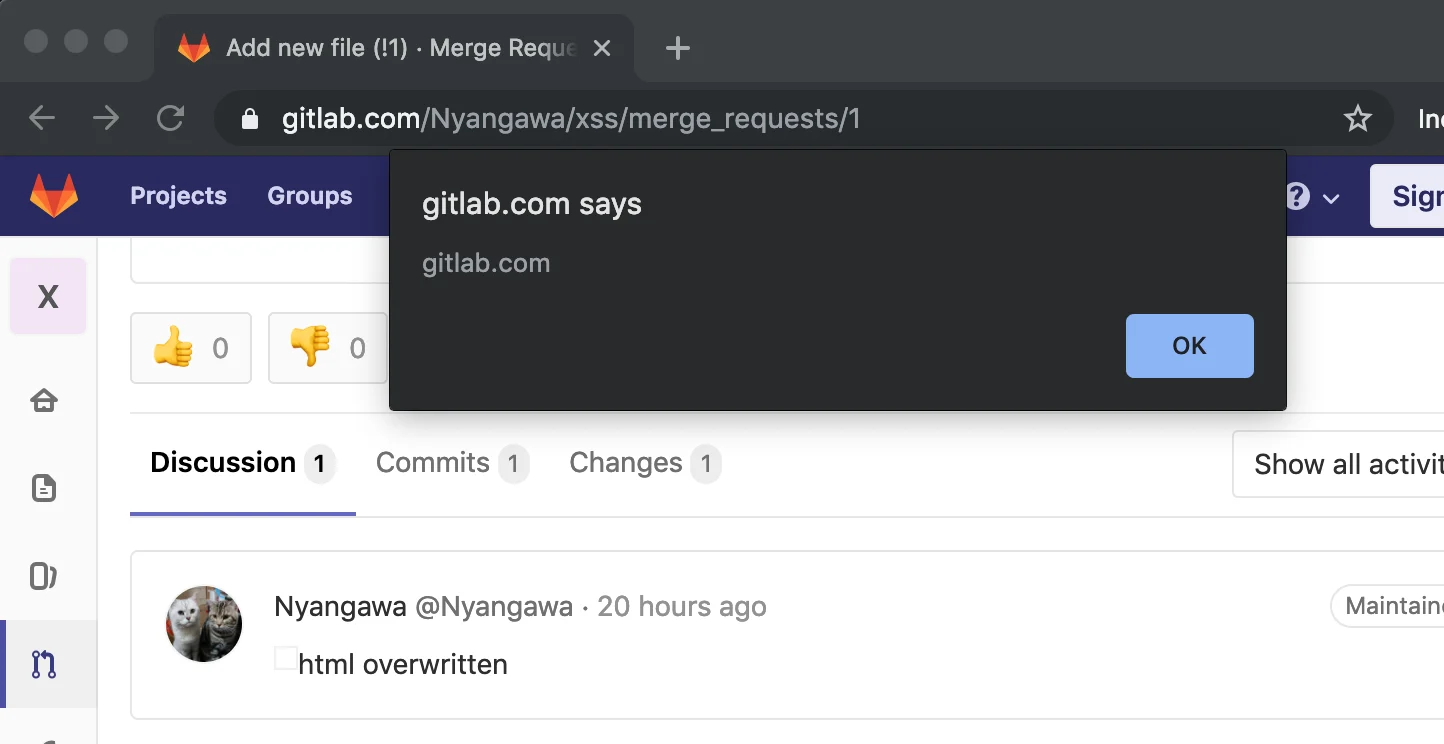
Check https://gitlab.com/Nyangawa/xss/merge_requests/1, you should be able to see a pop-up.
Impact
This is a typical persistent XSS issue and the link I mentioned above is accessible publicly, so all GitLab users are vulnerable theoretically.
Attachments
Context
GitLab projects can be exported and imported. An export is a bundle that contains a project.json file describing the project and its associated objects, including merge requests and their discussions. Discussions are made up of Note objects, and each note carries both the raw markdown (note) and a rendered HTML copy (note_html) that GitLab normally regenerates from the markdown.
The report describes a persistent (stored) cross-site scripting issue that abuses the import path: because the attributes of Note objects are taken from project.json during import, an attacker can supply a note_html value containing a script payload and try to stop GitLab from overwriting it with freshly rendered HTML.
Setup
The researcher observed the value 917504 on their own GitLab instance and on gitlab.com. The precondition for the attack is the ability to create a project export that contains at least one discussion in at least one merge request, then modify the export before importing it. The report does not describe any special role or account configuration beyond that.
Finding it
The starting observation is that all attributes of Note objects are controllable in project.json, for example note_html and cached_markdown_version. That alone would be enough to inject HTML, except that note_html is a CacheMarkdownField: it is regenerated from the value of note when a new object is created, specifically when note_object.note_html_invalidated? returns true. The real question the researcher pursued was how to trick GitLab into believing the field does not need to be regenerated.
The invalidation logic lives in app/models/concerns/cache_markdown_field.rb:
      define_method(invalidation_method) do
        changed_fields = changed_attributes.keys
        invalidations  = changed_fields & [markdown_field.to_s, *INVALIDATED_BY]
        invalidations.delete(markdown_field.to_s) if changed_fields.include?("#{markdown_field}_html")

        !invalidations.empty? || !cached_html_up_to_date?(markdown_field)
      end
Two checks decide whether the cached HTML is invalidated, and the researcher treats each as a separate issue.
The first check uses a constant and an intersection:
        INVALIDATED_BY = %w[author project].freeze
...
        invalidations  = changed_fields & [markdown_field.to_s, *INVALIDATED_BY]
        invalidations.delete(markdown_field.to_s) if changed_fields.include?("#{markdown_field}_html")
When a note is imported with the crafted attributes, the changed attributes look like this:
note_object.changed_attributes.keys
=> ["note", "noteable_type", "author_id", "created_at", "updated_at", "project_id", "line_code", "position", "original_position", "note_html", "cached_markdown_version", "change_position", "attachment"]
The check is voided for two reasons. Neither author nor project appears in the changed attributes list, only author_id and project_id, so the intersection with INVALIDATED_BY contributes nothing. And note is removed from invalidations because note_html is also changed. The result is that invalidations is empty.
The second check is:
!cached_html_up_to_date?(markdown_field)
This compares the attribute cached_markdown_version with latest_cached_markdown_version. The researcher found that latest_cached_markdown_version was always 917504 on their instance and on gitlab.com, and reasoned that local_version is always 0 for at least Notes in merge requests:
  def latest_cached_markdown_version
    @latest_cached_markdown_version ||= (CacheMarkdownField::CACHE_COMMONMARK_VERSION << 16) | local_version
  end

  def local_version
    return local_markdown_version if has_attribute?(:local_markdown_version)

    settings = Gitlab::CurrentSettings.current_application_settings

    if settings.respond_to?(:local_markdown_version)
      settings.local_markdown_version
    else
      0
    end
  end
With both checks defeated, the attacker can set note_html to the payload and cached_markdown_version to the magic number, and the payload survives instead of being overwritten by GitLab.
Exploitation
Step 1: Create an export
Create an export of a project that has at least one discussion in at least one merge request. The discussion is what gives the export a Note object to tamper with.
Step 2: Modify project.json
Edit the export and add the note_html and cached_markdown_version fields to the note entry:
      "notes": [
        {
          "id": 1,
          "note": "interesting note here",
          "note_html": "<img src=\"test\" onerror=\"alert(document.domain)\"></img>html overwritten",
          "cached_markdown_version": 917504,
note_html holds the payload, an img element with an onerror handler that runs alert(document.domain). cached_markdown_version is set to 917504, the value the researcher observed for latest_cached_markdown_version, so the up-to-date check passes and the field is not regenerated.
Step 3: Import the modified project
Import the modified export. Because the invalidation checks are defeated as described above, the supplied note_html is kept rather than rebuilt from note.
Step 4: View the discussion
Open the only discussion of the imported project. The payload executes in the browser of whoever views it.
Root cause
The import path trusts attributes of Note objects from project.json, including the rendered note_html and the cache version marker. The defence that should neutralise this is the CacheMarkdownField invalidation logic, and it fails on two counts.
First, the invalidation check compares changed attribute names against author and project, but the changed attributes are author_id and project_id, so the association names never match. Additionally, note is deliberately removed from the invalidation set when note_html is also changed, which is exactly the situation an attacker creates. Together these leave the invalidation set empty.
Second, the fallback check compares cached_markdown_version against latest_cached_markdown_version. Since local_version resolves to 0 for these notes, the expected value is a predictable constant (917504 in the researcher's observation), which an attacker can simply write into the import file.
Impact
This is a typical persistent XSS issue. The researcher notes that the example merge request they reference is publicly accessible, so in theory all GitLab users are vulnerable. The report says that, because the referenced merge request is publicly accessible, all GitLab users are theoretically vulnerable. The report does not go further into what an attacker could do with the resulting session.
Fix
The report does not describe a fix or a change that was made. Based on the root cause, the invalidation logic would need to treat imported note_html as untrusted (for example by not accepting rendered HTML and cache version fields from an import, or by comparing against association names that actually appear in the changed attributes), but the report itself does not state which approach was taken.
Variants to test
- Other
CacheMarkdownFieldattributes on importable objects: try supplying both the rendered HTML field and the cache version field in an export and see whether the rendered value survives import. A positive result is the injected markup appearing unmodified when the object is viewed. - Other predictable cache version values: if
local_versionresolves to 0 elsewhere, the expectedlatest_cached_markdown_versionis a constant that can be written into the import. A positive result is the field not being regenerated. - Association-name mismatches in invalidation checks: look for checks that compare
authororprojectagainst changed attribute keys that are actuallyauthor_idorproject_id. A positive result is an empty invalidation set after an import that changes the rendered field. - Other import formats that carry rendered HTML alongside raw content: check whether the rendered copy is trusted. A positive result is script execution when the imported object is viewed.
Hunting notes
This kind of bug tends to hide in import and export code, where object attributes are deserialised from a file the attacker controls, and in cache invalidation logic, where the decision to regenerate a rendered field can be influenced by the same input. During recon, features that accept project or object exports are worth examining, particularly where a rendered HTML copy and a version marker are both stored. The researcher pointed to a publicly accessible merge request where the pop-up should be visible.
Attachments
What happened, in plain words
GitLab is a website where teams keep their code and talk about it. One of its features lets you take a whole project and save it as a file bundle, then load that bundle back in later, perhaps on another GitLab server. The report describes a way to abuse that save-and-load feature so that a piece of malicious code gets stored inside a project and then runs in the browser of anyone who looks at it.
This kind of attack is called persistent cross-site scripting, or stored XSS. "Script" here means a small program written in JavaScript, the language browsers run. Normally a website only runs JavaScript that the website itself supplied. XSS tricks the site into storing and later serving JavaScript that an attacker wrote, so the browser believes it came from the site and runs it with the site's trust. "Persistent" means the malicious code is saved on the server and keeps coming back every time the page is viewed, rather than being a one-off trick in a single link.
The place the code gets hidden is a note: a comment in a merge request discussion. A merge request is GitLab's way of proposing a change to code and discussing it. Each comment is stored as a Note object. An object is just a bundle of data with named fields, like a row in a spreadsheet.
GitLab stores each note twice: once as the raw text the person typed (the field note), and once as a ready-to-display HTML copy (the field note_html). HTML is the language web pages are written in. GitLab builds the HTML copy from the raw text so that formatting like bold or links shows up. The report's trick is to smuggle in a hand-written HTML copy containing a script, and then stop GitLab from replacing it with a freshly built, safe one.
Background you need first
Projects, exports and imports
A GitLab project is a container for code and everything around it: issues, merge requests, comments. GitLab can export a project, which means writing all of that into a bundle of files. The most important file is project.json. JSON is a plain-text format for structured data: curly braces group things, names are followed by values, and lists sit in square brackets. It is readable by both people and programs.
Importing is the reverse: GitLab reads the bundle and recreates the project from it. Because the bundle is just a file, a user can open it in a text editor and change it before importing. That is the heart of this bug: GitLab trusts what the file says.
Notes and their two copies
A discussion in a merge request is made of Note objects. Each note has a raw text field called note and a rendered field called note_html. "Rendered" means converted from plain text into HTML.
GitLab does not want to redo that conversion every time a page is shown, so it caches the result: it keeps the finished HTML and reuses it. A cache is a stored copy kept to save work, like keeping a cooked meal in the fridge instead of cooking again. The catch with any cache is knowing when the stored copy is out of date and must be thrown away and rebuilt. In GitLab, the field that holds the cached HTML is a special kind called a CacheMarkdownField, and it has logic to decide when to regenerate.
The invalidation question
"Invalidating" a cache means marking the stored copy as stale. When GitLab creates a new note, it asks a question: does this note's HTML need to be regenerated? In code that question is note_object.note_html_invalidated?. If the answer is true, GitLab rebuilds note_html from note, which would wipe out any HTML an attacker had planted. So the attacker's whole problem is to make that answer false.
Finding it
The researcher's starting observation is simple: during import, every field of a Note object can be set from project.json, including note_html and cached_markdown_version. The second field is a version marker, a number that says which version of the rendering rules produced the cached HTML. If you can set both, you can plant HTML and also claim it is current.
That alone would be enough, except for the regeneration step described above. So the researcher went looking at the code that decides whether to regenerate. It lives in a file called app/models/concerns/cache_markdown_field.rb:
      define_method(invalidation_method) do
        changed_fields = changed_attributes.keys
        invalidations  = changed_fields & [markdown_field.to_s, *INVALIDATED_BY]
        invalidations.delete(markdown_field.to_s) if changed_fields.include?("#{markdown_field}_html")

        !invalidations.empty? || !cached_html_up_to_date?(markdown_field)
      end
Line by line, in plain words:
define_method(invalidation_method) dostarts the definition of a method, a named block of code that can be called. Its name is held in the variableinvalidation_method.changed_fields = changed_attributes.keyscollects the names of all fields that were changed on this object and stores them in a list calledchanged_fields.changed_attributesis GitLab's record of which fields differ from their original values;.keystakes just the names.invalidations = changed_fields & [...]builds a second list by taking only the names that appear in bothchanged_fieldsand the list on the right. The&symbol means "intersection": keep what the two lists have in common. The right-hand list contains the markdown field's own name plus everything in a constant calledINVALIDATED_BY.invalidations.delete(markdown_field.to_s) if changed_fields.include?("#{markdown_field}_html")removes the markdown field's name from that list, but only if the rendered HTML field (the name with_htmlappended) was also changed. In other words: if the HTML copy itself changed, do not count the raw text as a reason to rebuild.!invalidations.empty? || !cached_html_up_to_date?(markdown_field)is the final answer.empty?asks whether the list has nothing in it, and!flips true to false and back.||means "or". So the method says: regenerate if the list is not empty, or if the cached HTML is not up to date.
There are therefore two separate checks that could force a rebuild, and the researcher treats each as its own issue.
Issue one: the list of reasons comes out empty
The first check depends on a constant and an intersection:
        INVALIDATED_BY = %w[author project].freeze
...
        invalidations  = changed_fields & [markdown_field.to_s, *INVALIDATED_BY]
        invalidations.delete(markdown_field.to_s) if changed_fields.include?("#{markdown_field}_html")
Line by line:
INVALIDATED_BY = %w[author project].freezedefines a fixed list of two names,authorandproject.%w[...]is Ruby shorthand for a list of words, and.freezemeans the list cannot be modified afterwards. The idea is that if the author or the project of a note changes, the rendered HTML should be rebuilt.- The second line is the intersection from before: keep only changed field names that also appear in this list (plus the markdown field's own name).
- The third line removes the markdown field's name when the HTML field also changed.
When a note is imported with the crafted fields, the list of changed fields looks like this:
note_object.changed_attributes.keys
=> ["note", "noteable_type", "author_id", "created_at", "updated_at", "project_id", "line_code", "position", "original_position", "note_html", "cached_markdown_version", "change_position", "attachment"]
This is a snippet of a Ruby session: the first line asks the note object which fields changed, and the => line shows the answer, a list of field names. Reading it, you can see note, note_html and cached_markdown_version are all in there, along with many others.
The check fails for two reasons. First, the list contains author_id and project_id, not author and project. The constant is looking for the association names, but the changed fields are the underlying identifier columns, so nothing matches. Second, note is removed from the list because note_html is also changed. After both effects, the list of invalidations is empty, so the first check does not force a rebuild.
Issue two: the version number is predictable
The second check is:
!cached_html_up_to_date?(markdown_field)
This asks whether the cached HTML is up to date. In practice it compares the note's cached_markdown_version field with a value called latest_cached_markdown_version. If the two match, the cache is considered current and nothing is rebuilt.
The researcher found that latest_cached_markdown_version was always 917504 on their own GitLab instance and also on gitlab.com. They reasoned that a component called local_version is always 0 for at least notes in merge requests:
  def latest_cached_markdown_version
    @latest_cached_markdown_version ||= (CacheMarkdownField::CACHE_COMMONMARK_VERSION << 16) | local_version
  end

  def local_version
    return local_markdown_version if has_attribute?(:local_markdown_version)

    settings = Gitlab::CurrentSettings.current_application_settings

    if settings.respond_to?(:local_markdown_version)
      settings.local_markdown_version
    else
      0
    end
  end
Line by line:
def latest_cached_markdown_versionstarts a method that works out the current expected version number.@latest_cached_markdown_version ||= (...)stores the result in an instance variable (a value remembered on the object, written with@) and only computes it the first time;||=means "use the existing value if there is one, otherwise calculate and save it". This is a small cache of its own.(CacheMarkdownField::CACHE_COMMONMARK_VERSION << 16) | local_versionbuilds the number from two parts.<<shifts bits to the left, which here makes room for the second part, and|combines the two parts bit by bit. The first part is a constant version of the markdown renderer; the second is the local version.def local_versionstarts the method that supplies the second part.return local_markdown_version if has_attribute?(:local_markdown_version)says: if this object has its ownlocal_markdown_versionfield, use it and stop here.settings = Gitlab::CurrentSettings.current_application_settingsfetches the site-wide settings.if settings.respond_to?(:local_markdown_version)checks whether those settings include a local version value.settings.local_markdown_versionreturns it if so.elseand0mean: if not, the local version is zero.
Because the local part is zero, the expected version number becomes a fixed, predictable constant. An attacker can simply write that number into the import file, and the up-to-date check passes. With both checks defeated, the planted note_html survives instead of being overwritten.
Exploitation
Step 1: Create an export
Create an export of a project that has at least one discussion in at least one merge request. The discussion is what gives the export a Note object to tamper with; without one, there is nothing to plant HTML in.
Step 2: Modify project.json
Open the export and edit project.json, adding the note_html and cached_markdown_version fields to the note entry:
      "notes": [
        {
          "id": 1,
          "note": "interesting note here",
          "note_html": "<img src=\"test\" onerror=\"alert(document.domain)\"></img>html overwritten",
          "cached_markdown_version": 917504,
Line by line:
"notes": [starts a list callednotes, which holds the comments. The square bracket opens the list.{opens one note object, a group of named fields."id": 1,gives the note an identifier number."note": "interesting note here",is the raw text of the comment, the harmless version a reader would normally see."note_html": "<img src=\"test\" onerror=\"alert(document.domain)\"></img>html overwritten",is the planted HTML. The backslashes are there because the value sits inside double quotes in JSON, so inner quotes must be escaped. The value is animgelement, which tells the browser to load an image. Itssrcistest, and theonerrorhandler runsalert(document.domain). Theonerrorattribute is a handler: code the browser runs when that error happens. That code isalert(document.domain), which opens a pop-up showing the domain of the page.document.domainis the site name the browser associates with the page, so the pop-up proves the code ran as if it belonged to GitLab. The value ends with a closing</img>tag and the texthtml overwritten."cached_markdown_version": 917504,sets the version marker to the number the researcher observed, so the up-to-date check passes and GitLab does not rebuild the HTML.
Step 3: Import the modified project
Import the edited bundle. Because both invalidation checks are defeated as described, GitLab keeps the supplied note_html instead of rebuilding it from note.
Step 4: View the discussion
Open the only discussion of the imported project. The browser loads the stored HTML, the image fails to load, the error handler runs, and the pop-up appears. The researcher pointed to a publicly accessible merge request where the pop-up should be visible.
Why it works
The import path trusts the fields of Note objects from project.json, including the rendered HTML and the version marker. The safeguard that should neutralise this is the CacheMarkdownField invalidation logic, and it fails in two ways.
First, the check compares changed field names against author and project, but the changed fields are author_id and project_id, so the names never match. On top of that, note is deliberately removed from the list when note_html also changed, which is exactly the situation an attacker creates. Together these leave the list empty.
Second, the fallback check compares cached_markdown_version with latest_cached_markdown_version. Since local_version resolves to 0 for these notes, the expected value is a predictable constant, 917504 in the researcher's observation, which an attacker can simply write into the import file.
Impact
This is a typical persistent XSS issue. The example merge request the researcher references is publicly accessible, so in theory all GitLab users are vulnerable. The report says that, because the referenced merge request is publicly accessible, all GitLab users are theoretically vulnerable. The report does not go further into what an attacker could do with the resulting session.
Fix
The report does not describe a fix or a change that was made. Based on the root cause, the invalidation logic would need to treat imported note_html as untrusted, for example by not accepting rendered HTML and cache version fields from an import, or by comparing against association names that actually appear in the changed fields. The report itself does not state which approach was taken.
Variants to test
- Other
CacheMarkdownFieldattributes on importable objects: try supplying both the rendered HTML field and the cache version field in an export and see whether the rendered value survives import. A positive result is the injected markup appearing unmodified when the object is viewed. - Other predictable cache version values: if
local_versionresolves to 0 elsewhere, the expectedlatest_cached_markdown_versionis a constant that can be written into the import. A positive result is the field not being regenerated. - Association-name mismatches in invalidation checks: look for checks that compare
authororprojectagainst changed field names that are actuallyauthor_idorproject_id. A positive result is an empty invalidation list after an import that changes the rendered field. - Other import formats that carry rendered HTML alongside raw content: check whether the rendered copy is trusted. A positive result is script execution when the imported object is viewed.
Where to look next
This kind of bug tends to hide in import and export code, where object fields are read from a file the attacker controls, and in cache invalidation logic, where the decision to rebuild a rendered field can be influenced by the same input. During recon, features that accept project or object exports are worth examining, particularly where a rendered HTML copy and a version marker are both stored.
Attachments
Glossary
- API: a defined way for one program to talk to another, like a service counter with set requests you can make.
- Attribute: a named field on an object, such as
note_htmlon a note. - Cache: a stored copy of work already done, kept so it does not have to be redone.
- Cache invalidation: marking a cached copy as stale so it gets rebuilt.
- Constant: a named value in code that is not meant to change while the program runs.
- Cross-site scripting (XSS): tricking a website into running JavaScript written by an attacker, in the trust of that website.
- Discussion: a thread of comments attached to a merge request.
- Export: a bundle of files describing a project, produced by GitLab so it can be moved or backed up.
- HTML: the language web pages are written in, describing elements such as images and links.
- Import: loading an export bundle back into GitLab to recreate the project.
- Instance variable: a value remembered on an object in Ruby code, written with a leading
@. - Intersection: the items two lists have in common, written with
&in Ruby. - Invalidation: see cache invalidation.
- JavaScript: the programming language browsers run to make pages interactive.
- JSON: a plain-text format for structured data, using braces, brackets and name-value pairs.
- Markdown: a simple way of writing formatted text using plain characters, which is then converted to HTML.
- Merge request: GitLab's way of proposing a code change and discussing it before it is accepted.
- Method: a named block of code that can be called to do something.
- Note: the object GitLab uses to store one comment in a discussion.
- Object: a bundle of named fields holding data.
- Origin: the combination of scheme, host and port that a browser uses to decide which site a page belongs to.
- Persistent (stored) XSS: XSS where the malicious code is saved on the server and runs for every viewer of the affected page.
- Project: a GitLab container for code and everything around it, such as issues and merge requests.
- Rendered HTML: the finished HTML produced from raw text, ready for the browser to display.
- Session: the state a website keeps for a logged-in user, usually tied to a cookie.
- Version marker: a number stored alongside cached data saying which version of the rules produced it.




