Read files on application server, leads to RCE
A GitLab export import feature allowed symbolic links in the uploaded archive, so an attacker could make the version or project JSON file point to arbitrary server files. Error messages then revealed file contents, enabling reading of secrets and potentially remote code execution.

- Triaged in 14 hours
- Fixed in 8 days
- Disclosed after 8 days
Summary by the researcher
GitLab CE/EE versions 8.9, 8.10, 8.11, 8.12, and 8.13 are vulnerable to an arbitrary file read vulnerability. The vulnerability could be exploited to gain access to the application's secrets. These secrets could be used to gain command execution access on the application server.
The CVSS for the vulnerability in versions 8.9, 8.10, 8.11, and 8.12 is determined to be 8.4 (CVSS:3.0/AV:N/AC:L/PR:H/UI:R/S:C/C:H/I:H/A:H). The CVSS for the same vulnerability in version 8.13 was determined to be 9.0, because the admin privilege was not necessary anymore to exploit the vulnerability (CVSS:3.0/AV:N/AC:L/PR:L/UI:R/S:C/C:H/I:H/A:H). For all scenarios, the GitLab instance needs to have the import feature of GitLab export files enabled.
The report
The GitLab export upload feature contains a vulnerability that allows an attacker to read arbitrary files on a GitLab instance. This vulnerability is caused by the behaviour of JSON.parse, your error handling, and the possibility to reference a symbolic link in a GitLab export. When I started looking into this functionality, I created a demo repository and created a GitLab export through the project's admin panel. GitLab exports can be imported when creating a new project, for example at https://gitlab.com/projects/new (click GitLab export). Anyway, a simple, extracted GitLab export file contains the following files:
export $ ls -lash
total 48
 8 -rw-r--r--@   1 jobert  staff     5B Oct 25 19:52 VERSION
 8 -rw-r--r--@   1 jobert  staff   341B Oct 25 19:53 project.bundle
 8 lrwxr-xr-x    1 jobert  staff    11B Oct 25 20:43 project.json
When the export file is uploaded again, a few things happen. The first three are, in this order: it waits until the file has been written to disk (for big repositories), a version check based on the VERSION file, and creating a new Project model instance based on project.json. The first step isn't important. Lets look at the code that's being executed for the second step (line 12-18 from Gitlab::ImportExport::VersionChecker):
def check!
  version = File.open(version_file, &:readline)
  verify_version!(version)
rescue => e
  shared.error(e)
  false
end
Pay attention to line 13. It will open the file and call the method readline, which will return the first line of the file. Now, on line 16 any exception is caught and the message is pushed onto the errors array. All these errors are returned to the frontend. Take a look at line 27-31 of the same file:
if Gem::Version.new(version) != Gem::Version.new(Gitlab::ImportExport.version)
  raise Gitlab::ImportExport::Error.new("Import version mismatch: Required #{Gitlab::ImportExport.version} but was #{version}")
else
  true
end
This means if the version isn't correct, an exception is returned that contains the provided version from the GitLab export. Lets untar the GitLab export, replace the VERSION file with a symbolic link, and tar the GitLab export again. The structure of the tar will look like this:
export $ ls -lash
 8 lrwxr-xr-x    1 jobert  staff    11B Oct 25 20:43 VERSION -> /etc/passwd
 8 -rw-r--r--@   1 jobert  staff   341B Oct 25 19:53 project.bundle
 8 lrwxr-xr-x    1 jobert  staff    11B Oct 25 20:43 project.json
After creating a new GitLab export (run tar -czvf test.tar.gz . in the export directory), the new GitLab export can be uploaded. By doing so, the GitLab instance will return the first line of the error because the version matcher raises an exception:
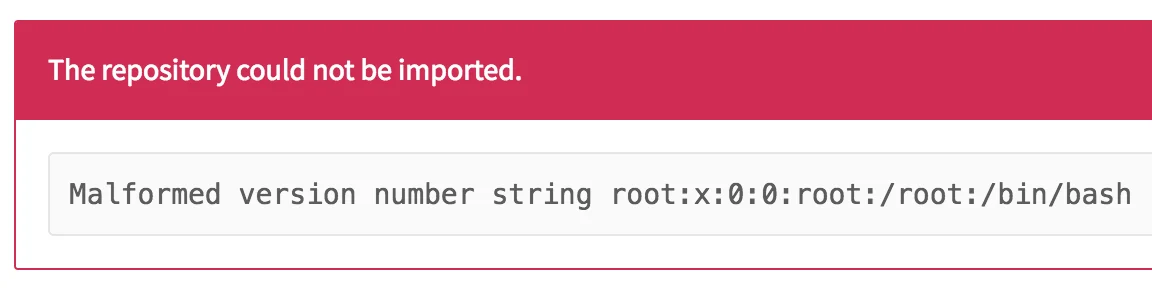
However, with this only the first line of a file can be read. This is interesting, but much harder to exploit than if an entire file can be read. I kept digging to see if there was a way to read an entire file. Like I pointed out earlier, the third step in the import process is creating a new instance of the Project model. It executes the following code (line 11-22 from Gitlab::ImportExport::ProjectTreeRestorer):
def restore
  json = IO.read(@path)
  tree_hash = ActiveSupport::JSON.decode(json)
  project_members = tree_hash.delete('project_members')

  ActiveRecord::Base.no_touching do
    create_relations
  end
rescue => e
  shared.error(e)
  false
end
A similar code structure as the version check is implemented: any exception that is thrown in line 13-18 is caught and the error message is pushed onto the errors array. It isn't immediately clear from the code, but the ActiveSupport implementation of JSON decoding uses JSON.parse, which returns the contents of the entire string to be decoded in the error message when it fails to decode. This means that if we can let the decoder raise an exception, we can read the contents of a file. This isn't so hard. Consider this file structure:
export $ ls -lash
 8 -rw-r--r--@   1 jobert  staff    11B Oct 25 20:43 VERSION
 8 -rw-r--r--@   1 jobert  staff   341B Oct 25 19:53 project.bundle
 8 lrwxr-xr-x    1 jobert  staff    11B Oct 25 20:43 project.json -> /etc/passwd
In this example, the project.json file is a symlink to /etc/passwd. The IO.read call on line 14 will follow a symlink to read the contents of a file. Obviously, the /etc/passwd file doesn't contain valid JSON, thus it will result in an exception with the contents of /etc/passwd. Use tar to compress the files again to prepare it for upload. An example file is attached: F130233. When this file gets imported, it'll show the contents of the linked file in the error message:
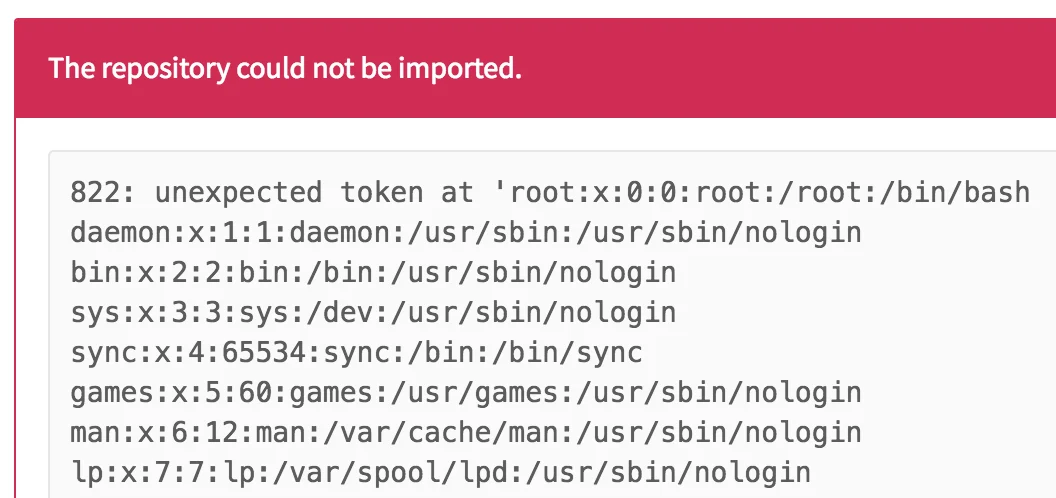
To proof that this isn't my own /etc/passwd file that was accidentally compressed with the file, here are the last 5 lines of the /etc/passwd of gitlab.com.
alejandro:x:1117:1117::/home/alejandro:/bin/bash
prometheus:x:999:999::/opt/prometheus:/bin/false
gitlab-monitor:x:998:998::/opt/gitlab-monitor:/bin/false
postgres:x:116:121:PostgreSQL administrator,,,:/var/lib/postgresql:/bin/bash
brian:x:1118:1118::/home/brian:/bin/bash
With this issue, the secrets of the GitLab rails project can be read, too. This results in an RCE because cookies can be marshalled and resigned again. It seems to also give access to the internal GitLab shell tokens, which give access to all repositories.
Let me know if you need any more information!
Not written yet. The AI write-up for this report has not been written yet. The Original tab links to the source.
How it worked
Root cause
The import process did not prevent symbolic links in the uploaded archive from being followed, and error messages included file contents.
Impact
An attacker could read arbitrary files on the GitLab server, including secrets that could lead to remote code execution and access to all repositories.
What the attacker needed
Import feature enabled; ability to upload a crafted export file; admin or user privileges depending on version
How it was found
- Create a GitLab export from a demo project.
- Extract the export archive and replace the VERSION or project.json file with a symbolic link to a target file.
- Re-compress the archive and upload it via the GitLab export import feature.
- Observe the error message containing the first line or full contents of the linked file.
Explained by bugbounty.wiki with AI from the original and checked against quotes from it; it can still be wrong. Read the original before relying on a detail.
Not written yet. The AI write-up for this report has not been written yet. The Original tab links to the source.
GitLab lets you import a project from an export file, which is a compressed archive. The archive can contain shortcuts called symbolic links that point to other files on the server. The import code followed these links and then showed file contents in error messages, so an attacker could read sensitive files.
What is Path traversal?
Input that builds a file path escapes the intended folder, reading or writing files the application should never touch.



