Remote file inclusion via Asciidoc plantuml render
A new version of the asciidoctor-plantuml extension enabled a block macro processor by default, allowing an attacker to include arbitrary local files in a rendered AsciiDoc wiki page. The attacker could read sensitive files such as config/secrets.yml, potentially leading to remote code execution.

GitLab
Originally disclosed on GitLab
- Fixed in 39 days
- Disclosed after 39 days
⚠️ Please read the process on how to fix security issues before starting to work on the issue. Vulnerabilities must be fixed in a security mirror.
HackerOne report #2871063 by yvvdwf on 2024-11-29:
Report | Attachments | How To Reproduce
Report
Gitlab rencently uses new version 0.1.1 of asciidoctor-plantuml which enables BlockMacroProcessor by default BlockMacroProcessor. This allows to read arbitrary files.
Reprocedure
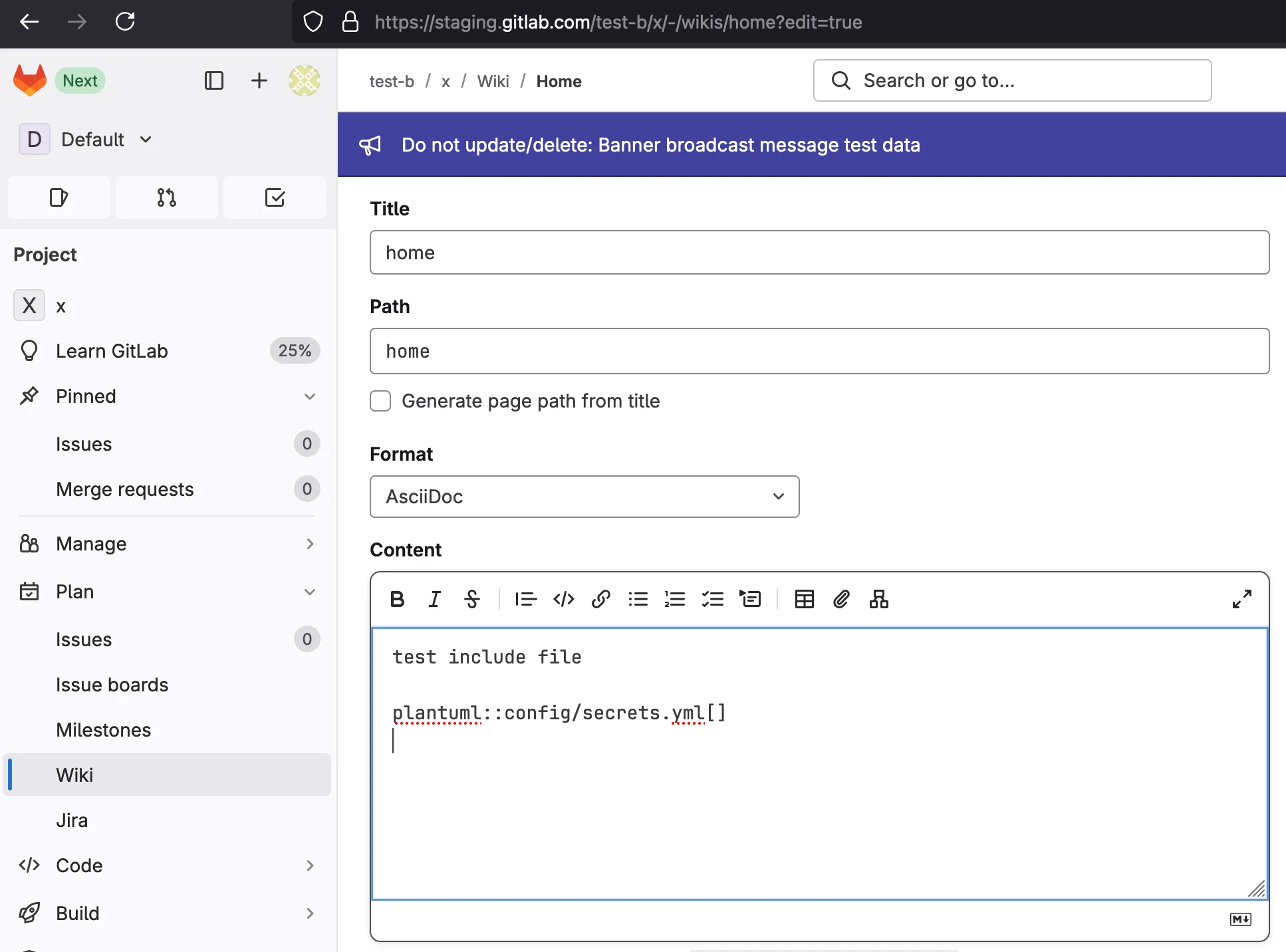
- create a new project, goto its wiki, then add a
AsciiDocfile using the following content:
test include file

plantuml::config/secrets.yml[]
-
save the file, then open its
rendered fileyou should see an (error) image which represent a part ofconfig/secrets.ymlfile -
decode the
srcattribute of the image to get the complete file content:
###  original url
url="https://plantuml.gitlab-static.net/png/[REDACTED]"

###  get last element
string=${url##*/}

echo string

###  decode
docker run ghcr.io/plantuml/plantuml -decodeurl $string
Impact
Arbitrary file inclusion leading to remote code execution
Note:
- I've tested this in staging.gitlab.com from
51.195.254.173 - I think that the vulnerable code should be deployed automatically in gitlab.com in few hours. Perhaps you can stop it
Attachments
Warning: Attachments received through HackerOne, please exercise caution!
How To Reproduce
Please add reproducibility information to this section:
Not written yet. The AI write-up for this report has not been written yet. The Original tab links to the source.
How it worked
Root cause
Likely the asciidoctor-plantuml extension version 0.1.1 enables BlockMacroProcessor by default, which permits reading arbitrary files without proper sanitisation.
Impact
Arbitrary file inclusion could lead to remote code execution.
What the attacker needed
Access to create a project and wiki page
How it was found
- Create a new project and go to its wiki.
- Add an AsciiDoc file containing a plantuml block macro that references a local file path.
- Save the file and open the rendered file to see an error image representing part of the file.
- Decode the src attribute of the image to get the complete file content.
Explained by bugbounty.wiki with AI from the original and checked against quotes from it; it can still be wrong. Read the original before relying on a detail.
Not written yet. The AI write-up for this report has not been written yet. The Original tab links to the source.
A wiki page can include a special command that tells the server to read a file from its own disk and show it as an image. Because the server trusts the command, someone can trick it into showing secret files that should never be visible.
What is File upload?
An upload feature accepts a file that the server or other users' browsers then treat as code or as something trusted.



