User Application can spoof the redirect url in the new trust screen
The OAuth permission prompt on GitLab.com displayed a spoofed redirect host because the hostname was normalised by globally removing 'www.', allowing an attacker to register an application with a redirect URI like 'https://gwww.itlab.com' that appeared as 'gitlab.com'. An attacker could trick a victim into authorising the attacker's application, granting access to the victim's account.

GitLab
Originally disclosed on GitLab
- Fixed in 2 months
- Disclosed after 2 months
⚠️ Please read the process on how to fix security issues before starting to work on the issue. Vulnerabilities must be fixed in a security mirror.
HackerOne report #2573481 by joaxcar on 2024-06-24, assigned to @cmaxim:
Report | Attachments | How To Reproduce
Report
Summary
This is a bit of an odd one, but as I found it I thought I could just report it.
There is a new design for OAuth permission prompts when using Gitlab.com as an OAuth provider. When registering an application, you have to add a redirect URI. This is the URL that the user will end up on with the code after accepting the requested access scope for the application.
When visiting the permission prompt gitlab will show an orange box that will inform the user what URL that is trusted
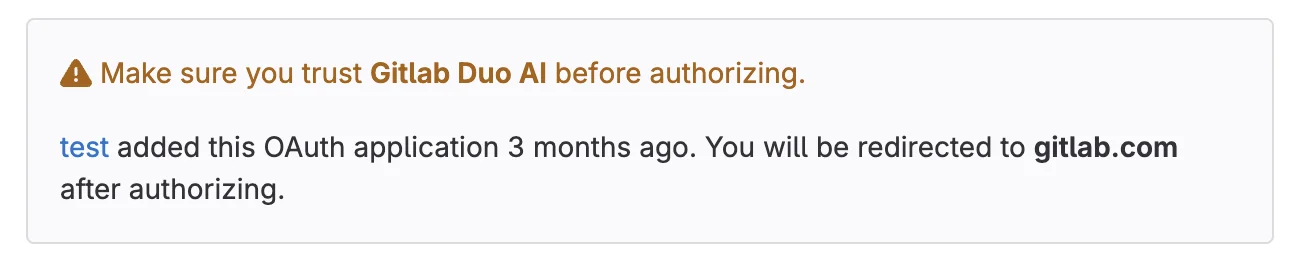
The issue here is that there is a small normalization in the template haml code
domain = URI.parse([@]pre_auth.redirect_uri).host.gsub('www.', '')
As you can see, the code will first extract the host correctly and safely using a proper URI parser. But after the host is extracted www. will get stripped globally in the host. This allows an attacker to register an application with a redirect URI like this https://gwww.itlab.com that will be shown as gitlab.com in the UI
The issue here is that users are meant to trust the UI that the host is the recipient of the trust that is given. By spoofing this URL, an attacker can trick a victim into giving the attacker permission to access the victim's account.
the gitlab scope page has this out of scope line
HTML or text injection is eligible only when significant impact can be achieved with minimal user interaction
I think that this affected page is significant enough to make this a vulnerability.
Steps to reproduce
- Go to https://gitlab.com/oauth/applications
- Click
add new application - Fill out the form and make sure to add
https://giwww.tlab.comas the redirect URL and scopeapi - Create the app, and copy the app ID
- Use the ID in this link
https://gitlab.com/oauth/authorize?client_id=APP_ID&redirect_uri=https://giwww.tlab.com&response_type=code&state=adf&scope=api
- The UI will tell you that the redirect is to
gitlab.com - Click
Authorize. And see that you end up ongiwww.tlab.com
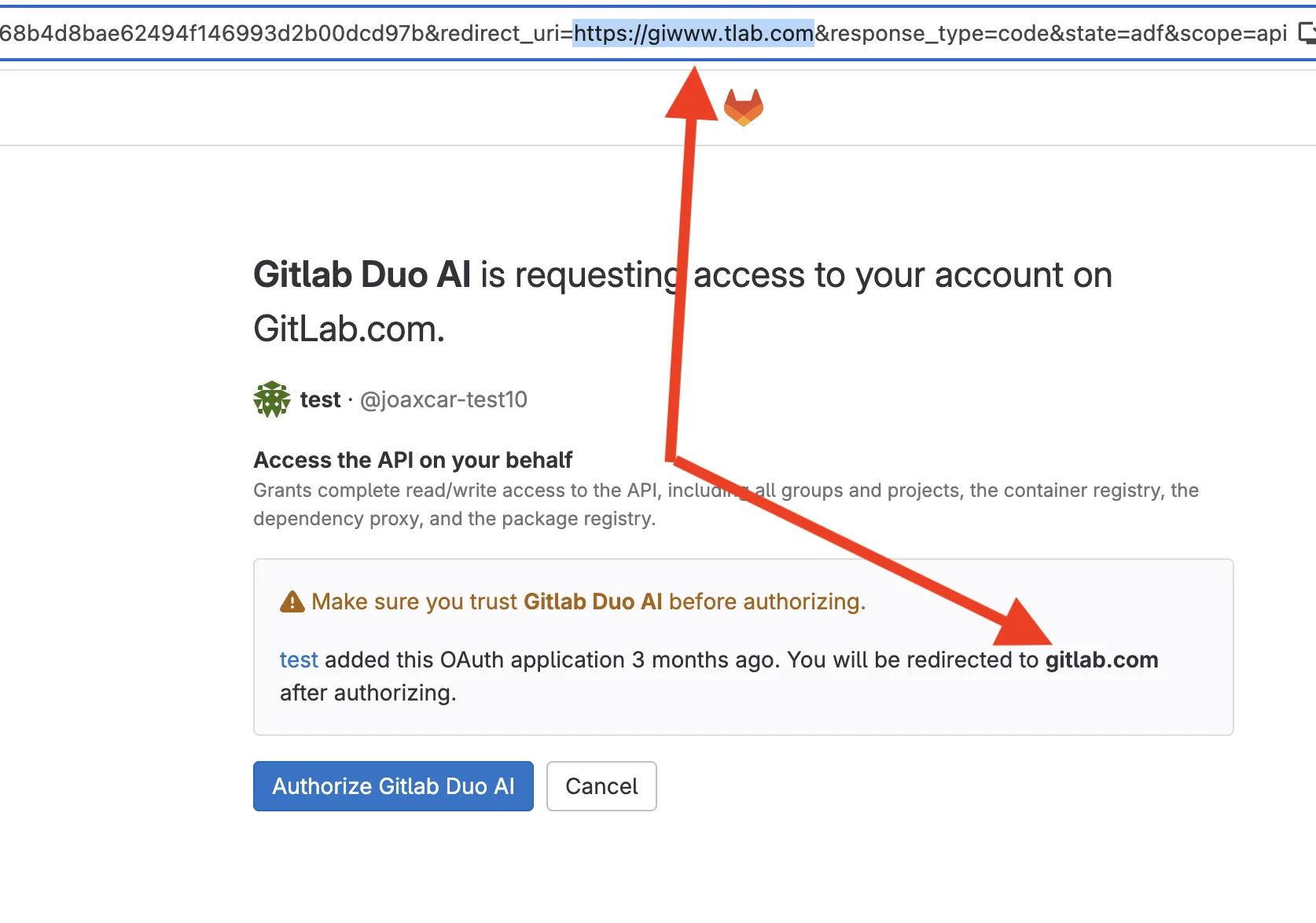
Impact
Spoofing redirect URL can trick a victim to give trust to an untrusted attacker application
What is the current bug behavior?
the host value is altered with an unsafe replace function
What is the expected correct behavior?
the UI should be trustworthy
Output of checks
This bug happens on GitLab.com
Impact
Spoofing redirect URL can trick a victim to give trust to an untrusted attacker application
Attachments
Warning: Attachments received through HackerOne, please exercise caution!
How To Reproduce
Please add reproducibility information to this section:
Not written yet. The AI write-up for this report has not been written yet. The Original tab links to the source.
How it worked
Root cause
The code extracted the hostname correctly but then removed every occurrence of 'www.' from it, so a hostname like 'gwww.itlab.com' became 'gitlab.com'.
Impact
Spoofing the redirect URL could trick a victim into granting trust to an untrusted attacker application, potentially giving the attacker access to the victim's account.
What the attacker needed
Attacker can register an OAuth application; victim clicks an authorisation link; victim approves the prompt
How it was found
- Go to the OAuth applications page and start creating a new application.
- Fill the form with a redirect URI that contains 'www.' inside the hostname and request the 'api' scope.
- Create the application and note its client ID.
- Visit the OAuth authorise URL with that client ID and the same redirect URI.
- Observe that the permission prompt displays 'gitlab.com' as the trusted host.
- Click Authorize and see that the browser is redirected to the attacker-controlled host.
Explained by bugbounty.wiki with AI from the original and checked against quotes from it; it can still be wrong. Read the original before relying on a detail.
Not written yet. The AI write-up for this report has not been written yet. The Original tab links to the source.
When you use a third-party app with your GitLab account, GitLab shows a screen telling you which website will receive access. The bug made that screen show a trusted-looking website (gitlab.com) even though the real destination was an attacker's site. So a user could be tricked into giving an attacker access to their account.
What is OAuth / SSO?
Mistakes in OAuth, OpenID Connect, SAML or token handling that leak codes and tokens or link an attacker's identity to a victim's account.



